cancel
Showing results for 
Search instead for 
Did you mean: 

The Power BI Data Visualization World Championships is back! Get ahead of the game and start preparing now! Learn more

Reply
prasy14
Helper I
Helper I

LLY and LLLY DAX


Hello All,


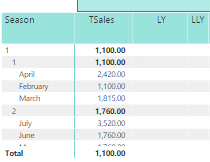
i am trying to calculate total sales amount for each week,Month,Qtr.


I have calendar table and i have created a heirarchy Year,Season,Quarter,Month,Week( 2 seasons per year).


What i want to display in reports is total amount of sales by period for current Year, Previous Year(LY), previous Previous Year(LLY),Previous Previous Previous year(LLLY) ( by Heirarchy on Matrix table)

Capture.PNG

TSales =
CALCULATE(SUM('sales'[sales_amt]),'bi_calendar'[bi_date], bi_calendar[IsInCurrentYear]=1)

LLY Sales =
CALCULATE(SUM('sales'[sales_amt]),SAMEPERIODLASTYEAR(SAMEPERIODLASTYEAR('bcalendar'[bdate].[Date]))

1 ACCEPTED SOLUTION
v-caliao-msft
Microsoft Employee
Microsoft Employee

@prasy14,


You could use PARALLELPERIOD function which returns a table that contains a column of dates that represents a period parallel to the dates in the specified dates column, in the current context, with the dates shifted a number of intervals either forward in time or back in time.

Sample DAX.

=CALCULATE(SUM(InternetSales_USD[SalesAmount_USD]), PARALLELPERIOD(DateTime[DateKey],-2,year))  


Regards,

Charlie Liao

View solution in original post

2 REPLIES 2
Anonymous
Not applicable

Hi all! 


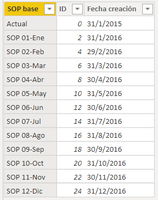
I'm trying to get the sales value of the previous previous month but i'm not been able to reach it using parallelperiod formula. 

 
(CALCULATE(Consolidado[TO]; PARALLELPERIOD(Consolidado[Fecha creacion];-2;MONTH)));0))
 
tabla.PNG
 

Now we are working in March, so I must get January value.


Thanks


v-caliao-msft
Microsoft Employee
Microsoft Employee

@prasy14,


You could use PARALLELPERIOD function which returns a table that contains a column of dates that represents a period parallel to the dates in the specified dates column, in the current context, with the dates shifted a number of intervals either forward in time or back in time.

Sample DAX.

=CALCULATE(SUM(InternetSales_USD[SalesAmount_USD]), PARALLELPERIOD(DateTime[DateKey],-2,year))  


Regards,

Charlie Liao

Helpful resources

Announcements
Power BI DataViz World Championships

Power BI Dataviz World Championships

The Power BI Data Visualization World Championships is back! Get ahead of the game and start preparing now!

November Power BI Update Carousel

Power BI Monthly Update - November 2025

Check out the November 2025 Power BI update to learn about new features.

FabCon Atlanta 2026 carousel

FabCon Atlanta 2026

Join us at FabCon Atlanta, March 16-20, for the ultimate Fabric, Power BI, AI and SQL community-led event. Save $200 with code FABCOMM.