Join us at FabCon Atlanta from March 16 - 20, 2026, for the ultimate Fabric, Power BI, AI and SQL community-led event. Save $200 with code FABCOMM.
Register now!The Power BI Data Visualization World Championships is back! Get ahead of the game and start preparing now! Learn more
Hi ,
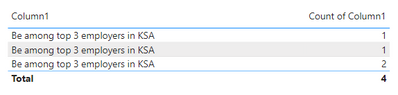
I have created a column for fields for which some have same values , so to differentiate i have added spaced towards end of value so i can get all the values in the table separately, and i have done this from SQL.
sample as below :
Solved! Go to Solution.
Hi @binayjethwa ,
As far as I know, if the space is at the end of your value, Power BI will ignore the space when you add the column into visuals. Also, Power BI will summarize the same data into one row.
For example, Power BI will think "Be among top 3 employers in KSA " the same as "Be among top 3 employers in KSA", and summarize them.
If you want to expand the same values , I suggest you to add an Index column in Power Query Editor. And then add it into table visual as Don't summarize.
Best Regards,
Rico Zhou
If this post helps, then please consider Accept it as the solution to help the other members find it more quickly.
Hi @binayjethwa ,
As far as I know, if the space is at the end of your value, Power BI will ignore the space when you add the column into visuals. Also, Power BI will summarize the same data into one row.
For example, Power BI will think "Be among top 3 employers in KSA " the same as "Be among top 3 employers in KSA", and summarize them.
If you want to expand the same values , I suggest you to add an Index column in Power Query Editor. And then add it into table visual as Don't summarize.
Best Regards,
Rico Zhou
If this post helps, then please consider Accept it as the solution to help the other members find it more quickly.
The Power BI Data Visualization World Championships is back! Get ahead of the game and start preparing now!
Check out the November 2025 Power BI update to learn about new features.
| User | Count |
|---|---|
| 65 | |
| 46 | |
| 43 | |
| 26 | |
| 19 |
| User | Count |
|---|---|
| 198 | |
| 126 | |
| 102 | |
| 68 | |
| 51 |