Join us at FabCon Atlanta from March 16 - 20, 2026, for the ultimate Fabric, Power BI, AI and SQL community-led event. Save $200 with code FABCOMM.
Register now!The Power BI Data Visualization World Championships is back! Get ahead of the game and start preparing now! Learn more
Hi!
Can somebody please help me with this?
I have some data that I want to show with a KPI and that is not working.
I have 3 measures to make this work. The measures are:
YTDUSD:
CALCULATE( DIVIDE( SUM( 'Ventas'[USD] ); 1000 ); USERELATIONSHIP( 'Ventas'[Fecha]; 'Fecha'[Fecha] ) )
YTDUSDAA:
CALCULATE( DIVIDE( SUM( 'Ventas'[USD] ); 1000 ); DATEADD( Fecha[Fecha]; -1; YEAR ); USERELATIONSHIP( 'Ventas'[Fecha]; 'Fecha'[Fecha] ) )
Crec.YTDUSD 2:
IF(
AND(
'Ventas'[YTDUSD] <> 0;
'Ventas'[YTDUSDAA] <> 0
);
(
('Ventas'[YTDUSD] / 'Ventas'[YTDUSDAA])
-1
);
0
)
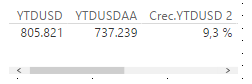
When showing this measures in a table visual, I see the expected values:
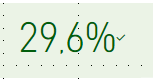
But when using Crec. YTDUSD 2 in the KPI, the final value is complete different:
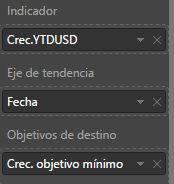
The KPI configuration is:
What can I be doing wrong?
Thanks in advance.
Solved! Go to Solution.
KPI is showing the latest value of "fecha" (date) in CREC YTD in KPI.
In order to verify it, either include Date in your table Visual or Export data from KPI visual. You will see the last date will have CREC value of 29.6%
KPI is showing the latest value of "fecha" (date) in CREC YTD in KPI.
In order to verify it, either include Date in your table Visual or Export data from KPI visual. You will see the last date will have CREC value of 29.6%
Many thanks @FarhanAhmed1984 for your reply!
That's correct, it was showing las value. What I did, is not to use the date as tendance but the year itself. That way I get what I needed.
Have a great day!
The Power BI Data Visualization World Championships is back! Get ahead of the game and start preparing now!
| User | Count |
|---|---|
| 39 | |
| 37 | |
| 33 | |
| 32 | |
| 29 |
| User | Count |
|---|---|
| 133 | |
| 88 | |
| 85 | |
| 68 | |
| 64 |