Join us at FabCon Atlanta from March 16 - 20, 2026, for the ultimate Fabric, Power BI, AI and SQL community-led event. Save $200 with code FABCOMM.
Register now!The Power BI Data Visualization World Championships is back! Get ahead of the game and start preparing now! Learn more
Hello,
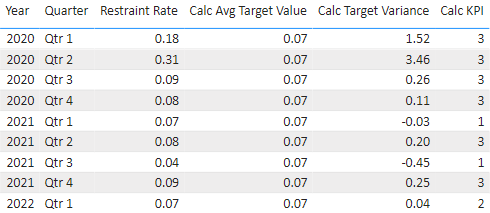
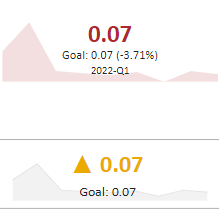
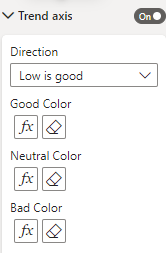
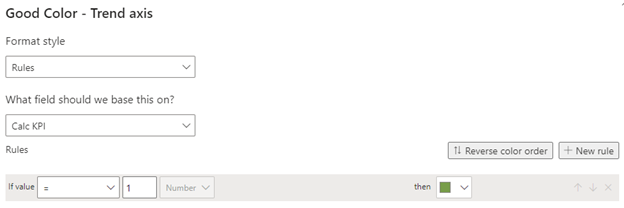
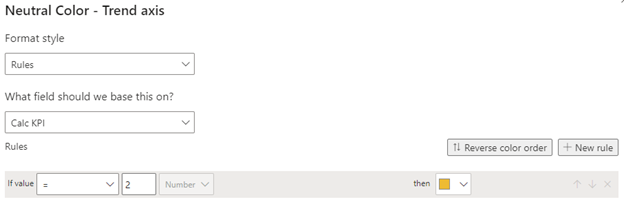
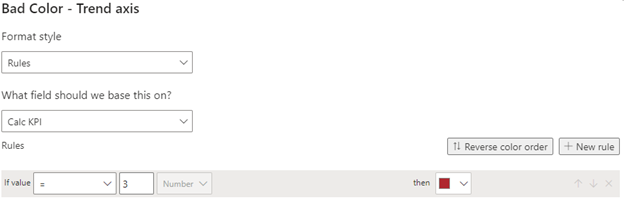
I have created a KPI visual in Power BI desktop. I would like the Trend Axis to be certain colors based on a table measure. I can't get the Neutral Color to work as expected. Below is the table of data. The Calc KPI column should drive the color of the KPI visual: 1=green, 2=yellow, 3=red. I would prefer to use the built in KPI visual (top right of table), but as you can see it is showing red, when it should show yellow (2022-Q1 KPI Calc = 2). I was able to create a similar visual (with a lot of extra steps) that displays the correct color, but I'd prefer not to create all those steps for multiple metrics. Any help would be greatly appreciated!
Thank you,
Andrea
The Power BI Data Visualization World Championships is back! Get ahead of the game and start preparing now!
| User | Count |
|---|---|
| 46 | |
| 42 | |
| 34 | |
| 31 | |
| 21 |
| User | Count |
|---|---|
| 134 | |
| 124 | |
| 98 | |
| 80 | |
| 65 |