cancel
Showing results for 
Search instead for 
Did you mean: 

Join the FabCon + SQLCon recap series. Up next: Power BI, Real-Time Intelligence, IQ and AI, and Data Factory take center stage. All sessions are available on-demand after the live show. Register now

Reply
Anonymous
Not applicable

Joining Table Using 2 Columns

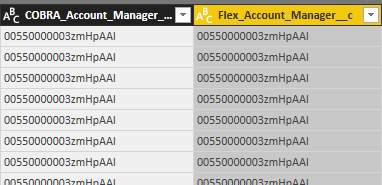
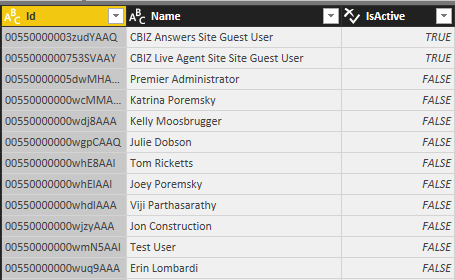
I have a table that has an ID field for a Cobra account manager and a an ID field for Flex account manager. Both lookup fields. I have another table that is a User table that has both of these ID's in one column:


Delta Account Table


1.PNG


User Table


1.PNG 


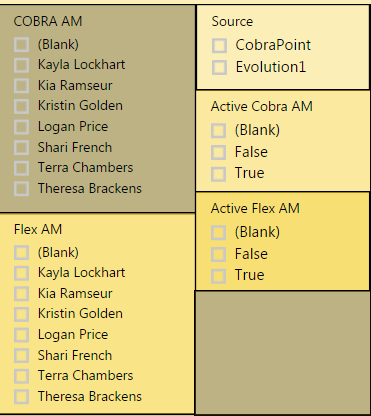
So what I've done is merged these two tables twice. I linked on Cobra ID->ID then again on Flex ID->ID to get the names populated for each. This works, but my issue is rather than having one slicer to toggle between an active and non-active employee, I have to to implement 2 slicers. One for Cobra and one for Flex:

1.PNG


This works but I'm sure will confuse end users. The tricky part is if I only connect the tables using just one of the ID's (Flex or Cobra) the other field remains as an ID you cannot see the name of the person. Is there a way to join the tables differently or create a universal slicer that operates for both Flex/Cobra? Both columns in table 1 share the same column in table 2.

1 REPLY 1
v-yulgu-msft
Microsoft Employee
Microsoft Employee

Hi @Anonymous,


I noticed that the Id numbers for Cobra account manager and Flex account manager are exactly the same, is that right? If so, please follow below steps applied in Query Editor.


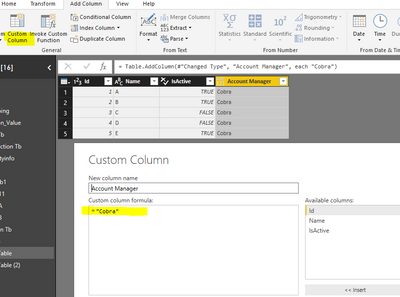
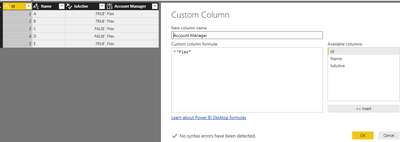
Duplicate the User Table. Add a custom column to the original User table and the duplicated table.

2.PNG3.PNG


Then, append above two tables.

4.PNG


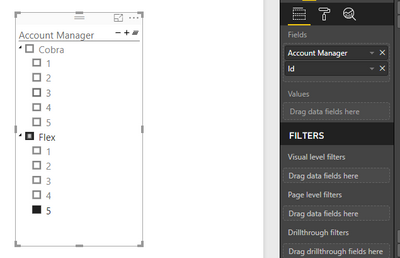
Apply all changes. Then, you can use a Hierarchy slicer to host fields.

1.PNG


If I have something misunderstood, please correct me.


Best regards,

Yuliana Gu

Community Support Team _ Yuliana Gu
If this post helps, then please consider Accept it as the solution to help the other members find it more quickly.

Helpful resources

Announcements
April Power BI Update Carousel

Power BI Monthly Update - April 2026

Check out the April 2026 Power BI update to learn about new features.

New to Fabric survey Carousel

New to Fabric Survey

If you have recently started exploring Fabric, we'd love to hear how it's going. Your feedback can help with product improvements.

Power BI DataViz World Championships carousel

Power BI DataViz World Championships - June 2026

A new Power BI DataViz World Championship is coming this June! Don't miss out on submitting your entry.

FabCon and SQLCon Highlights Carousel

FabCon &SQLCon Highlights

Experience the highlights from FabCon & SQLCon, available live and on-demand starting April 14th.