cancel
Showing results for 
Search instead for 
Did you mean: 

The Power BI Data Visualization World Championships is back! It's time to submit your entry. Live now!

Reply
CJANE
Helper I
Helper I

Joining Dates - Creating Column or Row

I have the following two tables

Fund

Fund IDTermination Date
A6/25/2019
B6/24/2019


FUND EVALUATION

FUND IDUnitsPriceEffective Date
A500106/21/2019
A10096/24/2019
A100076/25/2019
B60066/21/2019
B800026/24/2019


I need help creating a measure or column that will calculate the market value of a fund at termination date.  To do this I need to join the date in the Fund and Fund Evaluation table.  How would I go about calculating the following


Fund A:  1000*7 = 7000

Fund B:  8000*2 = 16000

1 REPLY 1
Anonymous
Not applicable


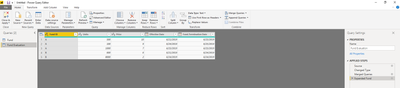
First step is to merge the queries on the Fund ID column. Select merge queries while you are viewing the Fund Evaluation table in the query editor. Expand it out so you can view the termination date.


pbi merge.PNG


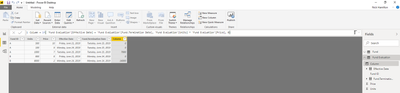
Next, add a new column and input the formula:


Column = if( 'Fund Evaluation'[Effective Date] = 'Fund Evaluation'[Fund.Termination Date], 'Fund Evaluation'[Units] * 'Fund Evaluation'[Price], 0)

 
pbi calc.PNG
 
This should provide what you are looking for. Let me know if this helps of not.


Helpful resources

Announcements
Power BI DataViz World Championships

Power BI Dataviz World Championships

The Power BI Data Visualization World Championships is back! It's time to submit your entry.

January Power BI Update Carousel

Power BI Monthly Update - January 2026

Check out the January 2026 Power BI update to learn about new features.

FabCon Atlanta 2026 carousel

FabCon Atlanta 2026

Join us at FabCon Atlanta, March 16-20, for the ultimate Fabric, Power BI, AI and SQL community-led event. Save $200 with code FABCOMM.