Join us at FabCon Atlanta from March 16 - 20, 2026, for the ultimate Fabric, Power BI, AI and SQL community-led event. Save $200 with code FABCOMM.
Register now!Get Fabric Certified for FREE during Fabric Data Days. Don't miss your chance! Request now
Hi,
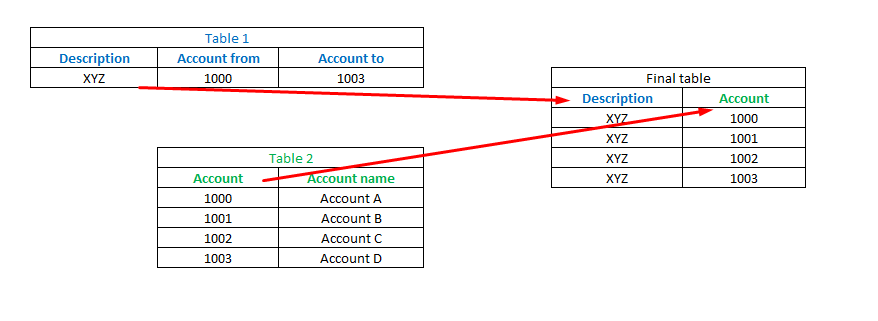
does anyone have any idea how to join Table1 and Table2 from picture below to get new table in PowerBI which looks like FinalTable?
The SQL pseudo is looking like this:
Select
Table1.Description
,Table2.Account
from
Table 1
join Table 2 on Table2.Account between Table1.AccountFrom and Table1.AccountTo
Solved! Go to Solution.
Based on your example, you don't need Table2 and can create the final table in Power Query with the following code:
let
Table1 = #table(type table[Description = text, Account from = number, Account to = number],{{"XYZ",1000,1003}}),
#"Added Custom" = Table.AddColumn(Table1, "Account", each {[Account from]..[Account to]}, type {Int64.Type}),
#"Removed Columns" = Table.RemoveColumns(#"Added Custom",{"Account from", "Account to"}),
#"Expanded Account" = Table.ExpandListColumn(#"Removed Columns", "Account")
in
#"Expanded Account"If you only need codes that are present in Table2, you can inner join the result with Table2.
You could do this with DAX inside of Power BI. You could either add a calculated column on table 1 and add the decription, you could add a calculated column on table 2 and add the account, or you could create a new table and add only account and description to it.
Based on your example, you don't need Table2 and can create the final table in Power Query with the following code:
let
Table1 = #table(type table[Description = text, Account from = number, Account to = number],{{"XYZ",1000,1003}}),
#"Added Custom" = Table.AddColumn(Table1, "Account", each {[Account from]..[Account to]}, type {Int64.Type}),
#"Removed Columns" = Table.RemoveColumns(#"Added Custom",{"Account from", "Account to"}),
#"Expanded Account" = Table.ExpandListColumn(#"Removed Columns", "Account")
in
#"Expanded Account"If you only need codes that are present in Table2, you can inner join the result with Table2.
Dear Marcel,
I have the same condition but I want use 2nd table as in a filter.
Perfect Marcel,
worked like a charm!
Check out the November 2025 Power BI update to learn about new features.
Advance your Data & AI career with 50 days of live learning, contests, hands-on challenges, study groups & certifications and more!