Join us at FabCon Atlanta from March 16 - 20, 2026, for the ultimate Fabric, Power BI, AI and SQL community-led event. Save $200 with code FABCOMM.
Register now!The Power BI Data Visualization World Championships is back! Get ahead of the game and start preparing now! Learn more
Hi,
I have a shape file(.shp), .dbf .prj and .shx files. I need to create a ArcGIS map with this data.
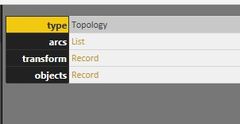
I have seen some posts where they were saying to convert these file into a TopoJson file and import it to Power BI. I did the same but while loading it Json file into power bi I can see only three rows as showm in below screenshot.
And after loading it into Power BI these are showing as Name and Value two cloumns in the table as in above 2nd screen.
And if I use those columns as location, for ArcGIS map it showing only four data points which are there in screen1.
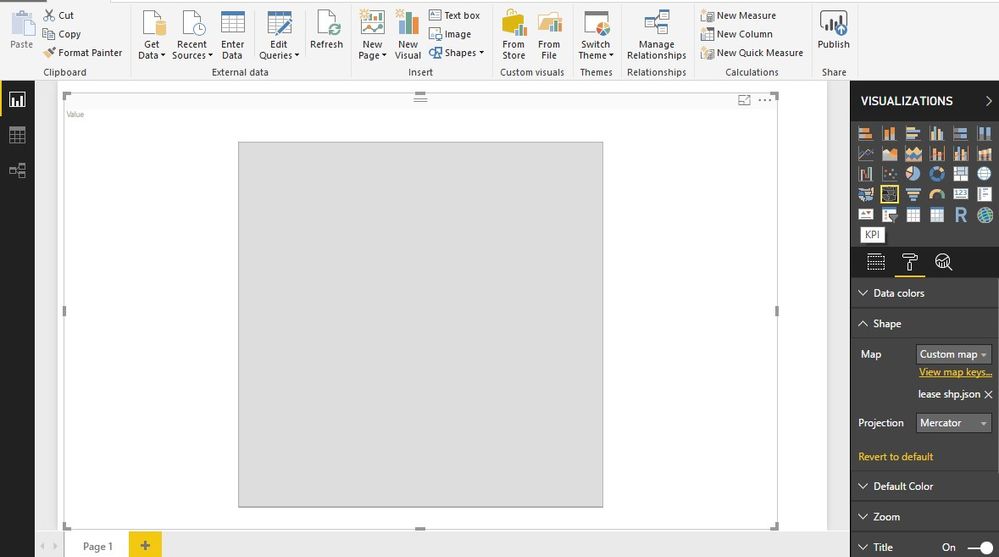
Or If use shape map adding the same jason as shape file it is showing as plane visual as below Screen.
But I could build the map with ArcGis tool by using the same data. I am not sure what I'm missing here.
Kindly help.
Thank you,
Praveen.
Hi,
Is it a custom map? If so, "the ability to use custom maps is not available in this Preview release of Shape Map, but custom maps will be enabled when this features comes out of Preview, which is expected with the next Power BI Desktop monthly update." Shape Maps in Power BI Desktop (Preview)
Other reference: https://www.sqlshack.com/create-geographic-maps-power-bi-using-custom-shape-maps/
Best Regards,
Henry
The Power BI Data Visualization World Championships is back! Get ahead of the game and start preparing now!
| User | Count |
|---|---|
| 40 | |
| 35 | |
| 34 | |
| 31 | |
| 27 |
| User | Count |
|---|---|
| 135 | |
| 102 | |
| 67 | |
| 65 | |
| 56 |