Join us at FabCon Atlanta from March 16 - 20, 2026, for the ultimate Fabric, Power BI, AI and SQL community-led event. Save $200 with code FABCOMM.
Register now!The Power BI Data Visualization World Championships is back! Get ahead of the game and start preparing now! Learn more
Hi there- I'm hoping someone can help me.
How can I make it so that my slicers only show options if there are values associated? For example, I have an organizational hierarchy, but not all "level 1"s had terminations occur. I want my slicer to only show those "Level 1" where there are terminations. I don't want my users to click on a "level 1" and see blank visuals - that is not a good user experience. I want them to only see the "level 1"s that had terminations.
I've made sure that my level 1 has "show items with no data" unchecked - so now I'm lost as to what I can do next.
Any suggestions would be greatly appreciated - thank you in advance!
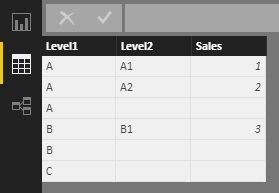
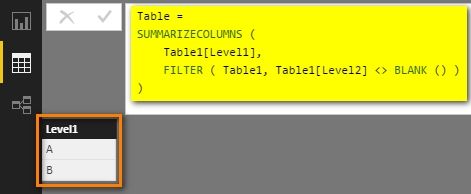
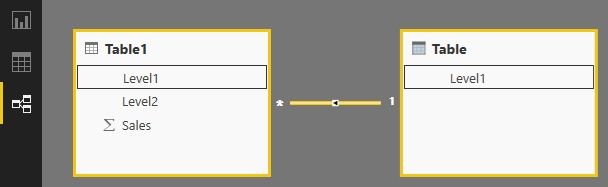
If we have a table like below, we can create another table which only has one column with following DAX formula and relationship.
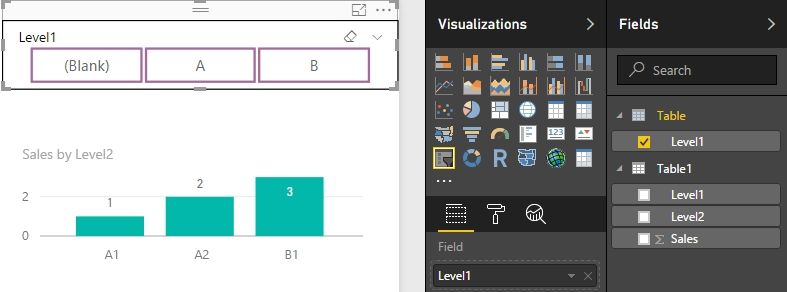
Then drag Table[Level1] into the slicer, and C will not be displayed in the slicer now.
Best Regards,
Herbert
The Power BI Data Visualization World Championships is back! Get ahead of the game and start preparing now!
Check out the November 2025 Power BI update to learn about new features.
| User | Count |
|---|---|
| 59 | |
| 43 | |
| 42 | |
| 23 | |
| 17 |
| User | Count |
|---|---|
| 190 | |
| 122 | |
| 96 | |
| 66 | |
| 47 |