cancel
Showing results for 
Search instead for 
Did you mean: 

The Power BI Data Visualization World Championships is back! Get ahead of the game and start preparing now! Learn more

Reply
msalamon
Helper I
Helper I

Issue Loading JSON File from Web

I am following the instructions from this page:  https://codingsight.com/using-rest-api-as-data-source-in-power-bi/, to load a json resource from the web.  I walked through the steps to import the test User json data and that worked fine. 


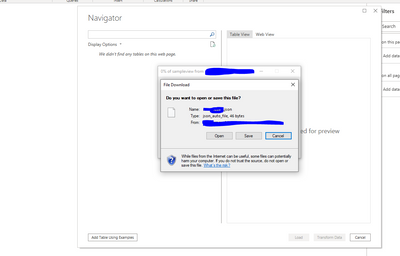
But I have a different (also anonymous) data source, but one that also returns a very basic json file (an array with several objects).  During the web data source configuration process, I get to the step where I enter the Advanced settings and hit OK.  Power BI desktop tries to connect to the data source, but then I get the message that it could not find any tables in the web page and I also get a popup message that Power BI is trying to download the json file to my computer.  I cancel or download, but nothing gets imported into Power BI.


When I click on "Add Table Using Examples", I also get a file download message, asking me to download the json file.


There must be something about the service that is returning the JSON response that that is causing Power BI to behave this way.

1 ACCEPTED SOLUTION
Anonymous
Not applicable

Hi @msalamon ,


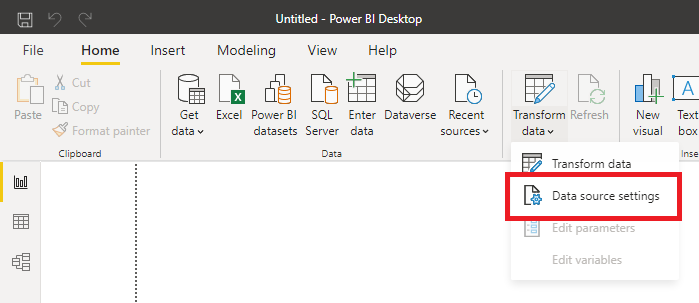
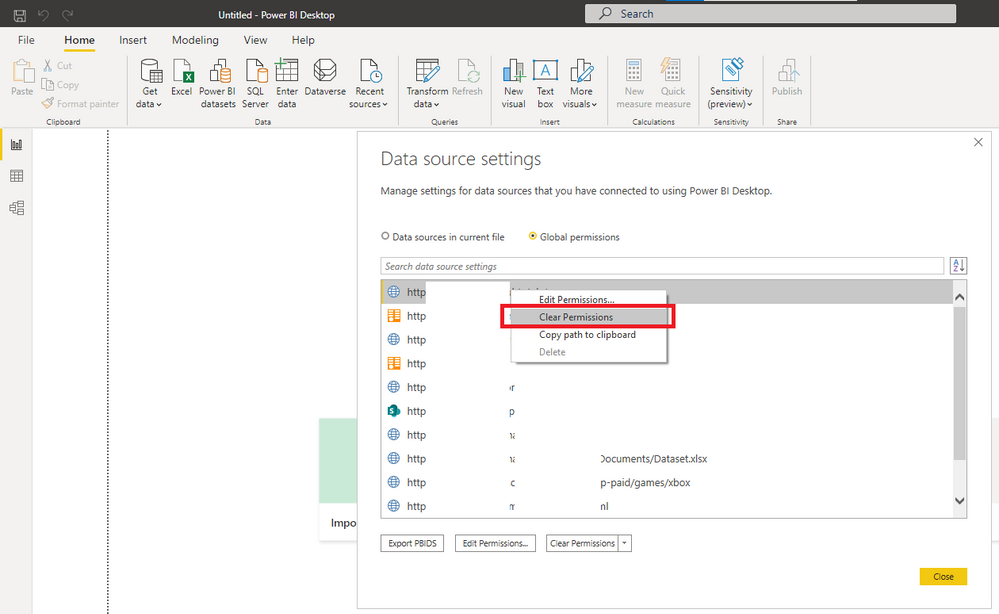
Have you tried deleting the data source and reconnecting?

1.png

Screenshot 2021-05-18 135652.png


Best Regards,

Stephen Tao


If this post helps, then please consider Accept it as the solution to help the other members find it more quickly.

View solution in original post

3 REPLIES 3
usmanaziz86
Regular Visitor

I am also having similar problem ,when i make rest api call from power bi it download a JSON file instead of showing it to POWERBI Navigator window. I followed above steps but didnt helped me i am getting data from AWS API gateway.File which is downloaded is having the actual data i need.


usmanaziz86_1-1625754444997.png


Anonymous
Not applicable

Hi @msalamon ,


Have you tried deleting the data source and reconnecting?

1.png

Screenshot 2021-05-18 135652.png


Best Regards,

Stephen Tao


If this post helps, then please consider Accept it as the solution to help the other members find it more quickly.

I had tried a few times to recreate the data source.  This time I created an entirely new Power BI report and imported the data and that worked!  Thanks.

Helpful resources

Announcements
Power BI DataViz World Championships

Power BI Dataviz World Championships

The Power BI Data Visualization World Championships is back! Get ahead of the game and start preparing now!

November Power BI Update Carousel

Power BI Monthly Update - November 2025

Check out the November 2025 Power BI update to learn about new features.

FabCon Atlanta 2026 carousel

FabCon Atlanta 2026

Join us at FabCon Atlanta, March 16-20, for the ultimate Fabric, Power BI, AI and SQL community-led event. Save $200 with code FABCOMM.