Don't miss your chance to take the Fabric Data Engineer (DP-600) exam for FREE! Find out how by attending the DP-600 session on April 23rd (pacific time), live or on-demand.
Learn moreJoin the FabCon + SQLCon recap series. Up next: Power BI, Real-Time Intelligence, IQ and AI, and Data Factory take center stage. All sessions are available on-demand after the live show. Register now
Hi, there
I am just moving from QuickSight to PowerBI. Everything looks good except for one concept. In QuickSight, there are two types of calculated fields:
I believe "measure" in PowerBI equals the "calculated measure field" of QuickSight. But what is the equivalent "calculated dimension field" in PowerBI?
Hao
Solved! Go to Solution.
@Anonymous , Got we can have calculated column based on parameter. what you need do I create measure which gives that value
Size = IF(Max(Table1[a]) < Threshold[Parameter Value], "S", "L")
Have a table with values S and L , Say Bucket
You need row level id column in the table, if required add index column in the power bi
new Measure
Sumx(filter(Values(Table[Index]), [size] = max(bucket[Value])), [a])
or see if this can work
Sumx(filter(Table, [size] = max(bucket[Value])), [a])
refer
Dynamic segmentation -Measure to Dimension conversion: https://youtu.be/gzY40NWJpWQ
@Anonymous , I think field parameter for May 2022, update should fill that gap
https://powerbi.microsoft.com/en-us/blog/power-bi-may-2022-feature-summary/#post-19361-_Toc103022212
Hi @amitchandak,
Thanks for your quick reply! I look at this new feature. It improved but still has a gap with the "calculated dimension field". The key difference is:
- PowerBI field parameter requires either column (one time of one-to-one transformation) or measure (dynamic N to one aggregation)
- QuickSight "calculated dimension field" is a dynamic one-to-one transformation
In summary, QuickSight "calculated dimension field" is "PowerBI field parameter" + "dynamic one-to-one transformation".
I put an example here to help you understand my scenario:
Step1: I have a table "Table1" with a single numeric column "a":
Step 2: I have a what-if parameter "Threshold" to allow the user to choose a threshold.
Step 3: I want to add a measure "Size" to "Table1" like
Size = IF(Table1[a] < Threshold[Parameter Value], "S", "L")
Step 4: Finally, I am trying to use "Size" as a "field parameter" to form a Matrix visual like below
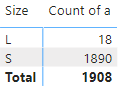
Unfortunately, I didn't figure out a way to do that because of step 3. "Size" is a measure that requires an "aggregation operator" (e.g., SUM, AVERAGE). QuickSight "calculated dimension field" has no such restriction.
Hao
@Anonymous , Got we can have calculated column based on parameter. what you need do I create measure which gives that value
Size = IF(Max(Table1[a]) < Threshold[Parameter Value], "S", "L")
Have a table with values S and L , Say Bucket
You need row level id column in the table, if required add index column in the power bi
new Measure
Sumx(filter(Values(Table[Index]), [size] = max(bucket[Value])), [a])
or see if this can work
Sumx(filter(Table, [size] = max(bucket[Value])), [a])
refer
Dynamic segmentation -Measure to Dimension conversion: https://youtu.be/gzY40NWJpWQ
@amitchandak, you pointed me in the right direction! Thank you so much!
My final formula looks like this:
COUNTX(FILTER(Table1, countrows(filter(Bucket, Table1[Size] == Bucket[Size])) > 0), [a])But the complexity of the computation of my version is O(M*N), in which N is the size of "Table1", and M is the size of "Bucket". When M or N is huge, the refresh of the page is extremely slow.
Your version looks more optimized (much faster than mine):
countx(filter(Table1, [size] = max(Bucket[Size])), [a])However, it doesn't return the correct result for me ("max" causes "S" to be used in comparison forever); what is your original intention of "max"? I hope to learn it for optimization.
BTW, I will mark your answer as a solution.
Hao
Check out the April 2026 Power BI update to learn about new features.
If you have recently started exploring Fabric, we'd love to hear how it's going. Your feedback can help with product improvements.
A new Power BI DataViz World Championship is coming this June! Don't miss out on submitting your entry.
| User | Count |
|---|---|
| 48 | |
| 46 | |
| 41 | |
| 20 | |
| 17 |
| User | Count |
|---|---|
| 70 | |
| 69 | |
| 32 | |
| 27 | |
| 26 |