cancel
Showing results for 
Search instead for 
Did you mean: 

The Power BI Data Visualization World Championships is back! Get ahead of the game and start preparing now! Learn more

Reply
Anonymous
Not applicable

Is there an ISNUMBER() or ISTEXT() equivalent in Power Query

Hi Folks,

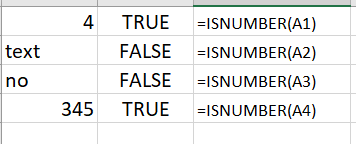
While data cleaning using the power query, I came across a situation where a column contains both text and numerical values. I want to add an additional column that states which one is number or text. In Excel, we have ISNUMBER() or ISTEXT().  Do we have any alternative in Power Query? Below is an Excel screenshot, an alternative of which want in Power Query.


sankalp_0-1601213729126.png


1 ACCEPTED SOLUTION
ryan_mayu
Super User
Super User

@Anonymous 

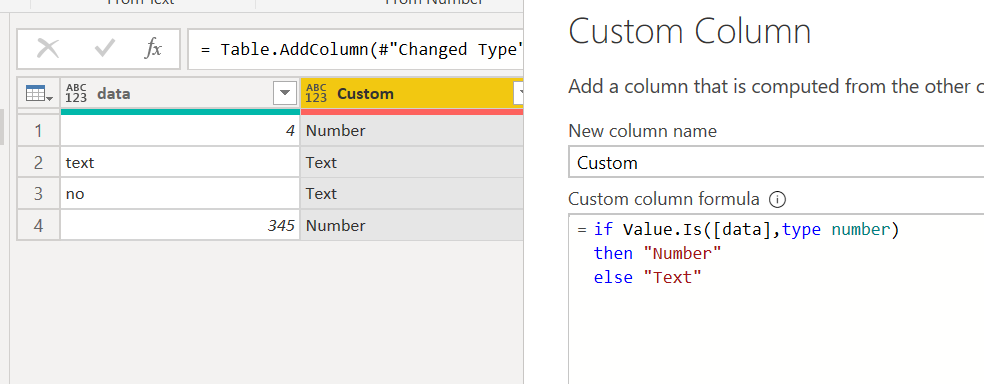
like what @CNENFRNL  suggested, you can try

if Value.Is([data],type number) 
then "Number"
else "Text"

 1.PNG


Did I answer your question? Mark my post as a solution!

Proud to be a Super User!


View solution in original post

4 REPLIES 4
ryan_mayu
Super User
Super User

@Anonymous 

like what @CNENFRNL  suggested, you can try

if Value.Is([data],type number) 
then "Number"
else "Text"

 1.PNG


Did I answer your question? Mark my post as a solution!

Proud to be a Super User!


Hi,
It is not working when you have column type text - then results is always Text,
It works when you first get valuefrom text, and then check type.

Value.Is(Value.FromText([data]), type number))

Thanks @QooT,

I was having this issue and even though my column data type was "Any", for whatever when PowerQuery parsed in the data everything became a string, so even values of 123 were resulting in Text, however your adjustment to the formula fixed this, so thanks!


IsNumber
--------
= if Value.Is(Value.FromText([--column-name-here--]), type number)
then "Y"
else "N"


CNENFRNL
Community Champion
Community Champion

Hi, @Anonymous , you may try Vaue.Is function,

https://docs.microsoft.com/en-us/powerquery-m/value-is


Thanks to the great efforts by MS engineers to simplify syntax of DAX! Most beginners are SUCCESSFULLY MISLED to think that they could easily master DAX; but it turns out that the intricacy of the most frequently used RANKX() is still way beyond their comprehension!

DAX is simple, but NOT EASY!

Helpful resources

Announcements
Power BI DataViz World Championships

Power BI Dataviz World Championships

The Power BI Data Visualization World Championships is back! Get ahead of the game and start preparing now!

November Power BI Update Carousel

Power BI Monthly Update - November 2025

Check out the November 2025 Power BI update to learn about new features.

FabCon Atlanta 2026 carousel

FabCon Atlanta 2026

Join us at FabCon Atlanta, March 16-20, for the ultimate Fabric, Power BI, AI and SQL community-led event. Save $200 with code FABCOMM.