cancel
Showing results for 
Search instead for 
Did you mean: 

July 28 - August 9 | Final Round of the Power BI Dataviz World Championships. This is your chance. Learn more

Reply
Anonymous
Not applicable

Is it possible to extract data from R visuals?

Hi!


I came across the Time Series Decomposition Chart R-visual, and while the visualisation is great and decomposition algorithm seem reliable, i'm not able to export the decomposed data (eg. seasonality, trend etc.) but only the underlying input (time and value).


So my question is if there is any way to extract the data behind the visuals?


Best, Andreas. 

3 REPLIES 3
Anonymous
Not applicable

Hi- 

same question.  This visual is great, but there is no meaning to extract from the data.  

For example, looking at the attached overall trend graphical parameter, it could be helpful to see what the overall trend is.  I don't know what the overall value of the decomp graphs are if there is no information one can pull out of it. 

Specifically things I would like to see or be able to modify:

tool tips over the trend lines

seasonality % trends

overall underlying trend over a time period


Can you explain how to modify the script in order to add these things?


Thanks 

decomp.PNG


v-juanli-msft
Community Support
Community Support

Hi @Anonymous 

Is this problem sloved? 

If it is sloved, could you kindly accept it as a solution to close this case?

If not, please let me know.


Best Regards

Maggie

v-juanli-msft
Community Support
Community Support

Hi @Anonymous 

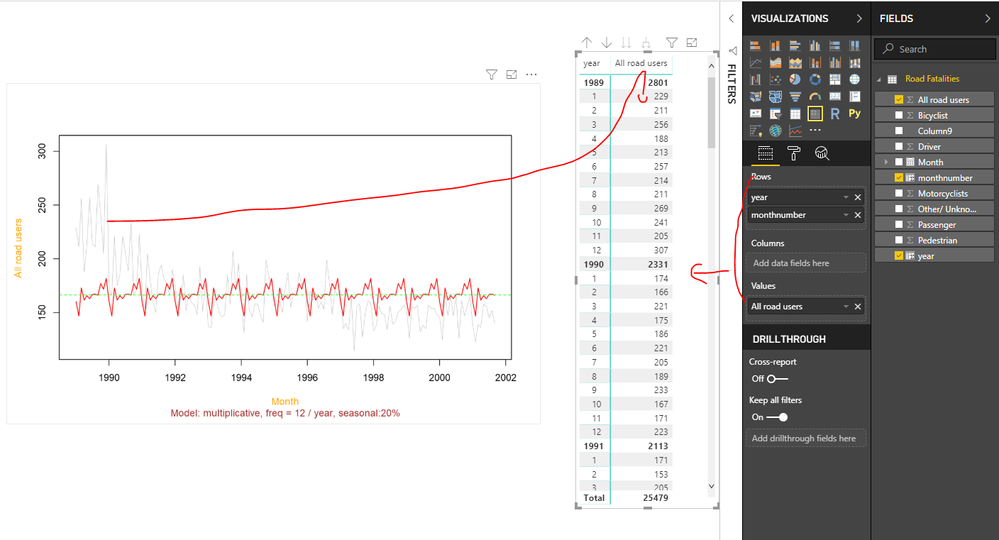
As tested, go to the Format tab and change the graphical parameters, the visual would show different type diagrams.

However, the data behind is still the original one, this visual doesn't make any aggregation for the dataset behind.

So when you export data, it would show the underlying data.


If you need to see the seasonality or trend data, please show your exact requirements.

so we can create measures/columns and add them in a table/matrix visual in Power BI to extract the data.

For example, for 1989~2002, i need monthly data every year.

1.png


Exported data

2.png


Best Regards
Maggie


Community Support Team _ Maggie Li
If this post helps, then please consider Accept it as the solution to help the other members find it more quickly.

Helpful resources

Announcements
FabCon and SQLCon Barcelona 2026

FabCon & SQLCon – Barcelona 2026

Join us in Barcelona for FabCon and SQLCon, the Fabric, Power BI, SQL, and AI community event. Save €200 with code FABCMTY200.

Fabric Community Sticker Design Challenge Barcelona Carousel

Fabric Community Sticker Challenge - Barcelona 2026

If you love stickers, then you will definitely want to check out our community sticker challenge, Barcelona edition!

July Power BI Update Carousel

Power BI Monthly Update - July 2026

Check out the July 2026 Power BI update to learn about new features.

Power BI DataViz World Championships carousel

Power BI DataViz World Championships - June 2026

A new Power BI DataViz World Championship is coming this June! Don't miss out on submitting your entry.

Top Solution Authors