Join us in Barcelona for FabCon and SQLCon, September 28 - October 1, 2026.
This is best Fabric, Power BI, SQL and AI community event. How do we know? The last event sold out! Save €200 with code FABCMTY200.
Register now- Power BI forums
- Get Help with Power BI
- Desktop
- Service
- Report Server
- Power Query
- Mobile Apps
- Developer
- DAX Commands and Tips
- Custom Visuals Development Discussion
- Health and Life Sciences
- Power BI Spanish forums
- Translated Spanish Desktop
- Training and Consulting
- Instructor Led Training
- Dashboard in a Day for Women, by Women
- Galleries
- Data Stories Gallery
- Themes Gallery
- Contests Gallery
- QuickViz Gallery
- Quick Measures Gallery
- Visual Calculations Gallery
- Fabric Apps Gallery
- Notebook Gallery
- Translytical Task Flow Gallery
- TMDL Gallery
- R Script Showcase
- Webinars and Video Gallery
- Ideas
- Custom Visuals Ideas (read-only)
- Issues
- Issues
- Events
- Upcoming Events
July 28 - August 9 | Final Round of the Power BI Dataviz World Championships. This is your chance. Learn more
- Power BI forums
- Forums
- Get Help with Power BI
- Desktop
- Is Group changed using If
- Subscribe to RSS Feed
- Mark Topic as New
- Mark Topic as Read
- Float this Topic for Current User
- Bookmark
- Subscribe
- Printer Friendly Page


- Mark as New
- Bookmark
- Subscribe
- Mute
- Subscribe to RSS Feed
- Permalink
- Report Inappropriate Content
Is Group changed using If
Hi guys,
I have the below data, recording every change happen on trading account concerning the risk model, which is the represented in the (GroupCode)
Every change is recorded, and several changes can be found there for 1 single account.

I need a formula to highlight the trading accounts that had a change in the their group, and precisly the last charerter is what my concern, as it's either S or X
I dont need to know how many times a change has happen, I just need to shortlist the accounts that had change ( at least once) and accounts that never had a change.
Appreciate any help!
Solved! Go to Solution.


- Mark as New
- Bookmark
- Subscribe
- Mute
- Subscribe to RSS Feed
- Permalink
- Report Inappropriate Content
OK, this is a bit brute force, but I created an Enter Data query:
GroupCodes
let
    Source = Table.FromRows(Json.Document(Binary.Decompress(Binary.FromText("i45WCg120XX01Q12c/EM0g1W0lEyNNA3MtE3MjA0U4rVwSFvTEDeiIC8IQF5AxzyERB5Q0sC8haY8iHBAQZweXMs+j2dDI1gDjA0w6UAZoIpFhuQXYAtBFEMwBaEKE6AhWEsAA==", BinaryEncoding.Base64), Compression.Deflate)), let _t = ((type text) meta [Serialized.Text = true]) in type table [GroupCode = _t, Date = _t]),
    #"Changed Type" = Table.TransformColumnTypes(Source,{{"GroupCode", type text}, {"Date", type date}})
in
    #"Changed Type"
I then created these custom columns in DAX:
Group = LEFT([GroupCode],LEN([GroupCode])-2)

Code = RIGHT([GroupCode],1)

HasX = IF([Code]="X",1,0)

HasS = IF([Code]="S",1,0)
Then you can put Group, HasX and HasS in a table visual and potentially filter by 0's to get whatever combination that you want.
Follow on LinkedIn
@ me in replies or I'll lose your thread!!!
Instead of a Kudo, please vote for this idea
Become an expert!: Enterprise DNA
External Tools: MSHGQM
YouTube Channel!: Microsoft Hates Greg
Latest book!: DAX For Humans
DAX is easy, CALCULATE makes DAX hard...

- Mark as New
- Bookmark
- Subscribe
- Mute
- Subscribe to RSS Feed
- Permalink
- Report Inappropriate Content
Hi @majdkaid22,
>>I need a formula to highlight the trading accounts that had a change in the their group, and precisly the last charerter is what my concern, as it's either S or X
I agree with smoupre's point of view, you can use right function to check the last charerter. Below is the sample:
Measure:
Changed = if(COUNTROWS(FILTER(ALL(Sheet1),Sheet1[Account Number]=MAX(Sheet1[Account Number])&&RIGHT(Sheet1[GroupCode],1)<>RIGHT(LASTNONBLANK(Sheet1[GroupType],[GroupType]),1)))>0,TRUE(),FALSE())
Calculate table about accounts list:
Table = DISTINCT(SELECTCOLUMNS(Sheet1,"Account Number",[Account Number],"IsChanged",[Changed]))
Regards,
Xiaoxin Sheng
- Mark as New
- Bookmark
- Subscribe
- Mute
- Subscribe to RSS Feed
- Permalink
- Report Inappropriate Content
@Greg_Deckler & @Anonymous Thanks for your feedback.
Am not sure I made myself clear in what exactly is needed.
You can see in the below example of Acount Number 442197 there were many changes happen on the GroupCode throughout the time from a group ends with S to a group ends with X, and vicse versa.
This is the type of accounts that I would like to filter, where in the case of this account, it falls under IsChanged "TRUE," while if all the groupcode changes happened within Groupcodes end with S, it fall under ,IsChanged, "FALSE"
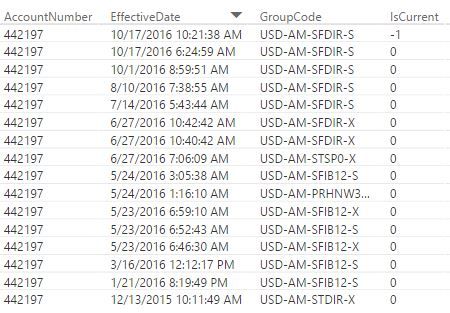
I don't think the proposed formulas would actually achieve what am looking for?
The formula has captured the below as "True" while it should have been "FALSE" as the account always remianed under groupcode ends with S

Hope you could help me further 🙂
Cheers,
Majd
- Mark as New
- Bookmark
- Subscribe
- Mute
- Subscribe to RSS Feed
- Permalink
- Report Inappropriate Content
OK, just so I have this straight. GroupCodes start with having an S extension. Changes happen and they continue to have the S extension. Then, for some GroupCodes, they end or something and at that point they are given an X extension. You want to identify the ones that have a change from S to X and those that never change and have all S entries and no X entries. Is that correct?
Follow on LinkedIn
@ me in replies or I'll lose your thread!!!
Instead of a Kudo, please vote for this idea
Become an expert!: Enterprise DNA
External Tools: MSHGQM
YouTube Channel!: Microsoft Hates Greg
Latest book!: DAX For Humans
DAX is easy, CALCULATE makes DAX hard...
- Mark as New
- Bookmark
- Subscribe
- Mute
- Subscribe to RSS Feed
- Permalink
- Report Inappropriate Content
@Greg_Deckler That is very much true Sir!
I want to identify the ones that have a change from S to X, or vice versa, and those that never change and have all S entiries or X entiries
- Mark as New
- Bookmark
- Subscribe
- Mute
- Subscribe to RSS Feed
- Permalink
- Report Inappropriate Content
OK, this is a bit brute force, but I created an Enter Data query:
GroupCodes
let
    Source = Table.FromRows(Json.Document(Binary.Decompress(Binary.FromText("i45WCg120XX01Q12c/EM0g1W0lEyNNA3MtE3MjA0U4rVwSFvTEDeiIC8IQF5AxzyERB5Q0sC8haY8iHBAQZweXMs+j2dDI1gDjA0w6UAZoIpFhuQXYAtBFEMwBaEKE6AhWEsAA==", BinaryEncoding.Base64), Compression.Deflate)), let _t = ((type text) meta [Serialized.Text = true]) in type table [GroupCode = _t, Date = _t]),
    #"Changed Type" = Table.TransformColumnTypes(Source,{{"GroupCode", type text}, {"Date", type date}})
in
    #"Changed Type"
I then created these custom columns in DAX:
Group = LEFT([GroupCode],LEN([GroupCode])-2)

Code = RIGHT([GroupCode],1)

HasX = IF([Code]="X",1,0)

HasS = IF([Code]="S",1,0)
Then you can put Group, HasX and HasS in a table visual and potentially filter by 0's to get whatever combination that you want.
Follow on LinkedIn
@ me in replies or I'll lose your thread!!!
Instead of a Kudo, please vote for this idea
Become an expert!: Enterprise DNA
External Tools: MSHGQM
YouTube Channel!: Microsoft Hates Greg
Latest book!: DAX For Humans
DAX is easy, CALCULATE makes DAX hard...
- Mark as New
- Bookmark
- Subscribe
- Mute
- Subscribe to RSS Feed
- Permalink
- Report Inappropriate Content
@Greg_Deckler appreciate you taking the time to demonstrate the case for me!
I know very basic info when it comes to data query.
I opened up my Advanced Editor and tried to paste your proposed Data query, but am keep getting an error.
Obviously am not writing the query the correct way.
Below is my current query for meAccountHistory table.
How should I add your query to it?
let
    Source = Sql.Databases("102.222.13.15"),
    ODS = Source{[Name="ODS"]}[Data],
    dbo_meAccountHistory = ODS{[Schema="dbo",Item="meAccountHistory"]}[Data],
    #"Replaced Value" = Table.ReplaceValue(dbo_meAccountHistory,null,"0",Replacer.ReplaceValue,{"AgentAccountNumber"}),
    #"Replaced Value1" = Table.ReplaceValue(#"Replaced Value",null,"Unknown",Replacer.ReplaceValue,{"AgentAccountName"})
in
    #"Replaced Value1"
- Mark as New
- Bookmark
- Subscribe
- Mute
- Subscribe to RSS Feed
- Permalink
- Report Inappropriate Content
Hi @majdkaid22,
You shouldn't add smoupre's query, it means these data is load from excel(your data is load from sql). You need to create calculate columns and create the visual.
Regards,
Xiaoxin Sheng
- Mark as New
- Bookmark
- Subscribe
- Mute
- Subscribe to RSS Feed
- Permalink
- Report Inappropriate Content
@Anonymous I did that first thing, but am getting the following error for the below column when I try to create it
"An argument of function 'LEFT' has the wrong data type or has an invalid value"
Group = LEFT([GroupCode],LEN([GroupCode])-2)
I assume it's the data type of [GroupCode], but I cannot know what to change it to.
Thanks,
Majd
- Mark as New
- Bookmark
- Subscribe
- Mute
- Subscribe to RSS Feed
- Permalink
- Report Inappropriate Content
I believe you need GroupCode to be Text for LEFT to work. You can change the data type in either the query editor or in your DAX model.
Follow on LinkedIn
@ me in replies or I'll lose your thread!!!
Instead of a Kudo, please vote for this idea
Become an expert!: Enterprise DNA
External Tools: MSHGQM
YouTube Channel!: Microsoft Hates Greg
Latest book!: DAX For Humans
DAX is easy, CALCULATE makes DAX hard...
- Mark as New
- Bookmark
- Subscribe
- Mute
- Subscribe to RSS Feed
- Permalink
- Report Inappropriate Content
Not entirely sure exactly what you are trying to do but a couple of things. First, if you want the last character, you could create a column like:
Column = RIGHT([GroupCode]],1)
You could also create a measure like:
Measure = VAR datemax = MAX([Date])
VAR datemin = MIN([Date])
RETURN (datemax - datemin) * 1.
Then just filter out the 0's and you have the accounts that have changed.
Follow on LinkedIn
@ me in replies or I'll lose your thread!!!
Instead of a Kudo, please vote for this idea
Become an expert!: Enterprise DNA
External Tools: MSHGQM
YouTube Channel!: Microsoft Hates Greg
Latest book!: DAX For Humans
DAX is easy, CALCULATE makes DAX hard...
Helpful resources

FabCon & SQLCon – Barcelona 2026
Join us in Barcelona for FabCon and SQLCon, the Fabric, Power BI, SQL, and AI community event. Save €200 with code FABCMTY200.

Fabric Community Sticker Challenge - Barcelona 2026
If you love stickers, then you will definitely want to check out our community sticker challenge, Barcelona edition!

Power BI Monthly Update - July 2026
Check out the July 2026 Power BI update to learn about new features.

Power BI DataViz World Championships - June 2026
A new Power BI DataViz World Championship is coming this June! Don't miss out on submitting your entry.

| User | Count |
|---|---|
| 25 | |
| 23 | |
| 19 | |
| 17 | |
| 14 |


| User | Count |
|---|---|
| 24 | |
| 20 | |
| 20 | |
| 19 | |
| 19 |


