Learn from the best! Meet the four finalists headed to the FINALS of the Power BI Dataviz World Championships! Register now
Good afternoon,
I'm running into a roadblock with a measure and I thought I'd see if anyone else can help me figure out what is happening.
The actual number of Interviews Scheduled for 12/1/2019 - 12/7/2019 is 17, but when I place this measure in the report it only shows 12
Total Interviews Scheduled =
SUMX(
SUMMARIZE(HI_Interview_Scheduled_BI_DIM,HI_Interview_Scheduled_BI_DIM[jobOrderID],HI_Interview_Scheduled_BI_DIM[candidateID]),
CALCULATE(COUNT(HI_Interview_Scheduled_BI_DIM[candidateID]))
) + 0
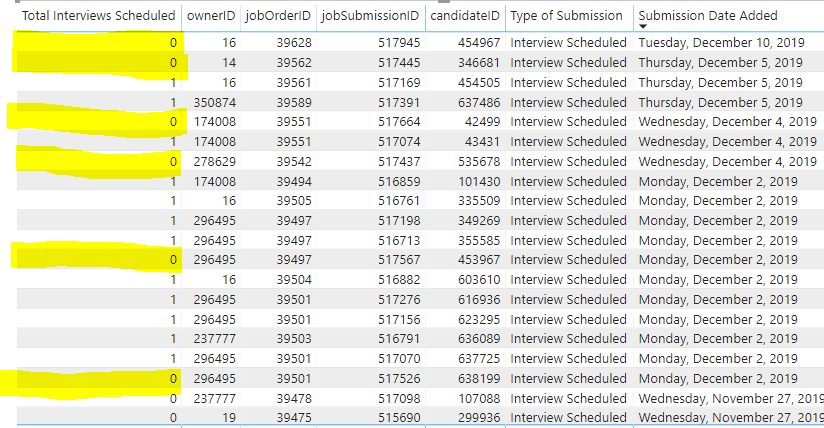
I thought I'd throw everything into a table to make sure I could see what exactly was happening and this is what I saw...
I'm seeing it is not counting some of the interviews.
I appreciate your help in figuring out what I should do and what the best practice moving forward for this type of issue would be.
Thank you,
Lance M
Solved! Go to Solution.
If I'm looking at your data correctly, should your interview scheduled column just be:
Interview Scheduled = IF( 'Table'[Type of Submission] = "Interview Scheduled" , 1 , 0 )
Then your measure would just be:
Total Interviews Scheduled = SUM( 'Table'[Interview Scheduled] )
Or simplify and just have a measure like this:
Total Interviews Scheduled = CALCULATE( COUNTROWS() , 'Table'[Type of Submission] = "Interview Scheduled" )
??
If I'm looking at your data correctly, should your interview scheduled column just be:
Interview Scheduled = IF( 'Table'[Type of Submission] = "Interview Scheduled" , 1 , 0 )
Then your measure would just be:
Total Interviews Scheduled = SUM( 'Table'[Interview Scheduled] )
Or simplify and just have a measure like this:
Total Interviews Scheduled = CALCULATE( COUNTROWS() , 'Table'[Type of Submission] = "Interview Scheduled" )
??
@CoreyP ,
I took a deeper look into the relationship view to see if there was an issue and I was able to find where the kink was, but I appreciate the simplified formula that I'll definitely keep in my back pocket for the future as I did plug it in to my model to see what would transpire.
Have a great Wednesday!
A new Power BI DataViz World Championship is coming this June! Don't miss out on submitting your entry.
Share feedback directly with Fabric product managers, participate in targeted research studies and influence the Fabric roadmap.
| User | Count |
|---|---|
| 50 | |
| 34 | |
| 32 | |
| 18 | |
| 17 |
| User | Count |
|---|---|
| 64 | |
| 64 | |
| 41 | |
| 27 | |
| 24 |