Join us at FabCon Atlanta from March 16 - 20, 2026, for the ultimate Fabric, Power BI, AI and SQL community-led event. Save $200 with code FABCOMM.
Register now!The Power BI Data Visualization World Championships is back! Get ahead of the game and start preparing now! Learn more
Hello all,
Would you be so kind and help me with interactive table?
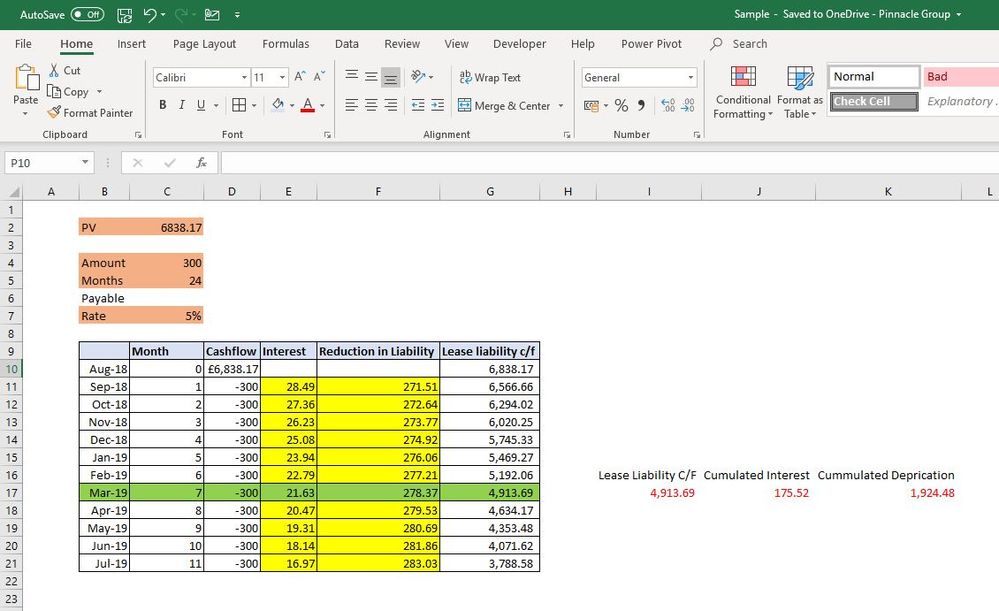
My Dashboard should contains interactive table, Lease Liability at beginning at 1st month & Lease Liability at 31.03.2019
I’ve added her links for data source and PBIX.
I have PV formula in PBI file.
Passwords are : 0000
https://ulozto.net/!UNAmkFEWfcJF/cashflow-xlsx
https://ulozto.net/!MI770rkrVenX/cashflow-pbix
Idea is that everything will change based on selection of Asset.
Problem is that sometimes is there Lease for 24 months, sometimes 36 months etc.
Can you help me out?
Many thanks.
Kind regards.
Andrej
You may take a look at the post below.
Hello @v-chuncz-msft ,
Thanks for your help.
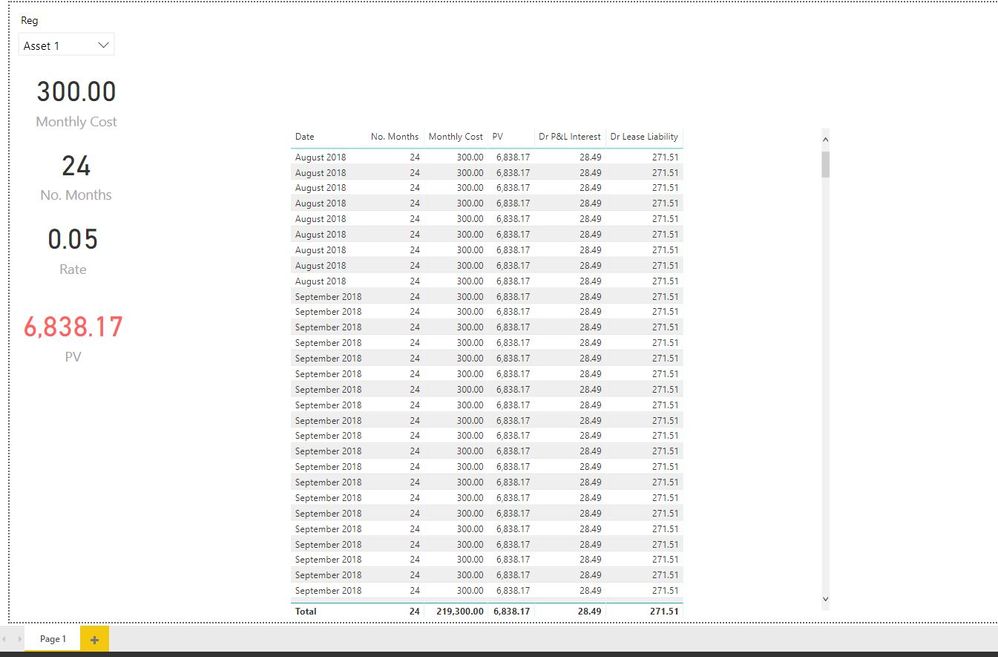
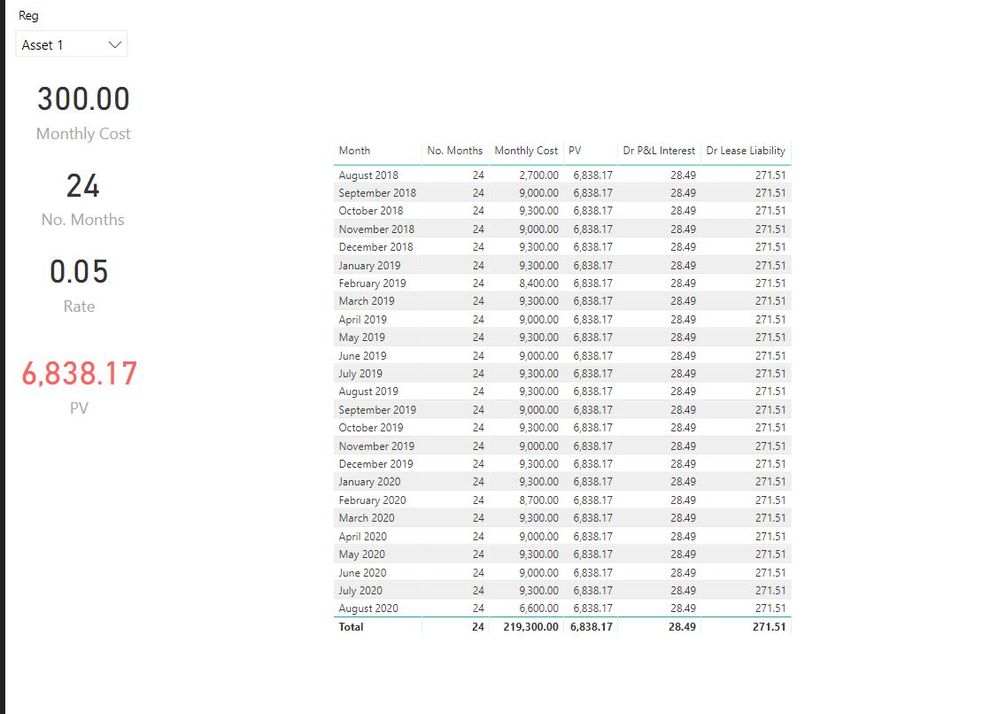
I've used bellow table. Problem is that There are all dates of my lease between start & end date.
I need to have one row per one month. In this case between Aug - 18 & Aug - 20.
With another asset will be range different.
Table =
VAR c =
CALENDARAUTO ()
RETURN
GENERATE (
'Full Lease List',
FILTER ( c, [Date] >= 'Full Lease List'[Start Date] && [Date] <= 'Full Lease List'[End Date] )
)
Any advice on that?
Here is link for PBI file. Password is 0000
https://ulozto.net/!iAMM9MEpOElD/cashflow-1-2-pbix
Once I will have table in correct order than I will need to find out way to calculate actual depreciation.
I must have in August month 0 and first deduction will be from September.
Just add a calculated column.
Column = DATE ( YEAR ( 'Table'[Date] ), MONTH ( 'Table'[Date] ), 1 )
Hello @v-chuncz-msft ,
Many thanks for your help. I really appreciate that as this currently my very urgent project.
I will close another query as items are related as I need both tables and running deprecation and totals for March - 19
Here is my file. Password is still 0000
https://uloz.to/!2qnn9chBI2LN/cashflow-1-3-pbix
Now I just need last 3 things.
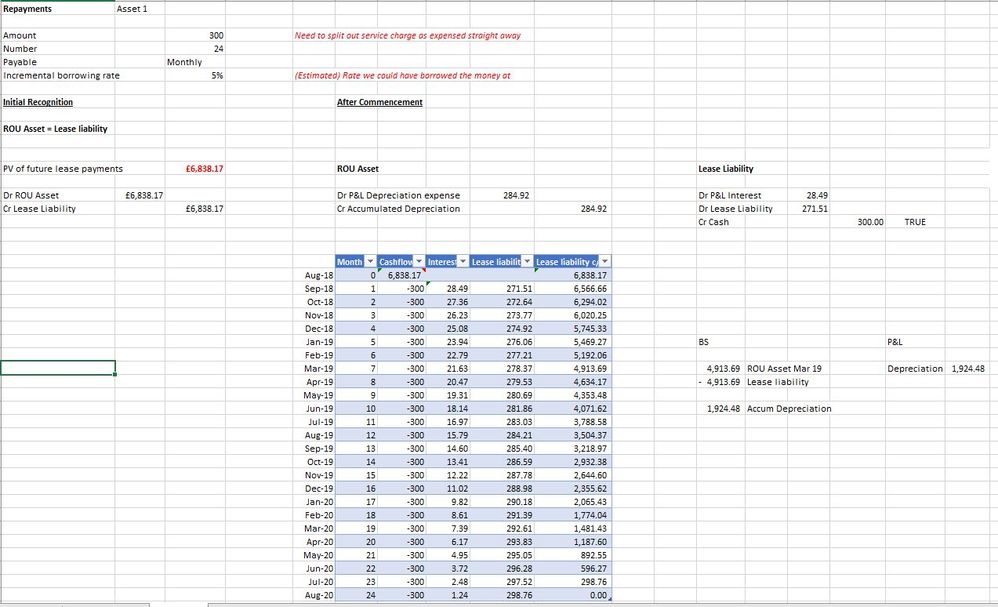
1st - Monthly count. 1st month should be zero, 2nd month should be 1, 3rd month should be 2nd etc.
(In this example Aug 18 - 0, Sep 18 - 1, Oct 18 - 2)
2nd - Cashflow should be Monthly payment but have to go from Month 1 as per above.
(In this example from Sep 18)
3rd - Interest. Start in Month 1. (PV*Rate)/12. (As per excel at top of this query)
4th - Lease. (Cashflow - Interest (As per excel at top of this query)
5th - Lease Liability. In month 0 it is PV and from month 1 Lease Liability - lease (As per excel at top of this query)
Sorry for so many requests but I struggle with this quick measures. I've tried deductions but it didn't worked for me.
The Power BI Data Visualization World Championships is back! Get ahead of the game and start preparing now!
| User | Count |
|---|---|
| 63 | |
| 55 | |
| 42 | |
| 41 | |
| 23 |
| User | Count |
|---|---|
| 167 | |
| 136 | |
| 120 | |
| 79 | |
| 54 |