cancel
Showing results for 
Search instead for 
Did you mean: 

We've captured the moments from FabCon & SQLCon that everyone is talking about, and we are bringing them to the community, live and on-demand. Starts on April 14th. Register now

Reply
MadBern85
Helper I
Helper I

Increase efficiency of measure

Hi
I have direct query dataset of about 3000 rows. One of the rows contains an int-value of seconds.
In PBI I have made a measure which is just MAX(table[DurationInSecs]), but I've set this to be Dynamic format and in the format I have made this:

var _vSecs = SELECTEDMEASURE()
var _vMins = INT(DIVIDE(_vSecs, 60, 0))
var _vRemainingSecs = INT(MOD(_vSecs, 60))
var _vHours = INT(DIVIDE(_vMins, 60,0))
var _vRemainingMins = INT(MOD(_vMins, 60))
var _vDays = INT(DIVIDE(_vHours, 24, 0))
var _vRemainingHours = INT(MOD(_vHours, 24))

var _d = SUBSTITUTE(_vDays, "0", "\0")
var _h = SUBSTITUTE(_vRemainingHours, "0", "\0")
 var _m = SUBSTITUTE(_vRemainingMins, "0", "\0")
 var _s = SUBSTITUTE(_vRemainingSecs, "0", "\0")

 var _d_h_m_s = _d & "d " & _h & "h " & _m & "m, " & _s & "s"
 var _h_m_s = _h & "h " & _m & "m " & _s & "s"
 var _m_s = _m & "m " & _s & "s"
 var __s = _s & "s"

 RETURN
    SWITCH(TRUE(),
    _vSecs >= 86400, _d_h_m_s,
    _vSecs >= 3600, _h_m_s,
    _vSecs >= 60, _m_s,
    _s)

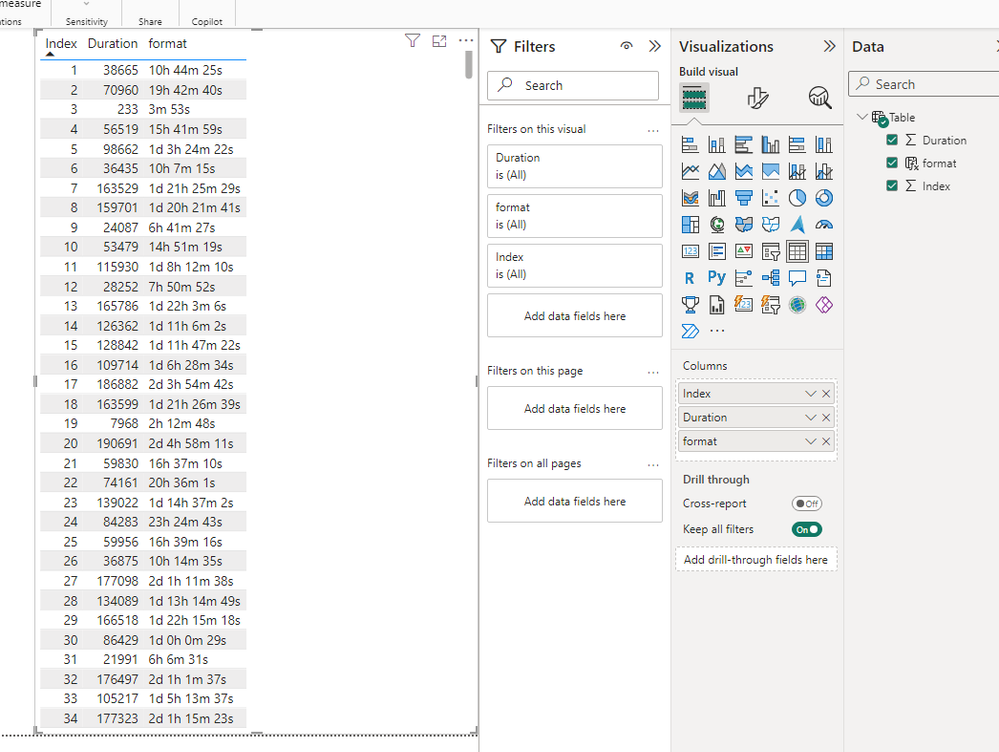
Strictly speaking, this works fine and produces the desired result, but it's quite slow.
So I'm looking for any tips to increase the efficiency.

Any input, anyone?

Regards,
Mads
1 ACCEPTED SOLUTION

However, you're suggestion gave me a better/more efficient code for the RETURN statement.
Changed my DAX to the following and the results good and the speed is much better.

Thanks a lot 🙂

var _vSecs = SELECTEDMEASURE()
var _vMins = INT(DIVIDE(_vSecs, 60, 0))
var _vRemainingSecs = INT(MOD(_vSecs, 60))
var _vHours = INT(DIVIDE(_vMins, 60,0))
var _vRemainingMins = INT(MOD(_vMins, 60))
var _vDays = INT(DIVIDE(_vHours, 24, 0))
var _vRemainingHours = INT(MOD(_vHours, 24))

var _d = SUBSTITUTE(_vDays, "0", "\0")
var _h = SUBSTITUTE(_vRemainingHours, "0", "\0")
 var _m = SUBSTITUTE(_vRemainingMins, "0", "\0")
 var _s = SUBSTITUTE(_vRemainingSecs, "0", "\0")

 RETURN
    IF ( _vSecs >= 86400, _d & "d " )
        & IF ( _vSecs >= 3600, _h & "h " )
        & IF ( _vSecs >= 60, _m & "m " ) & _s & "s"


Regards,
Mads

View solution in original post

3 REPLIES 3
Anonymous
Not applicable

HI @MadBern85 ,

You can try to use the following expressions if helps:

format = 
VAR _vTS = SELECTEDMEASURE()
VAR _vDays =
    INT ( DIVIDE ( _vTS, 86400, 0 ) )
VAR _vHours =
    INT ( DIVIDE ( _vTS - _vDays * 86400, 3600, 0 ) )
VAR _vMins =
    INT ( DIVIDE ( _vTS - _vDays * 86400 - _vHours * 3600, 60 ) )
VAR _vSecs = _vTS - _vDays * 86400 - _vHours * 3600 - _vMins * 60
RETURN
    IF ( _vTS > 86400, _vDays & "d " )
        & IF ( _vTS > 3600, _vHours & "h " )
        & IF ( _vTS > 60, _vMins & "m " ) & _vSecs & "s"

1.png

Regards,

Xiaoxin Sheng

Hi

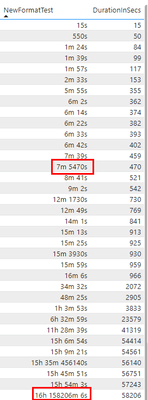
Thanks for the suggestion, this is quite close to something I've already tried and the speed is much improved, but it produces some errors. Which I haven't been able to correct.

MadBern85_0-1713939600965.png

Regards,
Mads

However, you're suggestion gave me a better/more efficient code for the RETURN statement.
Changed my DAX to the following and the results good and the speed is much better.

Thanks a lot 🙂

var _vSecs = SELECTEDMEASURE()
var _vMins = INT(DIVIDE(_vSecs, 60, 0))
var _vRemainingSecs = INT(MOD(_vSecs, 60))
var _vHours = INT(DIVIDE(_vMins, 60,0))
var _vRemainingMins = INT(MOD(_vMins, 60))
var _vDays = INT(DIVIDE(_vHours, 24, 0))
var _vRemainingHours = INT(MOD(_vHours, 24))

var _d = SUBSTITUTE(_vDays, "0", "\0")
var _h = SUBSTITUTE(_vRemainingHours, "0", "\0")
 var _m = SUBSTITUTE(_vRemainingMins, "0", "\0")
 var _s = SUBSTITUTE(_vRemainingSecs, "0", "\0")

 RETURN
    IF ( _vSecs >= 86400, _d & "d " )
        & IF ( _vSecs >= 3600, _h & "h " )
        & IF ( _vSecs >= 60, _m & "m " ) & _s & "s"


Regards,
Mads

Helpful resources

Announcements
New to Fabric survey Carousel

New to Fabric Survey

If you have recently started exploring Fabric, we'd love to hear how it's going. Your feedback can help with product improvements.

Power BI DataViz World Championships carousel

Power BI DataViz World Championships - June 2026

A new Power BI DataViz World Championship is coming this June! Don't miss out on submitting your entry.

Join our Fabric User Panel

Join our Fabric User Panel

Share feedback directly with Fabric product managers, participate in targeted research studies and influence the Fabric roadmap.

March Power BI Update Carousel

Power BI Community Update - March 2026

Check out the March 2026 Power BI update to learn about new features.