FabCon is coming to Atlanta
Join us at FabCon Atlanta from March 16 - 20, 2026, for the ultimate Fabric, Power BI, AI and SQL community-led event. Save $200 with code FABCOMM.
Register now!- Power BI forums
- Get Help with Power BI
- Desktop
- Service
- Report Server
- Power Query
- Mobile Apps
- Developer
- DAX Commands and Tips
- Custom Visuals Development Discussion
- Health and Life Sciences
- Power BI Spanish forums
- Translated Spanish Desktop
- Training and Consulting
- Instructor Led Training
- Dashboard in a Day for Women, by Women
- Galleries
- Data Stories Gallery
- Themes Gallery
- Contests Gallery
- QuickViz Gallery
- Quick Measures Gallery
- Visual Calculations Gallery
- Notebook Gallery
- Translytical Task Flow Gallery
- TMDL Gallery
- R Script Showcase
- Webinars and Video Gallery
- Ideas
- Custom Visuals Ideas (read-only)
- Issues
- Issues
- Events
- Upcoming Events
The Power BI Data Visualization World Championships is back! Get ahead of the game and start preparing now! Learn more
- Power BI forums
- Forums
- Get Help with Power BI
- Desktop
- Increase Order and Price
- Subscribe to RSS Feed
- Mark Topic as New
- Mark Topic as Read
- Float this Topic for Current User
- Bookmark
- Subscribe
- Printer Friendly Page


- Mark as New
- Bookmark
- Subscribe
- Mute
- Subscribe to RSS Feed
- Permalink
- Report Inappropriate Content
Increase Order and Price
Good Morning,
sorry for my english.
How calculate increase / Decrease item and % increse in this table?
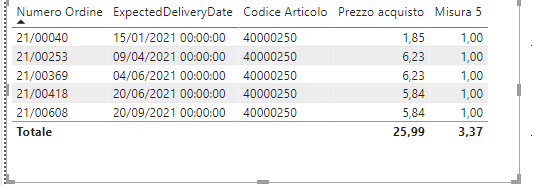
Thank you
Solved! Go to Solution.


- Mark as New
- Bookmark
- Subscribe
- Mute
- Subscribe to RSS Feed
- Permalink
- Report Inappropriate Content
Hi, @andreaturri27
According to your description, you can create two measures.
Like this:
Measure1 =
VAR a =
    MAXX (
        FILTER (
            ALL ( 'Table' ),
            [ExpectedDeliveryDate] < SELECTEDVALUE ( 'Table'[ExpectedDeliveryDate] )
        ),
        [ExpectedDeliveryDate]
    )
VAR b =
    MAXX (
        FILTER ( ALL ( 'Table' ), [ExpectedDeliveryDate] = a ),
        [Prezzo acquisto]
    )
RETURN
    MAX( 'Table'[Prezzo acquisto] ) - b
Measure2 =
VAR a =
    MAXX (
        FILTER (
            ALL ( 'Table' ),
            [ExpectedDeliveryDate] < SELECTEDVALUE ( 'Table'[ExpectedDeliveryDate] )
        ),
        [ExpectedDeliveryDate]
    )
VAR b =
    MAXX (
        FILTER ( ALL ( 'Table' ), [ExpectedDeliveryDate] = a ),
        [Prezzo acquisto]
    )
RETURN
    DIVIDE (
        MAX ( 'Table'[Prezzo acquisto] ) - b,
        MAX ( 'Table'[Prezzo acquisto] )
    )
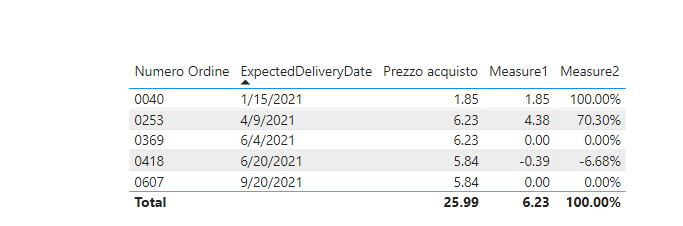
Did I answer your question ? Please mark my reply as solution. Thank you very much.
If not, please upload some insensitive data samples and expected output.
Best Regards,
Community Support Team _ Janey
- Mark as New
- Bookmark
- Subscribe
- Mute
- Subscribe to RSS Feed
- Permalink
- Report Inappropriate Content
Hi, @andreaturri27
You need to modify the code according to your needs.
Like :
Measure1 =
VAR a =
    MAXX (
        FILTER (
            ALL ( 'Table' ),
            [ExpectedDeliveryDate] < SELECTEDVALUE ( 'Table'[ExpectedDeliveryDate] )&&
            [item] < SELECTEDVALUE ( 'Table'[item] )
        ),
        [ExpectedDeliveryDate]
    )
VAR b =
    MAXX (
        FILTER ( ALL ( 'Table' ), [ExpectedDeliveryDate] = a &&
        [item] < SELECTEDVALUE ( 'Table'[item] )),
        [Prezzo acquisto]
    )
RETURN
    MAX( 'Table'[Prezzo acquisto] ) - b
Did I answer your question ? Please mark my reply as solution. Thank you very much.
If not, please upload some insensitive data samples and expected output.
Best Regards,
Community Support Team _ Janey
- Mark as New
- Bookmark
- Subscribe
- Mute
- Subscribe to RSS Feed
- Permalink
- Report Inappropriate Content
Thaks for reply @v-janeyg-msft but in my table have a lot value in this table.
i must verify item and ExpectedDeliveryDate...

how do to solve?
Thank you
Andrea
- Mark as New
- Bookmark
- Subscribe
- Mute
- Subscribe to RSS Feed
- Permalink
- Report Inappropriate Content
Hi, @andreaturri27
You need to modify the code according to your needs.
Like :
Measure1 =
VAR a =
    MAXX (
        FILTER (
            ALL ( 'Table' ),
            [ExpectedDeliveryDate] < SELECTEDVALUE ( 'Table'[ExpectedDeliveryDate] )&&
            [item] < SELECTEDVALUE ( 'Table'[item] )
        ),
        [ExpectedDeliveryDate]
    )
VAR b =
    MAXX (
        FILTER ( ALL ( 'Table' ), [ExpectedDeliveryDate] = a &&
        [item] < SELECTEDVALUE ( 'Table'[item] )),
        [Prezzo acquisto]
    )
RETURN
    MAX( 'Table'[Prezzo acquisto] ) - b
Did I answer your question ? Please mark my reply as solution. Thank you very much.
If not, please upload some insensitive data samples and expected output.
Best Regards,
Community Support Team _ Janey
- Mark as New
- Bookmark
- Subscribe
- Mute
- Subscribe to RSS Feed
- Permalink
- Report Inappropriate Content
Hi, @andreaturri27
According to your description, you can create two measures.
Like this:
Measure1 =
VAR a =
    MAXX (
        FILTER (
            ALL ( 'Table' ),
            [ExpectedDeliveryDate] < SELECTEDVALUE ( 'Table'[ExpectedDeliveryDate] )
        ),
        [ExpectedDeliveryDate]
    )
VAR b =
    MAXX (
        FILTER ( ALL ( 'Table' ), [ExpectedDeliveryDate] = a ),
        [Prezzo acquisto]
    )
RETURN
    MAX( 'Table'[Prezzo acquisto] ) - b
Measure2 =
VAR a =
    MAXX (
        FILTER (
            ALL ( 'Table' ),
            [ExpectedDeliveryDate] < SELECTEDVALUE ( 'Table'[ExpectedDeliveryDate] )
        ),
        [ExpectedDeliveryDate]
    )
VAR b =
    MAXX (
        FILTER ( ALL ( 'Table' ), [ExpectedDeliveryDate] = a ),
        [Prezzo acquisto]
    )
RETURN
    DIVIDE (
        MAX ( 'Table'[Prezzo acquisto] ) - b,
        MAX ( 'Table'[Prezzo acquisto] )
    )
Did I answer your question ? Please mark my reply as solution. Thank you very much.
If not, please upload some insensitive data samples and expected output.
Best Regards,
Community Support Team _ Janey


- Mark as New
- Bookmark
- Subscribe
- Mute
- Subscribe to RSS Feed
- Permalink
- Report Inappropriate Content
Hello there @andreaturri27 ! You can try the following for the variation:
Variation =
VAR _current =
    SUM ( Table[Prezzo acquisto] )
VAR _previous =
    CALCULATE (
        _current,
        FILTER (
            ALL ( Table[Numero Ordine] ),
            Table[Numero Ordine]
                = ( SELECTEDVALUE ( Table[Numero Ordine] ) - 1 )
        )
    )
RETURN
    _current - _previous
And for the percentage change:
% Variation =
VAR _current =
    SUM ( Table[Prezzo acquisto] )
VAR _previous =
    CALCULATE (
        _current,
        FILTER (
            ALL ( Table[Numero Ordine] ),
            Table[Numero Ordine]
                = ( SELECTEDVALUE ( Table[Numero Ordine] ) - 1 )
        )
    )
RETURN
    DIVIDE ( _current - _previous, _previous, 0 )
And format it as a % field.
Hope this answer solves your problem!
If you need any additional help please @ me in your reply.
If my reply provided you with a solution, please consider marking it as a solution ✔️ or giving it a kudoe 👍
Thanks!
You can also check out my LinkedIn!
Best regards,
Gonçalo Geraldes

Helpful resources

Power BI Dataviz World Championships
The Power BI Data Visualization World Championships is back! Get ahead of the game and start preparing now!

Power BI Monthly Update - December 2025
Check out the December 2025 Power BI Holiday Recap!

FabCon Atlanta 2026
Join us at FabCon Atlanta, March 16-20, for the ultimate Fabric, Power BI, AI and SQL community-led event. Save $200 with code FABCOMM.

| User | Count |
|---|---|
| 39 | |
| 38 | |
| 38 | |
| 28 | |
| 27 |


| User | Count |
|---|---|
| 124 | |
| 88 | |
| 73 | |
| 66 | |
| 65 |


