Join us at FabCon Atlanta from March 16 - 20, 2026, for the ultimate Fabric, Power BI, AI and SQL community-led event. Save $200 with code FABCOMM.
Register now!The Power BI Data Visualization World Championships is back! Get ahead of the game and start preparing now! Learn more
Hi All ,
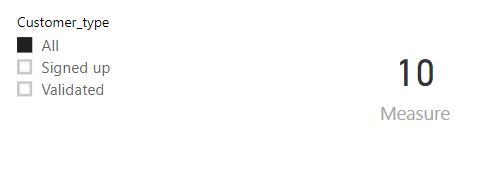
I have a slicer called Customer type which shows the below options to the users.
I am trying to create a one Card KPI which should show the values based on the below conditions.
Ex: Let’s say I have a values for validated as “10K” and values for ALL as ‘’15K”
Now user selected slicer is ALL ..Then the Card KPI value should show “Validated Members = 10” and Then user selected slicer set to either validated or signed up then the Card KPI value should show “Total Members = 15K”
Please find my workaround for this.
I have created a 2 new Mesures (dax Function )
Validated = sum(no_validated)
Singed up = sum( no_singed up)
Total = Validated + signed up
Final Measure for Card KPI
Measure = IF (
SELECTEDVALUE (Table1(Customer_type),
[Total],
[Validated]
)
By using above Dax function I can see the values as excepting but when I select the Signed up as a slicer values “0”
Can you please suggest how to achieve this
Solved! Go to Solution.
hi, @Anonymous
You could use ALL , ALLEXCEPT Function in dax formula to ignore the slicer like below:
Measure =
IF (
SELECTEDVALUE ( 'Table'[Customer_type] ) = "All",
CALCULATE (
SUM ( 'Table'[Value] ),
FILTER ( ALL ( 'Table' ), 'Table'[Customer_type] = "Validated" )
),
CALCULATE (
SUM ( 'Table'[Value] ),
FILTER ( ALL ( 'Table' ), 'Table'[Customer_type] = "All" )
)
)
Result:
here is the sample pbix file, please try it.
Best Regards,
Lin
Hi,
Thanks for your respones.
I achived the above one by using "HASONEVALUE" function.
Ex: IF (HASONEVALUE('Table'[Customer_type] ), [Total_member],[validated_members])
its worked me well the way i wanted.
hi, @Anonymous
You could use ALL , ALLEXCEPT Function in dax formula to ignore the slicer like below:
Measure =
IF (
SELECTEDVALUE ( 'Table'[Customer_type] ) = "All",
CALCULATE (
SUM ( 'Table'[Value] ),
FILTER ( ALL ( 'Table' ), 'Table'[Customer_type] = "Validated" )
),
CALCULATE (
SUM ( 'Table'[Value] ),
FILTER ( ALL ( 'Table' ), 'Table'[Customer_type] = "All" )
)
)
Result:
here is the sample pbix file, please try it.
Best Regards,
Lin
Hi,
Thanks for your respones.
I achived the above one by using "HASONEVALUE" function.
Ex: IF (HASONEVALUE('Table'[Customer_type] ), [Total_member],[validated_members])
its worked me well the way i wanted.
The Power BI Data Visualization World Championships is back! Get ahead of the game and start preparing now!
| User | Count |
|---|---|
| 38 | |
| 36 | |
| 33 | |
| 30 | |
| 28 |
| User | Count |
|---|---|
| 128 | |
| 88 | |
| 79 | |
| 67 | |
| 62 |