cancel
Showing results for 
Search instead for 
Did you mean: 

The Power BI Data Visualization World Championships is back! Get ahead of the game and start preparing now! Learn more

Reply
Anonymous
Not applicable

If statement check against day

Hi Experts,

I have created a column to test for the current month:

IsCurrentMonth =
    IF (
        YEAR (WS_SCCM[Month] ) = YEAR ( TODAY () )
            && MONTH (WS_SCCM[Month] ) = MONTH ( TODAY ()) -1,
        "Yes",
        "No"
    )

Since this is a monthly report I generally work on it from about the 27th of the month.

The problem in the if statement above is that the calculations differs depending on if I am in the report on the last few days in the month or in the new month.

if in the new month, I need to include the "-1".

What I hoped I could do is create another if statement that says if day > 27 then exlcude the '-1' else include the '-1', i.e. in the new month.

Yes, I am probably approaching the challenge incorrectly, but please forgive me as I make the transition between PowerShell and Power BI, as this is how I have done similar tests in PS. 🙂

Any help will be appreciated.


1 ACCEPTED SOLUTION

Hi @Anonymous ,

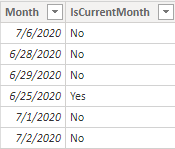
I think it will work and I have changed the date on my computer to 2020/6/28 manually and get this result:

june.png


Best Regards,
Yingjie Li

If this post helps then please consider Accept it as the solution to help the other members find it more quickly.

View solution in original post

4 REPLIES 4
v-yingjl
Community Support
Community Support

Hi @Anonymous ,

Is this your expect result?

month re.png

If so, try like this formula:

IsCurrentMonth =
IF (
    DAY ( 'WS_SCCM'[Month] ) <= 27,
    IF (
        YEAR ( WS_SCCM[Month] ) = YEAR ( TODAY () )
            && MONTH ( WS_SCCM[Month] )
                = MONTH ( TODAY () ) - 1,
        "Yes",
        "No"
    ),
    "No"
)

If not, please kindly let me know.


Best Regards,
Yingjie Li

If this post helps then please consider Accept it as the solution to help the other members find it more quickly.

Anonymous
Not applicable

Hi @v-yingjl ,

That is the expected result if the day is <= 27 and the current month is July.

I am not sure it will provide the expected result if the day is between 28 and 31 (during those days the "-1" must be replaced with "0" or removed).

I have made the changes below which I think will work if the day is between 28 and 31. What do you think?

IsCurrentMonth = IF ( DAY ( 'WS_SCCM'[Month] ) <= 27, IF ( YEAR ( 'WS_SCCM'[Month] ) = YEAR ( TODAY () ) && MONTH ( 'WS_SCCM'[Month] ) = MONTH ( TODAY () ) - 1, "Yes", "No" ), IF ( YEAR ( 'WS_SCCM'[Month] ) = YEAR ( TODAY () ) && MONTH ( 'WS_SCCM'[Month] ) = MONTH ( TODAY () ) , "Yes", "No" ) )


It's the syntax of the IF I think I needed help with.

Hi @Anonymous ,

I think it will work and I have changed the date on my computer to 2020/6/28 manually and get this result:

june.png


Best Regards,
Yingjie Li

If this post helps then please consider Accept it as the solution to help the other members find it more quickly.

amitchandak
Super User
Super User

@Anonymous , Try like

IsCurrentMonth =
    Switch ( True ,
	day(WS_SCCM[Month]) >27 && eomonth(TODAY (),0) =eomonth(WS_SCCM[Month] ,0) ,"Yes"
	day(WS_SCCM[Month]) <=27 && eomonth(TODAY (),-1) =eomonth(WS_SCCM[Month] ,0), "Yes",
	"No"
	)


You might have do some changes as per need

Share with Power BI Enthusiasts: Full Power BI Video (20 Hours) YouTube
Microsoft Fabric Series 60+ Videos YouTube
Microsoft Fabric Hindi End to End YouTube

Helpful resources

Announcements
Power BI DataViz World Championships

Power BI Dataviz World Championships

The Power BI Data Visualization World Championships is back! Get ahead of the game and start preparing now!

December 2025 Power BI Update Carousel

Power BI Monthly Update - December 2025

Check out the December 2025 Power BI Holiday Recap!

FabCon Atlanta 2026 carousel

FabCon Atlanta 2026

Join us at FabCon Atlanta, March 16-20, for the ultimate Fabric, Power BI, AI and SQL community-led event. Save $200 with code FABCOMM.