Join us at FabCon Atlanta from March 16 - 20, 2026, for the ultimate Fabric, Power BI, AI and SQL community-led event. Save $200 with code FABCOMM.
Register now!The Power BI Data Visualization World Championships is back! Get ahead of the game and start preparing now! Learn more
Hi,
I've got a holiday table with dates (like xmas) which is an import of SQL and I've got a own created date table (with weekdays, month, date from Date Dimension table). Now I want to know which date is an holiday. I've did this with
Holiday = IF(CONTAINS(CalendarEntry;CalendarEntry[StartTime];'Date'[Date]);"Yes";"No")
That works fine but I've got a problem that I've got Dutch and German Holidays in the same table (in 'CalendarEntry'[StartTime]). So I need to filter them ... The name (text) I can use is in CalendarEntry'[ModifiedBy] but I've tried a lot but no succes 😞
Anyone?
Because of my regional settings I need to use ; instead of ,
Solved! Go to Solution.
Try
Holiday =
IF (
CONTAINS (
FILTER ( CalendarEntry; CalendarEntry[ModifiedBy] = "German" );
CalendarEntry[StartTime]; 'Date'[Date]
);
"Yes";
"No"
)
Hope this helps
David
Try
Holiday =
IF (
CONTAINS (
FILTER ( CalendarEntry; CalendarEntry[ModifiedBy] = "German" );
CalendarEntry[StartTime]; 'Date'[Date]
);
"Yes";
"No"
)
Hope this helps
David
Hi David,
Thnx for your reply
I've tried the folowing code (copy of your code and replace the filter value)
Holiday =
IF (
CONTAINS (
FILTER ( CalendarEntry; CalendarEntry[ModifiedBy] = "Esther");
CalendarEntry[StartTime]; 'Date'[Date]
);
"Yes";
"No"
)
And it works 🙂 Thnx for helping me!
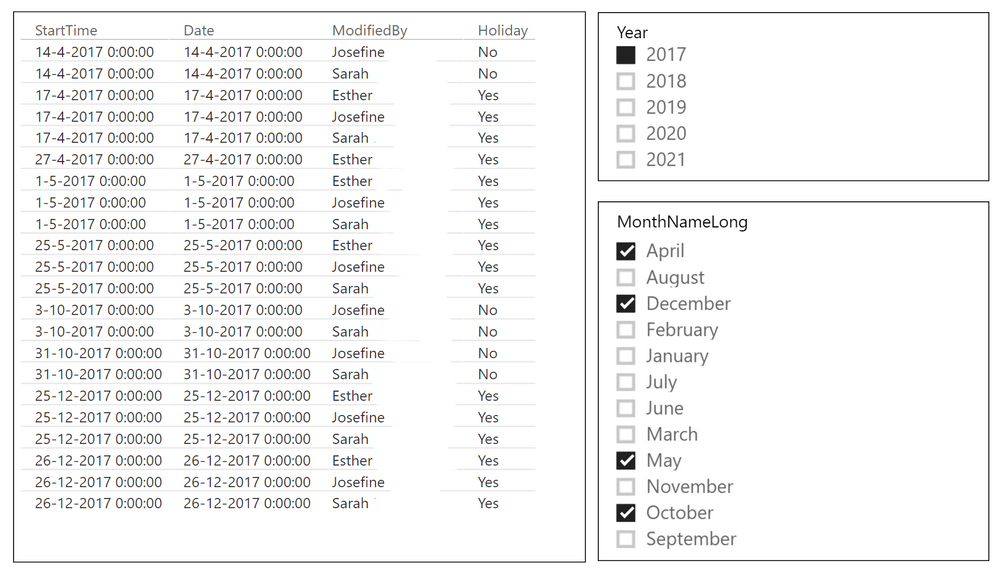
I've made a picture of the result (for privacy, I've stripped the surnames and I've create some slicers to reduce the results)
The Power BI Data Visualization World Championships is back! Get ahead of the game and start preparing now!
Check out the November 2025 Power BI update to learn about new features.
| User | Count |
|---|---|
| 66 | |
| 46 | |
| 42 | |
| 26 | |
| 19 |
| User | Count |
|---|---|
| 196 | |
| 126 | |
| 101 | |
| 67 | |
| 49 |