Join us at FabCon Atlanta from March 16 - 20, 2026, for the ultimate Fabric, Power BI, AI and SQL community-led event. Save $200 with code FABCOMM.
Register now!The Power BI Data Visualization World Championships is back! Get ahead of the game and start preparing now! Learn more
I am trying to display my percentages based on a custom format. If the number is above 0 then use a whole number, if the number is below 0 then format to tenths. Is this possible without changing to text? I want to still keep it a percentage.
Goal: 10%
0.2%
Solved! Go to Solution.
Hi, @dwel0120
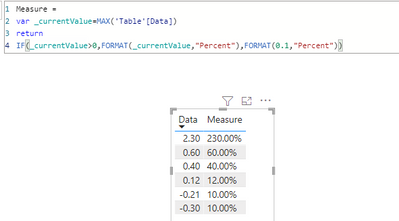
Try doing this with the FORMAT function, you could create a measure like this:
Measure =
var _currentValue=MAX('Table'[Data])
return
IF(_currentValue>0,FORMAT(_currentValue,"Percent"),FORMAT(0.1,"Percent"))
Result:
refer:
https://docs.microsoft.com/en-us/dax/format-function-dax
Hope this helps.
Best Regards,
Community Support Team _ Zeon Zheng
If this post helps, then please consider Accept it as the solution to help the other members find it more quickly.
Hi, @dwel0120
Try doing this with the FORMAT function, you could create a measure like this:
Measure =
var _currentValue=MAX('Table'[Data])
return
IF(_currentValue>0,FORMAT(_currentValue,"Percent"),FORMAT(0.1,"Percent"))
Result:
refer:
https://docs.microsoft.com/en-us/dax/format-function-dax
Hope this helps.
Best Regards,
Community Support Team _ Zeon Zheng
If this post helps, then please consider Accept it as the solution to help the other members find it more quickly.
@dwel0120 As I recall, the only real option here is to use a Calculation Group which allows you to specify the SELECTEDMEASUREFORMATSTRING function (DAX) - DAX | Microsoft Docs
The Power BI Data Visualization World Championships is back! Get ahead of the game and start preparing now!
| User | Count |
|---|---|
| 38 | |
| 36 | |
| 33 | |
| 30 | |
| 28 |
| User | Count |
|---|---|
| 128 | |
| 88 | |
| 79 | |
| 67 | |
| 62 |