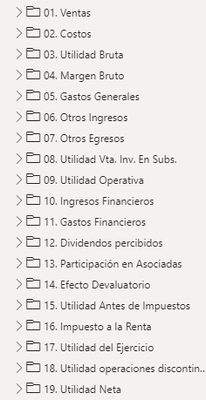
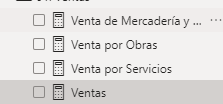
The graph above I use as a guide table for the structure. also create a formula for each row and group them by folders
The problem occurs to me when I want to use the following formula to combine all the data:
Final Value =
IF(ISINSCOPE(Estructura_[Level 2]),
SWITCH(
SELECTEDVALUE(Estructura_[Level 2]),
"Income for Works",[Sale by Works],
"Income from Services",[Sale for Services],
"Sale of Merchandise and Others",[Sale of Goods and Others],
"Cost per Works",[Cost for Works],
"Cost per Service",[Cost for Services],
"Cost of Merchandise and Others",[Cost of Merchandise and Others],
"MB Works %",FORMAT([MB Works %],"Percent"),
"MB Works with Liq. %",FORMAT([MB Works with Liq. %],"Percent"),
"MB Services %",FORMAT([MB Services %],"Percent"),
"MB Merchandise and Other %",FORMAT([MB Merchandise and Other %],"Percent"),
"Personnel Expense",[GG-Personnel Expenditure],
"Fee Holding",[GG-Fee Holding],
"Fee Qualys",[GG-Fee Qualys],
"General Expenditure",[GG-General Expenditure],
"% GG/Sales",FORMAT([GG / Sales %],"Percent"),
"Fines",[Other Expenses - Fines],
"Legal Claims (RC, Indecopi)",[Other Expenses - Legal Claims],
"Other Expenses",[Other Expenditures - Other],
"Bank Loans",[Financial Expenses - Bank Loans],
"Fine Asset Measurement. (GSP)",[Financial Expenses - Active Measurement],
"Measurement of Fin Liabilities. (RC / INDECOPI)",[Financial Expenses - Passive Measurement],
"Other Expenses",[Financial Expenses - Other Expenses]),
IF(ISINSCOPE(Estructura_[Level 1]),
SWITCH(
SELECTEDVALUE(Estructura_[Level 1]),
"Sales",[Sales],
"Cost of Sales",[Cost of Sales],
"GROSS PROFIT",[Gross Profit],
"Gross Margin %",[Gross Margin %],
"Overhead",[General Expenses],
"Other Income",[Other Income],
"Other Expenditures",[Other Expenditures],
"Utility Vta. Inv. In Subs.",[Utility Vta. Inv. In Subs.],
"OPERATIONAL UTILITY",[Operating Profit],
"Operating Margin %",FORMAT([Operating Margin%],"Percent"),
"Financial Income",[Financial Income],
"Financial Expenses",[Financial Expenses],
"Dividends received",[Dividends received],
"Participation in Associates",[Participation in Associates],
"Devaluation Effect",[Devaluation Effect],
"PROFIT BEFORE TAXES",[Profit Before Tax],
"Income Tax",[Income Tax],
"USEFULNESS OF THE EXERCISE",[Utility of the Exercise],
"Utility discontinued operations",[Utility discontinued operations],
"NET PROFIT FOR THE YEAR",[Net Income for the Year],
"Net Margin %",FORMAT([Net Margin %],"Percent"),
"Minority Interests",[Minority Interests],
"RESULT OF THE FINANCIAL YEAR",[Result of the Financial Year]
)))
When using this formula, certain parts of the structure appear correct to me, however, in the case of Profits and Margins that are divisions and are as measures in the same way, it does not show them to me:
I don't know if anyone can help me with this problem. I am using a level of hierarchy Level 1 and Level 2 and the rest are measures.
Already verify that the names in the measure "Value" are as they are written in the tables and I can not think of what the error may be, please would appreciate your help.