cancel
Showing results for 
Search instead for 
Did you mean: 

Learn from the best! Meet the four finalists headed to the FINALS of the Power BI Dataviz World Championships! Register now

Reply
MAJackson
Frequent Visitor

IF statement to show one value or blank - HELP

Hello,


I am creating a dashboard that shows a list of items on the left.   When an item is selected (filtered to 1) I would like the data to be displayed on the right.  I have mulitple fields and by default I would like everything blank until a single item is selected from the table. 


Is there a way to have a visual blank "  " until a single item is selected?


I tried the following if statement but am getting an error:

 View Company = IF(DISTINCTCOUNT (Engagements[Company]) = 1, Engagements [Company], "   ")


The text in red is not able to associate with the table/column I need.  When I enter text into that spot the formula works.  It reads the table/column correct in the distinct count section but not the if value is true display company  section.


Any help would be greatly appreciated. 


1 ACCEPTED SOLUTION
v-lid-msft
Community Support
Community Support

Hi @MAJackson ,


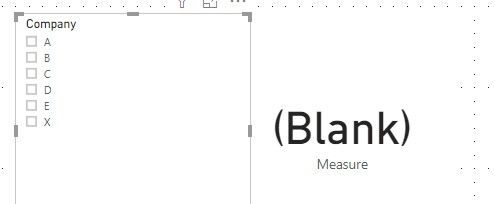
We can try to create a measure to meet your requirement:


Measure = IF(HASONEVALUE(Engagements[Company]),VALUES(Engagements[Company]),BLANK())


9.jpg10.jpg


Best regards,


Community Support Team _ Dong Li
If this post helps, then please consider Accept it as the solution to help the other members find it more quickly.

View solution in original post

4 REPLIES 4
v-lid-msft
Community Support
Community Support

Hi @MAJackson ,


How about the result after you follow the suggestions mentioned in my original post?Could you please provide more details about it If it doesn't meet your requirement?


Best regards,


Community Support Team _ Dong Li
If this post helps, then please consider Accept it as the solution to help the other members find it more quickly.
v-lid-msft
Community Support
Community Support

Hi @MAJackson ,


We can try to create a measure to meet your requirement:


Measure = IF(HASONEVALUE(Engagements[Company]),VALUES(Engagements[Company]),BLANK())


9.jpg10.jpg


Best regards,


Community Support Team _ Dong Li
If this post helps, then please consider Accept it as the solution to help the other members find it more quickly.
Tahreem24
Super User
Super User

You can use below accepted solution using below link:
https://community.powerbi.com/t5/Desktop/Text-field-to-show-the-selected-filter/td-p/251023

Don't forget to give thumbs up 👍and accept this as a solution if this helps you.
Don't forget to give thumbs up and accept this as a solution if it helped you!!!

Please take a quick glance at newly created dashboards : Restaurant Management Dashboard , HR Analytics Report , Hotel Management Report, Sales Analysis Report , Fortune 500 Companies Analysis , Revenue Tracking Dashboard
Tahreem24
Super User
Super User

You can use isfiltered DAX function.
https://docs.microsoft.com/en-us/dax/isfiltered-function-dax

Don't forget to give thumbs up 👍and accept this as a solution if this helps you.
Don't forget to give thumbs up and accept this as a solution if it helped you!!!

Please take a quick glance at newly created dashboards : Restaurant Management Dashboard , HR Analytics Report , Hotel Management Report, Sales Analysis Report , Fortune 500 Companies Analysis , Revenue Tracking Dashboard

Helpful resources

Announcements
Join our Fabric User Panel

Join our Fabric User Panel

Share feedback directly with Fabric product managers, participate in targeted research studies and influence the Fabric roadmap.

February Power BI Update Carousel

Power BI Monthly Update - February 2026

Check out the February 2026 Power BI update to learn about new features.