Join us at FabCon Atlanta from March 16 - 20, 2026, for the ultimate Fabric, Power BI, AI and SQL community-led event. Save $200 with code FABCOMM.
Register now!The Power BI Data Visualization World Championships is back! Get ahead of the game and start preparing now! Learn more
I want to create an IF statement that says if the value is greater than 90, then excellent, if it's 80-90, then good...etc. But keep getting error can't compare numbers and text. How can I do this?
Solved! Go to Solution.
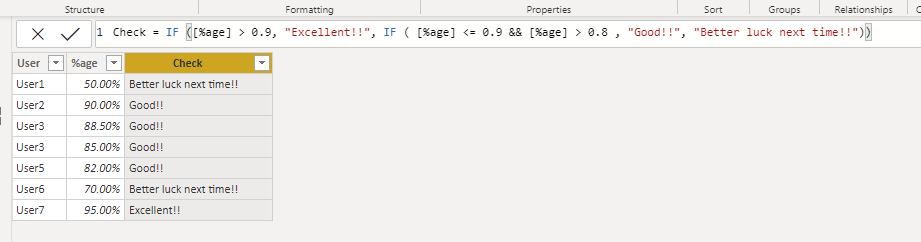
hi @Anonymous - Follow the below steps to compare a %age value and assign a corresponding value
1. You would need to create a calculated column as below:
Please mark the post as a solution and provide a 👍 if my comment helped with solving your issue. Thanks!
Proud to be a Super User!
@Anonymous
Proud to be a Super User!
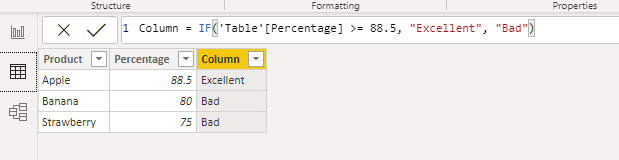
I have a calcuated field with a percentage, and I need to say if it is above this percentage, then assign them a status. I don't see how I can convert say a percentage of 88.5% into a string and say if it is greater than 88.5 then.....Less than and greater than won't work with a string will it?
Compliance Status = IF(CONVERT([Overall Compliance], string)>"80" , "Excellent", "BOOOOOOOO")
hi @Anonymous - Follow the below steps to compare a %age value and assign a corresponding value
1. You would need to create a calculated column as below:
Please mark the post as a solution and provide a 👍 if my comment helped with solving your issue. Thanks!
Proud to be a Super User!
Thank you, worked!!
Check out the November 2025 Power BI update to learn about new features.
Advance your Data & AI career with 50 days of live learning, contests, hands-on challenges, study groups & certifications and more!
| User | Count |
|---|---|
| 56 | |
| 42 | |
| 41 | |
| 20 | |
| 19 |