Join us at FabCon Atlanta from March 16 - 20, 2026, for the ultimate Fabric, Power BI, AI and SQL community-led event. Save $200 with code FABCOMM.
Register now!The Power BI Data Visualization World Championships is back! Get ahead of the game and start preparing now! Learn more
Hi!
I have this set of data:
I want to make a IF-function that tells me if there is a variation in the rows in column 'Blyfri95' or 'Diesel' between ex. 28-02-2019 and 01-03-2019, and if there is one i want it to give me the value 1 and if not i want the value 0 in the 28-02-2019 row.
So in the row 28-02-2019 i want the value 1 in the 'Variation' column because we see a variation in 'Blyfri95' to the next day.
I have tried the formula
Solved! Go to Solution.
Hi @Anonymous ,
Please create an index column in query editor firstly and then create a calculated column with the formula below.
Column =
VAR a =
CALCULATE (
MAX ( 'Table1'[Blyfri95] ),
FILTER ( 'Table1', 'Table1'[Index] = EARLIER ( Table1[Index] ) - 1 )
)
RETURN
IF ( ISBLANK ( a ), BLANK (), IF ( a <> 'Table1'[Blyfri95], 1, 0 ) )
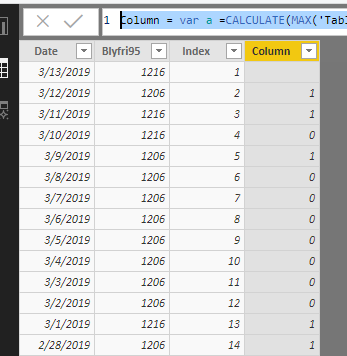
Here is my test output.
Best Regards,
Cherry
Hi @Anonymous ,
Please create an index column in query editor firstly and then create a calculated column with the formula below.
Column =
VAR a =
CALCULATE (
MAX ( 'Table1'[Blyfri95] ),
FILTER ( 'Table1', 'Table1'[Index] = EARLIER ( Table1[Index] ) - 1 )
)
RETURN
IF ( ISBLANK ( a ), BLANK (), IF ( a <> 'Table1'[Blyfri95], 1, 0 ) )
Here is my test output.
Best Regards,
Cherry
The Power BI Data Visualization World Championships is back! Get ahead of the game and start preparing now!
| User | Count |
|---|---|
| 39 | |
| 38 | |
| 37 | |
| 28 | |
| 24 |
| User | Count |
|---|---|
| 120 | |
| 93 | |
| 70 | |
| 69 | |
| 66 |