
cancel
Showing results for 
Search instead for 
Did you mean: 

The Power BI Data Visualization World Championships is back! Get ahead of the game and start preparing now! Learn more

Reply
fsy
Regular Visitor

IF Statement error

Hi,


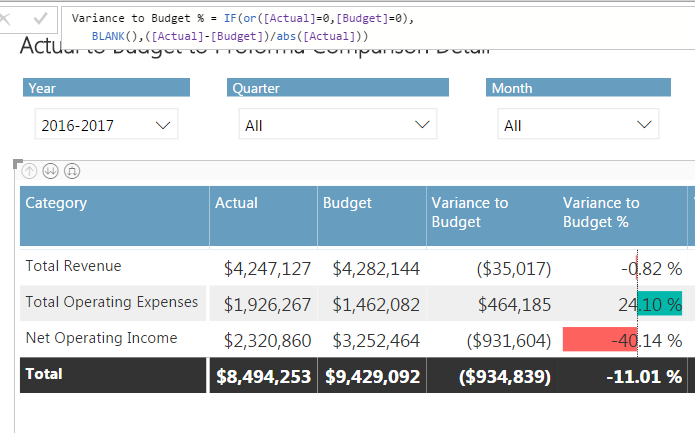
I’m trying to create a chart that compares Actual Revenues and Expenses to Budgeted Revenues and Expenses. I’m using Variance to Budget % = [Actual]-[Budget)/abs[Actual].


Screen Shot.PNG


If Actual Revenue is greater than Budgeted Revenue, I want to show a positive variance. However, if Actual Expenses is greater than Budgeted Expenses I need to show a negative variance, so I need to reverse the signs of my formula depending on whether or not I’m calculating a Revenue or Expense variance %.


I have a column [Category] that classifies whether or not the amount is a Revenue or Expense. I’m trying to solve for this by using the following IF statement:


Variance to Budget % = IF(or([Actual]=0,[Budget]=0),

                                       BLANK(),

                                              If ([Category] = “Total Revenue”, ([Actual]-[Budget])/abs([Actual])),

                                             , ([Actual]-[Budget])/abs([Actual])),*-1)


I get the following error:


Error.PNG


Any suggests as to what I am doing wrong? Thank you for your help!

1 ACCEPTED SOLUTION
MattAllington
Community Champion
Community Champion

Replace [category] with selectedvalue(tablename[category]).  but the total won't work here. I am not sure how you are going about this, but you may benefit from this video https://www.youtube.com/watch?v=ojHZkWkEY7Q/


As an aside, you should always add the table name before the column name (although this is not the issue causing the problem). https://exceleratorbi.com.au/best-practices-power-pivot-power-query-power-bi/


* Matt is an 8 times Microsoft MVP (Power BI) and author of the Power BI Book Supercharge Power BI.
I will not give you bad advice, even if you unknowingly ask for it.

View solution in original post

2 REPLIES 2
MattAllington
Community Champion
Community Champion

Replace [category] with selectedvalue(tablename[category]).  but the total won't work here. I am not sure how you are going about this, but you may benefit from this video https://www.youtube.com/watch?v=ojHZkWkEY7Q/


As an aside, you should always add the table name before the column name (although this is not the issue causing the problem). https://exceleratorbi.com.au/best-practices-power-pivot-power-query-power-bi/


* Matt is an 8 times Microsoft MVP (Power BI) and author of the Power BI Book Supercharge Power BI.
I will not give you bad advice, even if you unknowingly ask for it.

 Thank you very much, Matt!

Helpful resources

Announcements
Power BI DataViz World Championships

Power BI Dataviz World Championships

The Power BI Data Visualization World Championships is back! Get ahead of the game and start preparing now!

December 2025 Power BI Update Carousel

Power BI Monthly Update - December 2025

Check out the December 2025 Power BI Holiday Recap!

FabCon Atlanta 2026 carousel

FabCon Atlanta 2026

Join us at FabCon Atlanta, March 16-20, for the ultimate Fabric, Power BI, AI and SQL community-led event. Save $200 with code FABCOMM.

Top Solution Authors