Join us at FabCon Atlanta from March 16 - 20, 2026, for the ultimate Fabric, Power BI, AI and SQL community-led event. Save $200 with code FABCOMM.
Register now!The Power BI Data Visualization World Championships is back! Get ahead of the game and start preparing now! Learn more
Hi everyone,
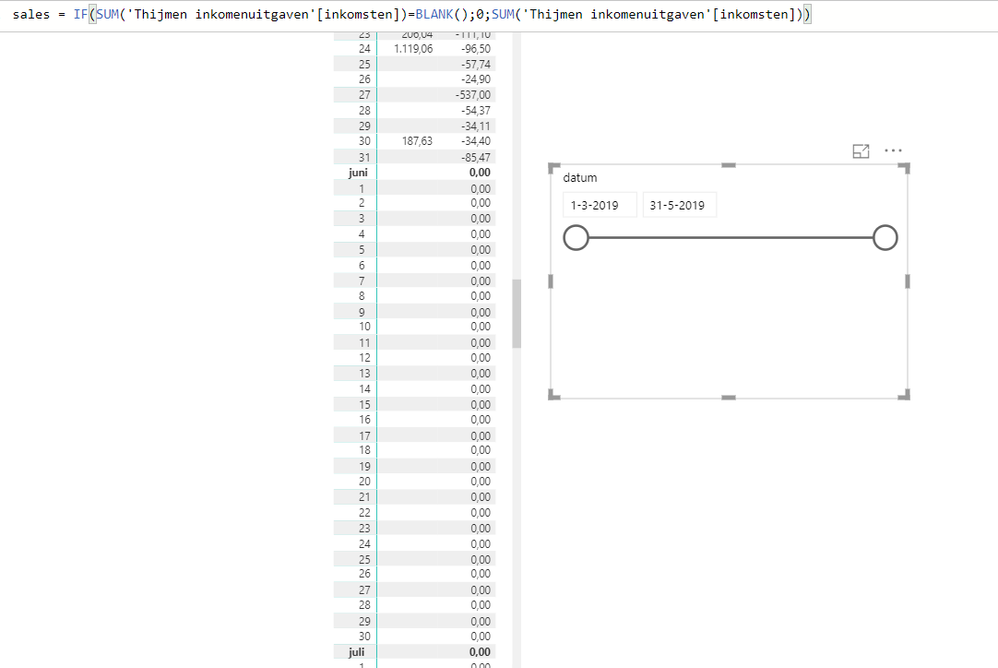
I have a small data set of only three months. Some variables had no data on a daily basis. To make a continuous line chart and matrix table, I've created a measure using the IF and BLANK statement (see image). However, in return, Power BI showed a table for the whole year. And adding a slicer didn't work, because the slicer showed only the three months I've actually data of. Can anyone explain what is going on?
Solved! Go to Solution.
Hi @Anonymous ,
In Power BI there is an option on the Data load that if turn on autommatically transform any date column into a calendar table (beginning on january ending on December). You need to turn this off.
Check link below on why you should turn this off.
Regards,
MFelix
Regards
Miguel Félix
Proud to be a Super User!
Check out my blog: Power BI em PortuguêsHi @Anonymous ,
In Power BI there is an option on the Data load that if turn on autommatically transform any date column into a calendar table (beginning on january ending on December). You need to turn this off.
Check link below on why you should turn this off.
Regards,
MFelix
Regards
Miguel Félix
Proud to be a Super User!
Check out my blog: Power BI em PortuguêsThe Power BI Data Visualization World Championships is back! Get ahead of the game and start preparing now!
| User | Count |
|---|---|
| 39 | |
| 37 | |
| 33 | |
| 33 | |
| 29 |
| User | Count |
|---|---|
| 134 | |
| 96 | |
| 78 | |
| 67 | |
| 65 |