cancel
Showing results for 
Search instead for 
Did you mean: 

The Power BI Data Visualization World Championships is back! Get ahead of the game and start preparing now! Learn more

Reply
Syndicate_Admin
Administrator
Administrator

I need to show more current status by customer

Hello
I have a customer record, where a column indicates the current status of the negotiations. For each status update, new data is generated as shown below:

Name Status Date

Carlos Preliminary call 02-03-2021

Franz Contact 01-03-2021

Carlos Adjusting details 02-03-2021

Franz Reunion final 04-03-2021

Franz Contract signed 05-03-2021

I what I need to show you what is the most up-to-date state of negotiations to take action on this, below is an example regarding the above data (it should work for the n customers I have):

Name Status Date

Carlos Adjusting details 02-03-2021

Franz Contract signed 05-03-2021

Thanks a lot!

1 ACCEPTED SOLUTION
V-lianl-msft
Community Support
Community Support

Hi @Syndicate_Admin ,


Since there is no unique value in the data, you need to create an index column in the query editor, which makes the problem much easier.

V-lianl-msft_1-1618210142615.png


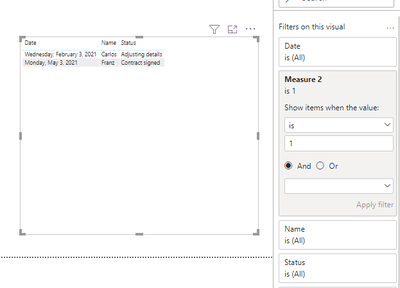
Then create a measure and apply it to visual level filter.

Measure 2 = 
var latest= CALCULATE(MAX('Table'[Index]),ALLEXCEPT('Table (2)','Table (2)'[Name]))
return IF(MAX('Table (2)'[Index])=latest,1)

V-lianl-msft_0-1618210112934.png


Best Regards,
Liang
If this post helps, then please consider Accept it as the solution to help the other members find it more quickly.

View solution in original post

3 REPLIES 3
V-lianl-msft
Community Support
Community Support

Hi @Syndicate_Admin ,


Since there is no unique value in the data, you need to create an index column in the query editor, which makes the problem much easier.

V-lianl-msft_1-1618210142615.png


Then create a measure and apply it to visual level filter.

Measure 2 = 
var latest= CALCULATE(MAX('Table'[Index]),ALLEXCEPT('Table (2)','Table (2)'[Name]))
return IF(MAX('Table (2)'[Index])=latest,1)

V-lianl-msft_0-1618210112934.png


Best Regards,
Liang
If this post helps, then please consider Accept it as the solution to help the other members find it more quickly.

Syndicate_Admin
Administrator
Administrator

Thank you for the answer, but following your advice I get the following error message and I don't see what the fault is.

Cristopher_0-1617735666721.png

amitchandak
Super User
Super User

@Syndicate_Admin , for date use Max and for status use this measure


Status =
VAR __id = MAX ('Table'[Name] )
VAR __date = CALCULATE ( MAX('Table'[Date] ), ALLSELECTED ('Table' ), 'Table'[Name] = __id )
CALCULATE ( max ('Table'[Status] ), VALUES ('Table'[Name] ),'Table'[Name] = __id,'Table'[Date] = __date )

Share with Power BI Enthusiasts: Full Power BI Video (20 Hours) YouTube
Microsoft Fabric Series 60+ Videos YouTube
Microsoft Fabric Hindi End to End YouTube

Helpful resources

Announcements
Power BI DataViz World Championships

Power BI Dataviz World Championships

The Power BI Data Visualization World Championships is back! Get ahead of the game and start preparing now!

December 2025 Power BI Update Carousel

Power BI Monthly Update - December 2025

Check out the December 2025 Power BI Holiday Recap!

FabCon Atlanta 2026 carousel

FabCon Atlanta 2026

Join us at FabCon Atlanta, March 16-20, for the ultimate Fabric, Power BI, AI and SQL community-led event. Save $200 with code FABCOMM.