Join us at FabCon Atlanta from March 16 - 20, 2026, for the ultimate Fabric, Power BI, AI and SQL community-led event. Save $200 with code FABCOMM.
Register now!The Power BI Data Visualization World Championships is back! Get ahead of the game and start preparing now! Learn more
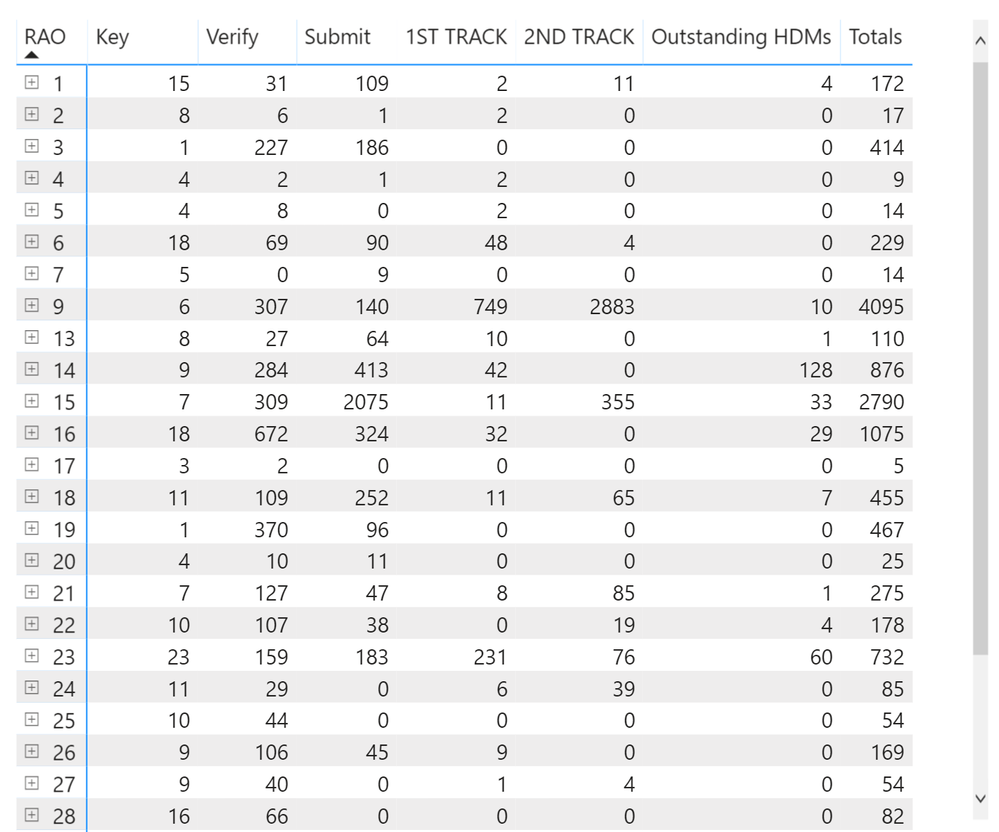
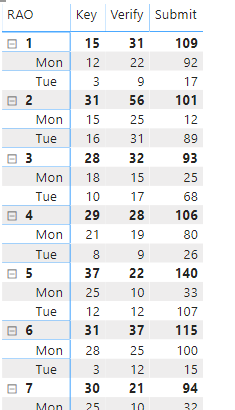
this is my matrix:
The requirement is that on monday I only show rows with key values 15, 28, 29, 30, 31, 32. My thoughts are that you create a custom column that returns records with key values 15, 28, 29, 30, 31, 32 but how it is combined with the day of the week is beyond me.
Furthermore, there needs to be radio buttons so they can change the day of the week from 'today' to any other day of the week or the whole week.
Any help would be appreciated.\
Regards,
Luis
Solved! Go to Solution.
Hi,
According to your description, i am confused with the [RAO] means? is it the number of each week?
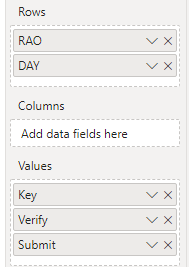
If so, i create some data to test:
Then, create a calculated table:
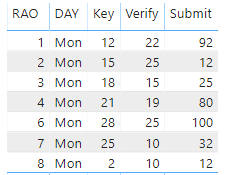
Table 2 = FILTER(ALLSELECTED('Table'),([Measure]=15||[Measure]=28||[Measure]=29||[Measure]=30||[Measure]=31||[Measure]=32)&&'Table'[DAY]="Mon")And it shows:
Hope this helps.
Best Regards,
Giotto Zhi
Hi,
According to your description, i am confused with the [RAO] means? is it the number of each week?
If so, i create some data to test:
Then, create a calculated table:
Table 2 = FILTER(ALLSELECTED('Table'),([Measure]=15||[Measure]=28||[Measure]=29||[Measure]=30||[Measure]=31||[Measure]=32)&&'Table'[DAY]="Mon")And it shows:
Hope this helps.
Best Regards,
Giotto Zhi
thx for the solution. didnt even think of creating a new table.
The Power BI Data Visualization World Championships is back! Get ahead of the game and start preparing now!
Check out the November 2025 Power BI update to learn about new features.
| User | Count |
|---|---|
| 59 | |
| 43 | |
| 42 | |
| 23 | |
| 17 |
| User | Count |
|---|---|
| 190 | |
| 122 | |
| 96 | |
| 66 | |
| 47 |