Join us at FabCon Atlanta from March 16 - 20, 2026, for the ultimate Fabric, Power BI, AI and SQL community-led event. Save $200 with code FABCOMM.
Register now!The Power BI Data Visualization World Championships is back! Get ahead of the game and start preparing now! Learn more
Hi All,
I have implemented basket analysis and getting the required cross-sell for the products. Now I want to calculate the sales amount for the products.
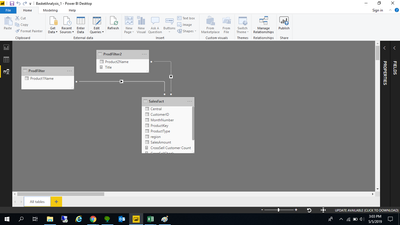
Can someone please help me out to find the sales measure. See the screenshot of the model that I have used.
I have created the cross sell measure for calculating the count of customers as below:
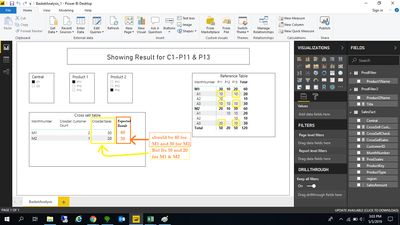
In the given case the CrossSellLIV should be :
Monthnumber CrossSell Customer Count CrossSellSales Expected CrossSell Sales
M1 2 30 40
M2 1 20 30
Model
Please see the expected result for sales by checking data in the Reference table.
Expected result is shown in orange color column
@Anonymous ,
You may take a look at https://www.sqlbi.com/articles/apply-and-logic-to-multiple-selection-in-dax-slicer/.
The link provided by you works if I have only one slicer in the report. But in my case, I am having two slicers for Product 1 and Product 2. So this doesn't work in my case.
Thank You.
The Power BI Data Visualization World Championships is back! Get ahead of the game and start preparing now!
Check out the November 2025 Power BI update to learn about new features.
| User | Count |
|---|---|
| 59 | |
| 46 | |
| 42 | |
| 23 | |
| 17 |
| User | Count |
|---|---|
| 190 | |
| 122 | |
| 96 | |
| 66 | |
| 47 |