- Power BI forums
- Updates
- News & Announcements
- Get Help with Power BI
- Desktop
- Service
- Report Server
- Power Query
- Mobile Apps
- Developer
- DAX Commands and Tips
- Custom Visuals Development Discussion
- Health and Life Sciences
- Power BI Spanish forums
- Translated Spanish Desktop
- Power Platform Integration - Better Together!
- Power Platform Integrations (Read-only)
- Power Platform and Dynamics 365 Integrations (Read-only)
- Training and Consulting
- Instructor Led Training
- Dashboard in a Day for Women, by Women
- Galleries
- Community Connections & How-To Videos
- COVID-19 Data Stories Gallery
- Themes Gallery
- Data Stories Gallery
- R Script Showcase
- Webinars and Video Gallery
- Quick Measures Gallery
- 2021 MSBizAppsSummit Gallery
- 2020 MSBizAppsSummit Gallery
- 2019 MSBizAppsSummit Gallery
- Events
- Ideas
- Custom Visuals Ideas
- Issues
- Issues
- Events
- Upcoming Events
- Community Blog
- Power BI Community Blog
- Custom Visuals Community Blog
- Community Support
- Community Accounts & Registration
- Using the Community
- Community Feedback
Register now to learn Fabric in free live sessions led by the best Microsoft experts. From Apr 16 to May 9, in English and Spanish.
- Power BI forums
- Forums
- Get Help with Power BI
- Desktop
- Re: I have a data of following type. Could anyone...
- Subscribe to RSS Feed
- Mark Topic as New
- Mark Topic as Read
- Float this Topic for Current User
- Bookmark
- Subscribe
- Printer Friendly Page

- Mark as New
- Bookmark
- Subscribe
- Mute
- Subscribe to RSS Feed
- Permalink
- Report Inappropriate Content
I have a data of following type. Could anyone please help me make chart as the below.
I am new to power BI and recently started making some dashboards reports.
I have a table as below.
| Name | Score A | Score B | Score C | Score D |
| College A | 7 | 4 | 4 | 3 |
| College A | 3 | 3 | 6 | 4 |
| College A | 5 | 5 | 8 | 5 |
| College B | 2 | 6 | 8 | 6 |
| College B | 6 | 3 | 2 | 2 |
| College C | 2 | 5 | 4 | 8 |
| College C | 4 | 3 | 2 | 4 |
| College D | 8 | 4 | 6 | 3 |
| College D | 6 | 7 | 7 | 4 |
| College D | 2 | 4 | 8 | 2 |
Can any one help me summarize above table as
| Name | Average Score A | Average Score B | Average Score C | Average Score D |
| College A | 5 | 4 | 6 | 4 |
| College B | 4 | 5 | 5 | 4 |
| College C | 3 | 4 | 3 | 6 |
| College D | 8 | 5 | 7 | 3 |
| Instution | 5.00 | 4.50 | 5.25 | 4.25 |
in power bi and make a chart as follows.
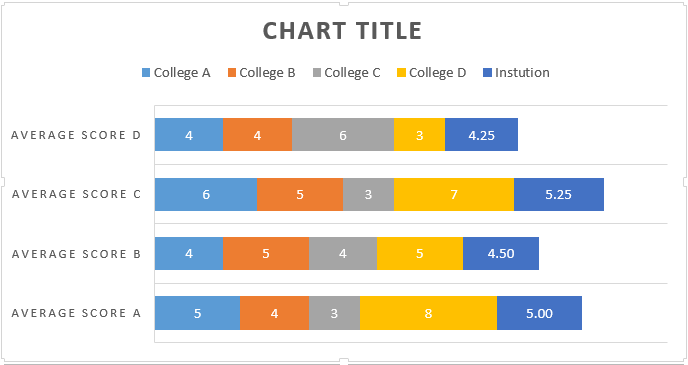
I could do it in excel but not in power BI.
Solved! Go to Solution.


- Mark as New
- Bookmark
- Subscribe
- Mute
- Subscribe to RSS Feed
- Permalink
- Report Inappropriate Content
hi @slowlearner,
alternatively to the suggested DAX way you could use power query when getting the data into power bi so it fits your needs.
I made an pbix showing the transformations step by step - you would do it in a single step, so you do not end up with the intermediate steps.
https://www.dropbox.com/s/5fugnzrsvpwr9er/unpivot%20college%20chart.pbix?dl=0

steps were:
- 00 base data as you provided
- 01 aggregating data (00) to institution level (average for scores)
- 02 unpivot the score columns
- 03 unpivoting the base data (00)
- 04 union of (02) and (03)
best regards
florian
- Mark as New
- Bookmark
- Subscribe
- Mute
- Subscribe to RSS Feed
- Permalink
- Report Inappropriate Content
hi @slowlearner,
alternatively to the suggested DAX way you could use power query when getting the data into power bi so it fits your needs.
I made an pbix showing the transformations step by step - you would do it in a single step, so you do not end up with the intermediate steps.
https://www.dropbox.com/s/5fugnzrsvpwr9er/unpivot%20college%20chart.pbix?dl=0
steps were:
- 00 base data as you provided
- 01 aggregating data (00) to institution level (average for scores)
- 02 unpivot the score columns
- 03 unpivoting the base data (00)
- 04 union of (02) and (03)
best regards
florian
- Mark as New
- Bookmark
- Subscribe
- Mute
- Subscribe to RSS Feed
- Permalink
- Report Inappropriate Content
Hi @DaFloDo,
Thank you for your reply.
Do I have to manually do the step 02 and 03?
How do I automatically unpivot?
Thanks,
Santo
- Mark as New
- Bookmark
- Subscribe
- Mute
- Subscribe to RSS Feed
- Permalink
- Report Inappropriate Content
Hi @slowlearner,
you perform these steps only one time when you define your query. I would do this manually using the UI. Alternatively you can use the Power Query M code provided within the sample file as a starting point.
After that, each time you refresh the data (for example after the source has been updated) these steps are automatically performed to bring the data into your Power BI model.
best regards
Florian
- Mark as New
- Bookmark
- Subscribe
- Mute
- Subscribe to RSS Feed
- Permalink
- Report Inappropriate Content
Hi @slowlearner
To get the Score as Axis, you need to do this in Power Query and use Pivot as suggested by @DaFloDo .
Thanks
Raj

- Mark as New
- Bookmark
- Subscribe
- Mute
- Subscribe to RSS Feed
- Permalink
- Report Inappropriate Content
Hi @slowlearner
You can create a calculated table using the below DAX ( Go to Modelling tab -> New Table, use this code)
Avg summary = SUMMARIZE('Avg',
ROLLUP('Avg'[Name]),
"Avg of A", AVERAGE('Avg'[Score A]),
"Avg of B", AVERAGE('Avg'[Score B]),
"Avg of C", AVERAGE('Avg'[Score C]),
"Avg of D", AVERAGE('Avg'[Score D])
)
2. Create a new column
Rename = IF(ISBLANK('Avg summary'[Name]),"Institution", 'Avg summary'[Name])Use "stackd bar chart" visual to get your desired result.
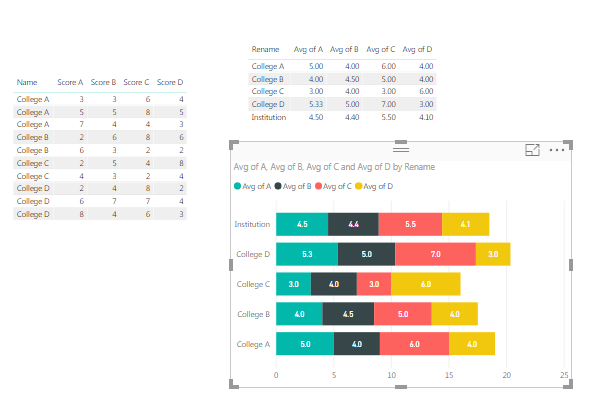
Thanks
Raj
- Mark as New
- Bookmark
- Subscribe
- Mute
- Subscribe to RSS Feed
- Permalink
- Report Inappropriate Content
Thank you for the reply.
I need college names as an legend and average of A, B, C,D as an axis.
Helpful resources

Microsoft Fabric Learn Together
Covering the world! 9:00-10:30 AM Sydney, 4:00-5:30 PM CET (Paris/Berlin), 7:00-8:30 PM Mexico City

Power BI Monthly Update - April 2024
Check out the April 2024 Power BI update to learn about new features.

Fabric Community Update - April 2024
Find out what's new and trending in the Fabric Community.

| User | Count |
|---|---|
| 113 | |
| 104 | |
| 77 | |
| 67 | |
| 63 |


| User | Count |
|---|---|
| 144 | |
| 107 | |
| 105 | |
| 82 | |
| 69 |


