Join us at FabCon Atlanta from March 16 - 20, 2026, for the ultimate Fabric, Power BI, AI and SQL community-led event. Save $200 with code FABCOMM.
Register now!The Power BI Data Visualization World Championships is back! Get ahead of the game and start preparing now! Learn more
Hello,
Thank you for your help and support;
Please this is my database below, and i want to create 2 measures to calculate:
- how many tickets number were in groupe of support N0 and then transfered to N1 <<>> the result should be : 2
- how many ticket number were in groupe N0 and then transfered directly to N3 <>> the result should be : 1
-
Thank you for your reply and answered
Solved! Go to Solution.
Hi @ayoubb,
Try measure as:
Measure =
var _table=CALCULATETABLE(VALUES('Table'[Request number]),FILTER(ALL('Table'),'Table'[Status]="opened"&&'Table'[groupe of support]="N0"))
var _table1=CALCULATETABLE(VALUES('Table'[Request number]),FILTER(ALL('Table'),'Table'[Status]="pending"&&'Table'[groupe of support]="N1"))
Return
IF(MAX('Table'[Request number]) in _table && MAX('Table'[Request number]) in _table1,1,0)Measure1 =
var _table=CALCULATETABLE(VALUES('Table'[Request number]),FILTER(ALL('Table'),'Table'[Status]="opened"&&'Table'[groupe of support]="N0"))
var _table1=CALCULATETABLE(VALUES('Table'[Request number]),FILTER(ALL('Table'),'Table'[Status]="pending"&&'Table'[groupe of support]="N3"))
Return
IF(MAX('Table'[Request number]) in _table&&MAX('Table'[Request number]) in _table1,CALCULATE(DISTINCTCOUNT('Table'[Request number])),0)
Here is the output:
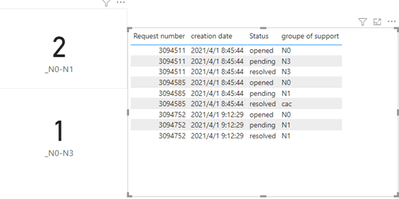
Here is the demo, please try it: Hwo to calculate transfered tickets from a group to another
Best Regards,
Link
If this post helps then please consider Accept it as the solution to help the other members find it more quickly.
Hi @ayoubb,
Try measure as:
Measure =
var _table=CALCULATETABLE(VALUES('Table'[Request number]),FILTER(ALL('Table'),'Table'[Status]="opened"&&'Table'[groupe of support]="N0"))
var _table1=CALCULATETABLE(VALUES('Table'[Request number]),FILTER(ALL('Table'),'Table'[Status]="pending"&&'Table'[groupe of support]="N1"))
Return
IF(MAX('Table'[Request number]) in _table && MAX('Table'[Request number]) in _table1,1,0)Measure1 =
var _table=CALCULATETABLE(VALUES('Table'[Request number]),FILTER(ALL('Table'),'Table'[Status]="opened"&&'Table'[groupe of support]="N0"))
var _table1=CALCULATETABLE(VALUES('Table'[Request number]),FILTER(ALL('Table'),'Table'[Status]="pending"&&'Table'[groupe of support]="N3"))
Return
IF(MAX('Table'[Request number]) in _table&&MAX('Table'[Request number]) in _table1,CALCULATE(DISTINCTCOUNT('Table'[Request number])),0)
Here is the output:
Here is the demo, please try it: Hwo to calculate transfered tickets from a group to another
Best Regards,
Link
If this post helps then please consider Accept it as the solution to help the other members find it more quickly.
@ayoubb , Try a measure like
countx(filter(Summarize(table, Table[ticket number], "_1", calculate(count(Table[ticket number]), filter(Table,Table[Group of supporte] ="N0")), "_2", calculate(count(Table[ticket number]), filter(Table,Table[Group of supporte] ="N1"))), [_1]>0 && [_2]>0),[ticket number])
I have tested and itried this mesure to calcule all other tickets that they have been transfered from N0 to other groupe except N1, is this mesure below correct??:
countx(filter(Summarize(table, Table[ticket number], "_1", calculate(count(Table[ticket number]), filter(Table,Table[Group of supporte] ="N0")), "_2", calculate(count(Table[ticket number]), filter(Table,Table[Group of supporte] <>"N1"))), [_1]>0 && [_2]>0),[ticket number])
The Power BI Data Visualization World Championships is back! Get ahead of the game and start preparing now!
| User | Count |
|---|---|
| 38 | |
| 36 | |
| 33 | |
| 30 | |
| 28 |
| User | Count |
|---|---|
| 128 | |
| 88 | |
| 79 | |
| 67 | |
| 62 |