FabCon is coming to Atlanta
Join us at FabCon Atlanta from March 16 - 20, 2026, for the ultimate Fabric, Power BI, AI and SQL community-led event. Save $200 with code FABCOMM.
Register now!- Power BI forums
- Get Help with Power BI
- Desktop
- Service
- Report Server
- Power Query
- Mobile Apps
- Developer
- DAX Commands and Tips
- Custom Visuals Development Discussion
- Health and Life Sciences
- Power BI Spanish forums
- Translated Spanish Desktop
- Training and Consulting
- Instructor Led Training
- Dashboard in a Day for Women, by Women
- Galleries
- Data Stories Gallery
- Themes Gallery
- Contests Gallery
- QuickViz Gallery
- Quick Measures Gallery
- Visual Calculations Gallery
- Notebook Gallery
- Translytical Task Flow Gallery
- TMDL Gallery
- R Script Showcase
- Webinars and Video Gallery
- Ideas
- Custom Visuals Ideas (read-only)
- Issues
- Issues
- Events
- Upcoming Events
The Power BI Data Visualization World Championships is back! Get ahead of the game and start preparing now! Learn more
- Power BI forums
- Forums
- Get Help with Power BI
- Desktop
- Hubspot pagination not refreshing in PBI Service
- Subscribe to RSS Feed
- Mark Topic as New
- Mark Topic as Read
- Float this Topic for Current User
- Bookmark
- Subscribe
- Printer Friendly Page


- Mark as New
- Bookmark
- Subscribe
- Mute
- Subscribe to RSS Feed
- Permalink
- Report Inappropriate Content
Hubspot pagination not refreshing in PBI Service
Thanks to @WillBatesHydro I've managed to get some code working to paginate my Hubspot Deals.
However, when I upload this to the PowerBI Service the refresh fails as its dynamic.
I've tried splitting it out to relative path as I've done with others, but it does not work.
Any ideas?
Code, with credit to @WillBatesHydro and others on this thread: https://community.fabric.microsoft.com/t5/Power-Query/Hubspot-Private-Apps-Powerquery-pagination/m-p...
let
baseuri = "https://api.hubapi.com/crm/v3/objects/deals?limit=100",
headers = [Headers=[#"Content-Type"="application/json", Authorization="API KEY"]],
initReq = Json.Document(Web.Contents( baseuri, headers)),
#"Converted to Table" = Record.ToTable(initReq),
initData = initReq[results],
//We want to get data = {lastNPagesData, thisPageData}, where each list has the limit # of Records,
//then we can List.Combine() the two lists on each iteration to aggregate all the records. We can then
//create a table from those records
gather = (data as list, uri) =>
let
//get new offset from active uri
newOffset = Json.Document(Web.Contents(uri, headers))[paging][next][after],
//build new uri using the original uri so we dont append offsests
newUri = baseuri & relativepath & "&after=" & newOffset,
//get new req & data
newReq = Json.Document(Web.Contents(newUri, headers)) ,
newdata = newReq[results] ,
//add that data to rolling aggregate
data = List.Combine({data, newdata}),
//if theres no next page of data, return. if there is, call @gather again to get more data
check = if Table.Contains ( Record.ToTable(newReq) , [Name = "paging"] ) = true then @gather (data , newUri) else data
in check,
//before we call gather(), we want see if its even necesarry. First request returns only one page? Return.
outputList = if Table.Contains ( Record.ToTable (initReq) , [Name = "paging"] ) = true then gather( initData , baseuri ) else initData ,
//then place records into a table. This will expand all columns available in the record.
expand = Table.FromRecords(outputList),
#"Removed Other Columns" = Table.SelectColumns(expand,{"id", "properties"}),
#"Expanded Custom" = Table.ExpandRecordColumn(#"Removed Other Columns", "properties",
Record.FieldNames(#"Removed Other Columns"{0}[properties]),
Record.FieldNames(#"Removed Other Columns"{0}[properties]))
in
#"Expanded Custom"


- Mark as New
- Bookmark
- Subscribe
- Mute
- Subscribe to RSS Feed
- Permalink
- Report Inappropriate Content
You are missing the Query and RelativePath piece of the Web.Contents call.
Web.Contents - PowerQuery M | Microsoft Learn
They are required to avoid the error you get.
- Mark as New
- Bookmark
- Subscribe
- Mute
- Subscribe to RSS Feed
- Permalink
- Report Inappropriate Content
Thank you @lbendlin . I've used RelativePath before in other API calls, but that was where we knew the page numbers being called.
I've amended the origional code as follows, but any ideas what to try next is welcome:
- Mark as New
- Bookmark
- Subscribe
- Mute
- Subscribe to RSS Feed
- Permalink
- Report Inappropriate Content
Please read the documentation again. The "limit=100" needs to go into the Query parameter too.
- Mark as New
- Bookmark
- Subscribe
- Mute
- Subscribe to RSS Feed
- Permalink
- Report Inappropriate Content
Sadly I'm just not getting this to work. I presumed it wouldn't be too difficult but the service just isn't refreshing.
Any advice welcome as I'm going round in circles here.
- Mark as New
- Bookmark
- Subscribe
- Mute
- Subscribe to RSS Feed
- Permalink
- Report Inappropriate Content
show your current code (sanitized).
As you can probably appreciate it is nearly impossible to help with API queries without access to said API (which you may not be willing to provide for understandable reasons)
- Mark as New
- Bookmark
- Subscribe
- Mute
- Subscribe to RSS Feed
- Permalink
- Report Inappropriate Content
Thanks @lbendlin, yes, I cannot give the API Key but the last working code is below. I need to create a relative path for "?limit=100" and I've done it successfully for other API calls, where I know the page numbers and made list.generate functions etc. but I cannot see how to do it in this when it's using Offset parameters
- Mark as New
- Bookmark
- Subscribe
- Mute
- Subscribe to RSS Feed
- Permalink
- Report Inappropriate Content
I need to create a relative path for "?limit=100"No, this needs to go into the Query section, not the RelativePath section.
- Mark as New
- Bookmark
- Subscribe
- Mute
- Subscribe to RSS Feed
- Permalink
- Report Inappropriate Content
So I now have the beloe, but get the same error in the service as before (You can't schedule refresh for this semantic model because the following data sources currently don't support refresh):
let
baseuri = "https://api.hubapi.com/crm/v3/objects/deals",
query = "?limit=100",
fullUri = baseuri & query,
headers = [#"Content-Type" = "application/json", #"Authorization" = "API KEY"],
initData = Json.Document(Web.Contents(fullUri, [Headers = headers]))[results],
gather = (data as list, uri as text, relativepath as text, headers as record) =>
let
newOffset = Json.Document(Web.Contents(uri, [Headers = headers]))[paging][next][after],
newUri = baseuri & "?" & relativepath & "&after=" & newOffset,
newReq = Json.Document(Web.Contents(newUri,[Headers = headers])),
newdata = newReq[results],
allData = List.Combine({data, newdata}),
check = if Table.Contains(Record.ToTable(newReq), [Name = "paging"]) then @gather(allData, newUri, relativepath, headers) else allData
in
check,
outputList = if Table.Contains(Record.ToTable(Json.Document(Web.Contents(fullUri, [Headers = headers]))), [Name = "paging"]) then gather(initData, fullUri, "", headers) else initData,
expand = Table.FromRecords(outputList),
#"Expanded Custom" = Table.ExpandRecordColumn(expand, "properties", Record.FieldNames(expand{0}[properties]), Record.FieldNames(expand{0}[properties])),
#"Sorted Rows" = Table.Sort(#"Expanded Custom",{{"closedate", Order.Descending}})
in
#"Sorted Rows"
- Mark as New
- Bookmark
- Subscribe
- Mute
- Subscribe to RSS Feed
- Permalink
- Report Inappropriate Content
Please read the documentation again. The "limit=100" needs to go into the Query parameter, with the correct syntax.
- Mark as New
- Bookmark
- Subscribe
- Mute
- Subscribe to RSS Feed
- Permalink
- Report Inappropriate Content
I have read it, many times, and tried changing things. Latest iteration below. It loads ok in Desktop but doesn't refresh in the service. Any idea what is causing this not to refresh?
Any advice welcome.
let
baseuri = "https://api.hubapi.com/crm/v3/objects/deals",
query = "?limit=100",
headers = [#"Content-Type" = "application/json", #"Authorization" = "API Key"],
initData = Json.Document(Web.Contents(baseuri, [Headers = headers & [#"query" = query]]))[results],
gather = (data as list, uri as text, relativepath as text, headers as record) =>
let
newOffset = Json.Document(Web.Contents(uri, [Headers = headers & [#"query" = query]]))[paging][next][after],
newUri = baseuri & "?" & relativepath & "&after=" & newOffset,
newReq = Json.Document(Web.Contents(newUri,[Headers = headers & [#"query" = query]])),
newdata = newReq[results],
allData = List.Combine({data, newdata}),
check = if Table.Contains(Record.ToTable(newReq), [Name = "paging"]) then @gather(allData, newUri, relativepath, headers) else allData
in
check,
outputList = if Table.Contains(Record.ToTable(Json.Document(Web.Contents(baseuri, [Headers = headers & [#"query" = query]]))), [Name = "paging"]) then gather(initData, baseuri, "", headers) else initData,
expand = Table.FromRecords(outputList),
#"Expanded Custom" = Table.ExpandRecordColumn(expand, "properties", Record.FieldNames(expand{0}[properties]), Record.FieldNames(expand{0}[properties])),
#"Sorted Rows" = Table.Sort(#"Expanded Custom",{{"closedate", Order.Descending}})
in
#"Sorted Rows"
- Mark as New
- Bookmark
- Subscribe
- Mute
- Subscribe to RSS Feed
- Permalink
- Report Inappropriate Content
- Mark as New
- Bookmark
- Subscribe
- Mute
- Subscribe to RSS Feed
- Permalink
- Report Inappropriate Content
Ah, I see. Thank you.
I uploaded to the Service and still no joy. Took out all of the Query throughout the script and still not refreshing, so it must be something else. 😞


- Mark as New
- Bookmark
- Subscribe
- Mute
- Subscribe to RSS Feed
- Permalink
- Report Inappropriate Content
Hi @DrewSmith As a workaround, maybe you can use a 3rd party connector, it can save you a lot of time compared to the other options. I've tried windsor.ai, supermetrics and funnel.io. I stayed with windsor because it is much cheaper so just to let you know other options. In case you wonder, to make the connection first search for the Hubspot connector in the data sources list:

After that, just grant access to your Hubspot account using your credentials, then on preview and destination page you will see a preview of your Hubspot fields:

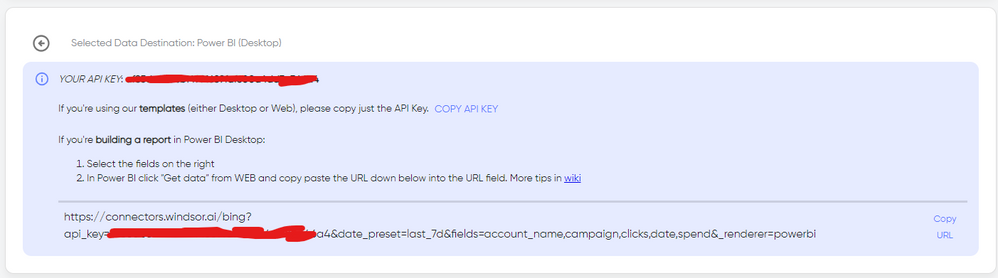
There just select the fields you need. Finally, just select PBI as your data destination and finally just copy and paste the url on PBI --> Get Data --> Web --> Paste the url.

Helpful resources

Power BI Dataviz World Championships
The Power BI Data Visualization World Championships is back! Get ahead of the game and start preparing now!

Power BI Monthly Update - December 2025
Check out the December 2025 Power BI Holiday Recap!

FabCon Atlanta 2026
Join us at FabCon Atlanta, March 16-20, for the ultimate Fabric, Power BI, AI and SQL community-led event. Save $200 with code FABCOMM.

| User | Count |
|---|---|
| 41 | |
| 38 | |
| 36 | |
| 30 | |
| 28 |


| User | Count |
|---|---|
| 129 | |
| 88 | |
| 79 | |
| 68 | |
| 63 |


