Forum Discussion

 Resolver III
How to write MySQL queries in editor query to fecth data and make visualization ?
 9 years ago
Hi mehaboob557,
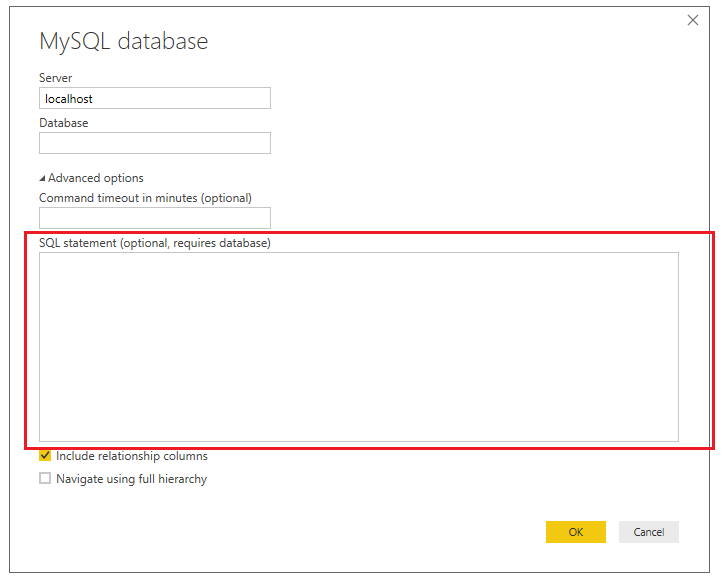
You can click Get Data -> MySQL database, then paste the query in the red section below then click OK. It will create a new table.
Best Regards,
Qiuyun Yu
 Community Support
Hi mehaboob557,
You can click Get Data -> MySQL database, then paste the query in the red section below then click OK. It will create a new table.
Best Regards,
Qiuyun Yu
 Resolver III
Hi v-qiuyu-msft,
Thank you so much. I will try and i will accept the solution once it works for me :)
- mehaboob5579 years ago
Hi v-qiuyu-msft ,
I want to know, is there dynamic variable can be passed into query using Power Bi. I mean, if i am selecting any value.. that value to be passed into the query which gives a result in the visualization... is this possible ?
- v-qiuyu-msft9 years ago
Hi mehaboob557,
Power BI provide Query Parameter feature, which can be used to filter data already retrieved in Query Editor. But this query parameter can't be passed to MySQL query. For more information, see:
Deep Dive into Query Parameters and Power BI Templates
Power BI Desktop Query Parameters, Part 1
Best Regards,
QiuyunYu - v-qiuyu-msft9 years ago
Hi mehaboob557,
Do you have any other questions? If you are satisfied with my response, would you please mark a helpful reply as an answer so we can close the thread?
Best Regards,
QiuyunYu
- mehaboob5579 years ago
Hi v-qiuyu-msft
Please help in query part. As suggested by you, i did.
But, OldGuids=true error is coming while i am writing query directly.
- v-qiuyu-msft9 years ago
Hi mehaboob557,
Please make sure the query can run successfully in MySQL workbench firstly then paste the query into below red section:
Best Regards,
Qiuyun Yu- aneeshvarghese8 years agoFrequent Visitor
Hi i totally understand how to fetch queries from Mysql. My question is about schedule refresh and creating a live connection in power BI web. How do we do that??