FabCon is coming to Atlanta
Join us at FabCon Atlanta from March 16 - 20, 2026, for the ultimate Fabric, Power BI, AI and SQL community-led event. Save $200 with code FABCOMM.
Register now!- Power BI forums
- Get Help with Power BI
- Desktop
- Service
- Report Server
- Power Query
- Mobile Apps
- Developer
- DAX Commands and Tips
- Custom Visuals Development Discussion
- Health and Life Sciences
- Power BI Spanish forums
- Translated Spanish Desktop
- Training and Consulting
- Instructor Led Training
- Dashboard in a Day for Women, by Women
- Galleries
- Data Stories Gallery
- Themes Gallery
- Contests Gallery
- QuickViz Gallery
- Quick Measures Gallery
- Visual Calculations Gallery
- Notebook Gallery
- Translytical Task Flow Gallery
- TMDL Gallery
- R Script Showcase
- Webinars and Video Gallery
- Ideas
- Custom Visuals Ideas (read-only)
- Issues
- Issues
- Events
- Upcoming Events
Get Fabric Certified for FREE during Fabric Data Days. Don't miss your chance! Request now
- Power BI forums
- Forums
- Get Help with Power BI
- Desktop
- How to write Filter and AllExcept if I have a coup...
- Subscribe to RSS Feed
- Mark Topic as New
- Mark Topic as Read
- Float this Topic for Current User
- Bookmark
- Subscribe
- Printer Friendly Page


- Mark as New
- Bookmark
- Subscribe
- Mute
- Subscribe to RSS Feed
- Permalink
- Report Inappropriate Content
How to write Filter and AllExcept if I have a couple of parameters to filter?
HI,
I need help on creating a DAX for filtering the following result in column E to H.
Basically, I need to create a 'Filter All' by Age and the year. And for the Age I would like it to ignore the calculation for the band Age_99 and be able to differentiate between two company type (A & B)
For Column F(Filter All), I believe the DAX language is something like this
Filter All= CALCULATE([Total Count],

Appreciate if someone can help on this.
Solved! Go to Solution.
- Mark as New
- Bookmark
- Subscribe
- Mute
- Subscribe to RSS Feed
- Permalink
- Report Inappropriate Content
Thanks @v-joesh-msft I think I have it figured out, that is to include the year parameter in the filter allexecept.
Total Age Count =
CALCULATE (
    [Total Count],
    FILTER ( ALLEXCEPT ( Table1, Table1[Year], Table1[CompanyType]),
    Table1[AGE_ID] <> "AG_99" ))


- Mark as New
- Bookmark
- Subscribe
- Mute
- Subscribe to RSS Feed
- Permalink
- Report Inappropriate Content
I think something like this should work:
Filter 2017 =
IF( SELECTEDVALUE(Calendar[Year]) = 2017 ,
CALCULATE([Total Count],
FILTER(ALLEXCEPT(Table1,Table1[Company Type]),
Table1[AGE_ID] <> "AG_99"),
Calendar[Year] = 2017
),
BLANK()
)
Filter 2017/2018 =
IF( SELECTEDVALUE(Calendar[Year]) = 2017 || SELECTEDVALUE(Calendar[Year]) = 2018 ,
CALCULATE([Total Count],
FILTER(ALLEXCEPT(Table1,Table1[Company Type]),
Table1[AGE_ID] <> "AG_99"),
Calendar[Year] = 2017 || Calendar[Year] = 2018
),
BLANK()
)
Connect on LinkedIn
- Mark as New
- Bookmark
- Subscribe
- Mute
- Subscribe to RSS Feed
- Permalink
- Report Inappropriate Content
Let's just say I do not want to explicitly call out the year, but it is a year filter that will aggregate these numbers accordingly.
- Mark as New
- Bookmark
- Subscribe
- Mute
- Subscribe to RSS Feed
- Permalink
- Report Inappropriate Content
Alright. In that case i will need to know how the selection logic is supposed to work. Could you give some examples of displayed columns with different selections on year?
Connect on LinkedIn
- Mark as New
- Bookmark
- Subscribe
- Mute
- Subscribe to RSS Feed
- Permalink
- Report Inappropriate Content
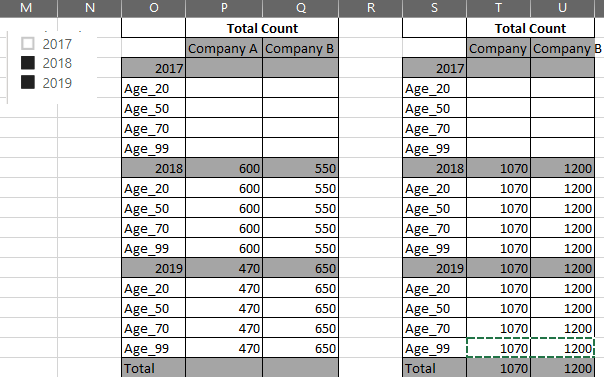
Basically, rather than me specifying the year, I will allow the user to choose the year.
I wrote something based on what you have but I got the most outer left table output.
What I would want is the most outer right table output


- Mark as New
- Bookmark
- Subscribe
- Mute
- Subscribe to RSS Feed
- Permalink
- Report Inappropriate Content
Hi @echow ,
I think what you need is the following measure:
Total Age Count =
CALCULATE (
    [Total Count],
    FILTER ( ALLEXCEPT ( Table1, Table1[CompanyType] ), Table1[AGE_ID] <> "AG_99" )
)
Best Regards,
Community Support Team _ Joey
If this post helps, then please consider Accept it as the solution to help the other members find it more quickly.
- Mark as New
- Bookmark
- Subscribe
- Mute
- Subscribe to RSS Feed
- Permalink
- Report Inappropriate Content
Thanks @v-joesh-msft I think I have it figured out, that is to include the year parameter in the filter allexecept.
Total Age Count =
CALCULATE (
    [Total Count],
    FILTER ( ALLEXCEPT ( Table1, Table1[Year], Table1[CompanyType]),
    Table1[AGE_ID] <> "AG_99" ))

Helpful resources

Power BI Monthly Update - November 2025
Check out the November 2025 Power BI update to learn about new features.

Fabric Data Days
Advance your Data & AI career with 50 days of live learning, contests, hands-on challenges, study groups & certifications and more!

FabCon Atlanta 2026
Join us at FabCon Atlanta, March 16-20, for the ultimate Fabric, Power BI, AI and SQL community-led event. Save $200 with code FABCOMM.


