cancel
Showing results for 
Search instead for 
Did you mean: 

Data Days is here! Join us now for 60+ days of learning, challenges, and connection. Learn more

Reply
Stephane_SFE
New Member

How to use Map Visual with Calculated Latitude and longitude

Hi

I'm currently struggling with the map visual and GPS coordinate.

I have sales data for accounts, and I want to calculate the Economic center of gravity of my territories ("Secteur").

So, for that I’ve created:

  • The sales measure: Sales_CA = SUM(Sales_Account[CA])     "CA"
  • The latitude of the Economic center of gravity:
    • Latitude_vs_CA_total = [Sales_CA]*SUM(Accounts [Latitude])
    • Barycentre_Eco_Latitude = DIVIDE(SUMX( Accounts,[ Latitude_vs_CA_total]),[Sales_CA])  "Bary Lat"
  • The longitude of the Economic center of gravity:
    • Longitude_vs_CA_total = [Sales_CA]*SUM(Accounts [Longitude])
    • Barycentre_Eco_Longitude = DIVIDE(SUMX( Accounts,[ Longitude_vs_CA_total]),[Sales_CA]) "Bary Long"


When I create a table, all is fine:
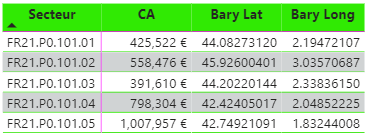
Stephane_SFE_0-1674032165322.png


But when I want to use it in the map, I have an issue. Due the fact the measure needs the ‘don’t summarize’ option but I can’t.
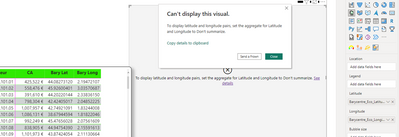
 

Stephane_SFE_1-1674032183550.png


What is the best thing to do to solve it ?


Many thanks for the help.

Regards

5 REPLIES 5
AlanRGroskreutz
Helper II
Helper II

I ended up using the Icon Map custom visual from the AppSource.  Works great.

AlanRGroskreutz
Helper II
Helper II

l'm also having this issue.  Replying here to get this moved back up the list.   I have created a Calculated Measure for my Lat & Lon based on an if statement so one of them can be moveable.

fhill
Resident Rockstar
Resident Rockstar

Replying here to get this moved back up the list.  I'm having simular issues.  I have created a Calculated Measure for my Lat & Lon based on weighted location data.  But I can't map the Measure values?


Did I answer your question, or help you along the way?
Please give Kudos or Mark as a Solution!


https://www.linkedin.com/in/forrest-hill-04480730/

Proud to give back to the community!
Thank You!


Idrissshatila
Super User
Super User

Hello @Stephane_SFE,


You should format the columns as latitude and longitude, refer to the ling for instructions

https://radacad.com/how-to-do-power-bi-mapping-with-latitude-and-longitude-only


If I answered your question, please mark my post as solution, Appreciate your Kudos 👍


Follow me on Linkedin


Did I answer your question? Mark my post as a solution! Appreciate your Kudos
Follow me on LinkedIn linkedIn
Vote for my Community Mobile App Idea

Proud to be a Super User!


Hi

Thanks for the answer but it's not columns but measures and they are already tag as Latitude and Longitude.

Stephane_SFE_0-1674034555116.png


Helpful resources

Announcements
Fabric Data Days is here Carousel

Fabric Data Days 2026

Don't miss out on Data Days, June 15 through August 7. Learn Fabric, Power BI, SQL, AI and more.

May Power BI Update Carousel

Power BI Monthly Update - May 2026

Check out the May 2026 Power BI update to learn about new features.

Power BI DataViz World Championships carousel

Power BI DataViz World Championships - June 2026

A new Power BI DataViz World Championship is coming this June! Don't miss out on submitting your entry.
