cancel
Showing results for 
Search instead for 
Did you mean: 

Level up your Power BI skills this month - build one visual each week and tell better stories with data! Get started

Reply
cboelterGNH
Frequent Visitor

How to show two Column Headers when all of the values of a matrix are calculations/measures

Hi, 

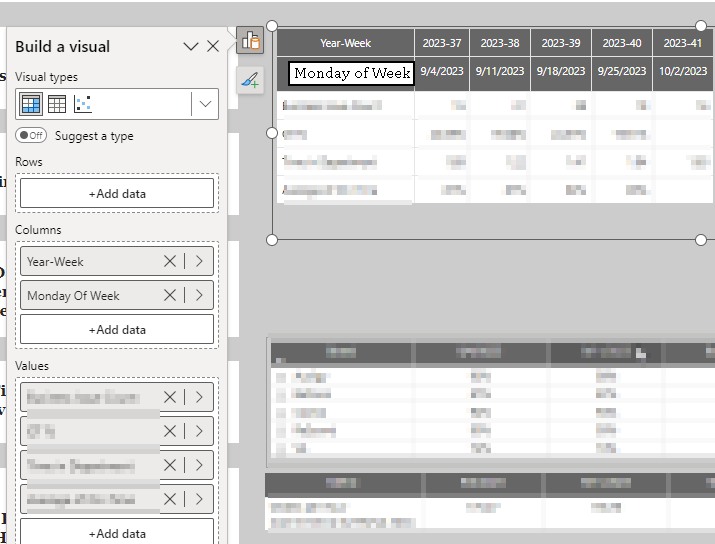
Perhaps the screenshot will be a clearer explanation:

2023-10-13 10_47_31-Material Management Scorecard - Power BI Desktop.png


This Report is updated once a week, Just a bit annoying that I can't get the 2nd column Description to Show.

Any suggestions?

Thanks!

2 REPLIES 2
amitchandak
Super User
Super User

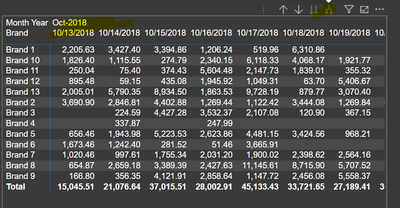
@cboelterGNH , You can expand the column to see the second row , But values of first column will not repeat if they are same


amitchandak_0-1697214008269.png


Share with Power BI Enthusiasts: Full Power BI Video (20 Hours) YouTube
Microsoft Fabric Series 60+ Videos YouTube
Microsoft Fabric Hindi End to End YouTube

@amitchandak 
Hi,

I believe your example is using Brand as the row, in my example, there are no unifying rows for each metric, each is simply a measure calculated by the column date.

The table is already expanded, yes the Column header "Monday of the Week" is not shown. 

Helpful resources

Announcements
April Power BI Update Carousel

Power BI Monthly Update - April 2026

Check out the April 2026 Power BI update to learn about new features.

Fabric SQL PBI Data Days

Data Days 2026 coming soon!

Sign up to receive a private message when registration opens and key events begin.

New to Fabric survey Carousel

New to Fabric Survey

If you have recently started exploring Fabric, we'd love to hear how it's going. Your feedback can help with product improvements.

Power BI DataViz World Championships carousel

Power BI DataViz World Championships - June 2026

A new Power BI DataViz World Championship is coming this June! Don't miss out on submitting your entry.