- Power BI forums
- Updates
- News & Announcements
- Get Help with Power BI
- Desktop
- Service
- Report Server
- Power Query
- Mobile Apps
- Developer
- DAX Commands and Tips
- Custom Visuals Development Discussion
- Health and Life Sciences
- Power BI Spanish forums
- Translated Spanish Desktop
- Power Platform Integration - Better Together!
- Power Platform Integrations (Read-only)
- Power Platform and Dynamics 365 Integrations (Read-only)
- Training and Consulting
- Instructor Led Training
- Dashboard in a Day for Women, by Women
- Galleries
- Community Connections & How-To Videos
- COVID-19 Data Stories Gallery
- Themes Gallery
- Data Stories Gallery
- R Script Showcase
- Webinars and Video Gallery
- Quick Measures Gallery
- 2021 MSBizAppsSummit Gallery
- 2020 MSBizAppsSummit Gallery
- 2019 MSBizAppsSummit Gallery
- Events
- Ideas
- Custom Visuals Ideas
- Issues
- Issues
- Events
- Upcoming Events
- Community Blog
- Power BI Community Blog
- Custom Visuals Community Blog
- Community Support
- Community Accounts & Registration
- Using the Community
- Community Feedback
Earn a 50% discount on the DP-600 certification exam by completing the Fabric 30 Days to Learn It challenge.
- Power BI forums
- Forums
- Get Help with Power BI
- Desktop
- How to show the latest date per ID within selected...
- Subscribe to RSS Feed
- Mark Topic as New
- Mark Topic as Read
- Float this Topic for Current User
- Bookmark
- Subscribe
- Printer Friendly Page


- Mark as New
- Bookmark
- Subscribe
- Mute
- Subscribe to RSS Feed
- Permalink
- Report Inappropriate Content
How to show the latest date per ID within selected date range in Power BI
Hi everyone,
For a Power BI report I'm trying to show the latest ParticipationDate per ID in a table visual, within the selected ParticipationDate range. Here is some sample data:
ID Partitipation date
1 02-03-2020
1 16-04-2020
1 02-12-2021
2 05-01-2020
2 08-09-2020
2 06-02-2021
The desired result, with the ParticipationDate range slicer set from 01-01-2020 to 31-12-2020:
ID PartitipationDate LatestParticipationDatePerID
1 02-03-2020 16-04-2020
1 16-04-2020 16-04-2020
2 05-01-2020 08-09-2020
2 08-09-2020 08-09-2020
I managed to show the latest date per ID with this calculated column:
LatestParticipationDatePerID = CALCULATE ( MAX ( Table1[ParticipationDate] ), ALLEXCEPT (Table1, Table1[ID] ) )
This shows the latest participation date grouped per ID, but still regardless of the selected date range. I can't seem to get the DAX to work when I add an ALLSELECTED of ParticipationDate.
How could the desired result be achieved?
Any suggestions would be much appreciated..
Thanks!
Solved! Go to Solution.

- Mark as New
- Bookmark
- Subscribe
- Mute
- Subscribe to RSS Feed
- Permalink
- Report Inappropriate Content
Hi @GKJARC ,
You could create date table as a slicer. Then create a measure by the following formula:
First: create Date table and Use as a slicer
Date = CALENDAR(MIN('Table'[PartitipationDate1]),TODAY())Then create a measure
Latest =
MAXX (
    FILTER (
        ALL ( 'Table' ),
        [ID] = MAX ( [ID] )
            && [PartitipationDate1] >= MIN ( 'Date'[Date] )
            && [PartitipationDate1] <= MAX ( 'Date'[Date] )
    ),
    [PartitipationDate1]
)
The final output is shown below:
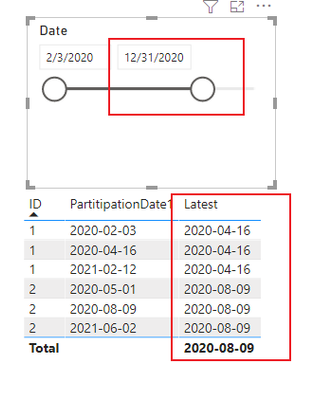
Best Regards,
Community Support Team_ Yalan Wu
If this post helps, then please consider Accept it as the solution to help the other members find it more quickly.
- Mark as New
- Bookmark
- Subscribe
- Mute
- Subscribe to RSS Feed
- Permalink
- Report Inappropriate Content
Hi @GKJARC ,
You could create date table as a slicer. Then create a measure by the following formula:
First: create Date table and Use as a slicer
Date = CALENDAR(MIN('Table'[PartitipationDate1]),TODAY())Then create a measure
Latest =
MAXX (
    FILTER (
        ALL ( 'Table' ),
        [ID] = MAX ( [ID] )
            && [PartitipationDate1] >= MIN ( 'Date'[Date] )
            && [PartitipationDate1] <= MAX ( 'Date'[Date] )
    ),
    [PartitipationDate1]
)
The final output is shown below:
Best Regards,
Community Support Team_ Yalan Wu
If this post helps, then please consider Accept it as the solution to help the other members find it more quickly.
- Mark as New
- Bookmark
- Subscribe
- Mute
- Subscribe to RSS Feed
- Permalink
- Report Inappropriate Content
Thank you very mucht @ v-yalanwu-msft for your reply. It is a solution to my initial request.
One follow-up question if I may. In this case the matching row should be marked as 1, the middle row in the example below.
My current calculated column 'Latest Y/N' ignores the selection Date[Date], is there a way to include this Date selection in the calculated column?
Latest Y/N =
IF ( [Latest participation date within selection] = Table1[ParticipationDate], 1, 0)


- Mark as New
- Bookmark
- Subscribe
- Mute
- Subscribe to RSS Feed
- Permalink
- Report Inappropriate Content
@GKJARC , Try like
CALCULATE ( MAX ( Table1[ParticipationDate] ), filter(allselected(Table1), Table1[ID] =max(Table1[ID]) ) )
Microsoft Power BI Learning Resources, 2023 !!
Learn Power BI - Full Course with Dec-2022, with Window, Index, Offset, 100+ Topics !!
Did I answer your question? Mark my post as a solution! Appreciate your Kudos !! Proud to be a Super User! !!
- Mark as New
- Bookmark
- Subscribe
- Mute
- Subscribe to RSS Feed
- Permalink
- Report Inappropriate Content
Thanks @amitchandak for your reply. After creating this calculated column, for some reason it still seems to select the max ParticipationDate outside of the selected ParticipationDate range. The date range slicer is also Table1[ParticipationDate] so I don't understand why ALLSELECTED doesn't seem to work in this case.

Helpful resources


Fabric Community Update - April 2024
Find out what's new and trending in the Fabric Community.

| User | Count |
|---|---|
| 94 | |
| 86 | |
| 78 | |
| 70 | |
| 63 |


| User | Count |
|---|---|
| 114 | |
| 101 | |
| 97 | |
| 66 | |
| 59 |


