Join us at FabCon Atlanta from March 16 - 20, 2026, for the ultimate Fabric, Power BI, AI and SQL community-led event. Save $200 with code FABCOMM.
Register now!The Power BI Data Visualization World Championships is back! Get ahead of the game and start preparing now! Learn more
Hi - my MS Form has many questions with both single and multiple select. Such forms compile all results in an online Excel file, which is a dataset in my PowerBI used to create reports.
Now the problem is, when I create charts to display the different answers from the form, I cannot show items with no data in PowerBI. However, in the online "Responses" tab in MS Forms the charts show those items with no data (zero counts).
How can I achieve the same level of analytics in my BI report?
Thanks in advance!
Solved! Go to Solution.
Hi, @fpinero
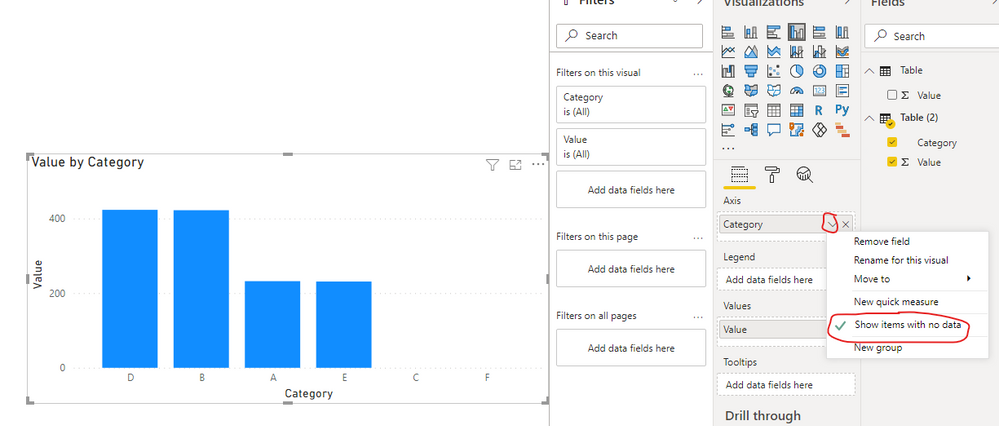
According to your description, you said that you can’t make the chart display the items with no data. I think you can try to click on the “Show items with no data” button to make the blank value display, like this:
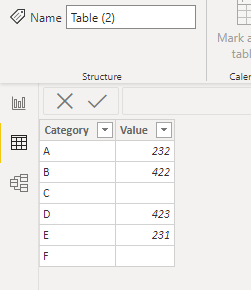
This is my test data:
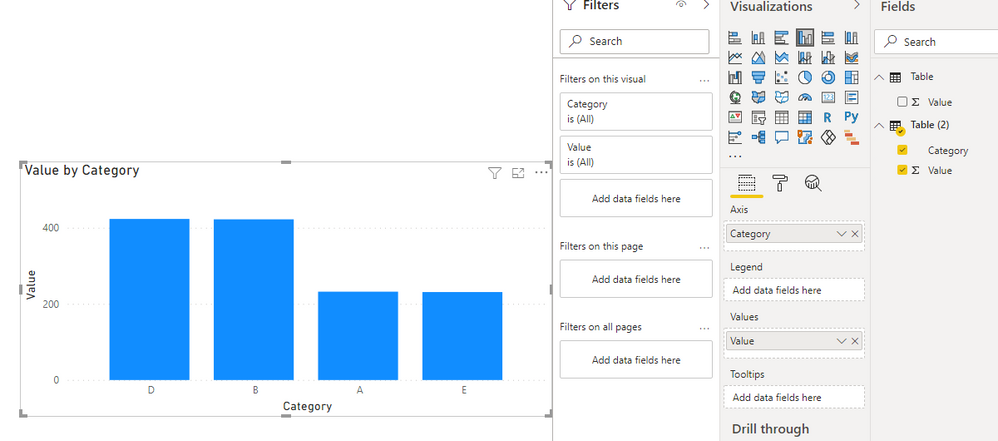
Before turning on:
After turning on:
And you can get what you want.
You can download my test pbix file here
If this result is not what you want, you can post some sample data(without sensitive data) and your expected result.
How to Get Your Question Answered Quickly
Best Regards,
Community Support Team _Robert Qin
If this post helps, then please consider Accept it as the solution to help the other members find it more quickly.
Hi, @fpinero
According to your description, you said that you can’t make the chart display the items with no data. I think you can try to click on the “Show items with no data” button to make the blank value display, like this:
This is my test data:
Before turning on:
After turning on:
And you can get what you want.
You can download my test pbix file here
If this result is not what you want, you can post some sample data(without sensitive data) and your expected result.
How to Get Your Question Answered Quickly
Best Regards,
Community Support Team _Robert Qin
If this post helps, then please consider Accept it as the solution to help the other members find it more quickly.
Thank you Amit, not sure I understand though.
The online form has questions with multiple options to choose from.
The online form analitycs shows me a chart with both chosen and not chosen options for each of the questions. But the dataset on PowerBI doesn't get the information of what options weren't chosen in each question, it only gets the chosen options from the question.
So, when I create a chart, it only shows options that were chosen in the response.
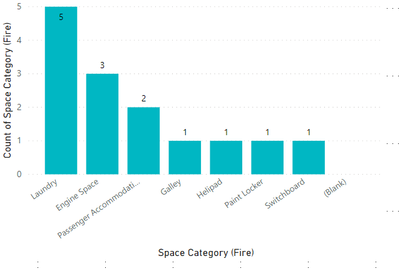
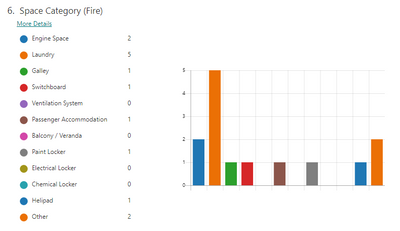
You can see the difference between the two charts. The first one doesn't have empty bars (menaing option not chosen from questions) while the second chart does.
The Power BI Data Visualization World Championships is back! Get ahead of the game and start preparing now!
Check out the November 2025 Power BI update to learn about new features.
| User | Count |
|---|---|
| 66 | |
| 47 | |
| 43 | |
| 26 | |
| 19 |
| User | Count |
|---|---|
| 198 | |
| 126 | |
| 102 | |
| 67 | |
| 50 |