cancel
Showing results for 
Search instead for 
Did you mean: 

Get Fabric Certified for FREE during Fabric Data Days. Don't miss your chance! Request now

Reply
Anonymous
Not applicable

How to show both percentage and values in one chart

Hello everyone,


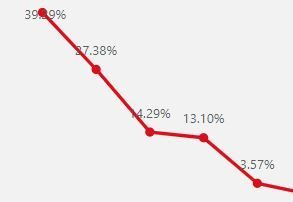
I would be grateful if someone can let me know a way to show both percentage and values in chart.

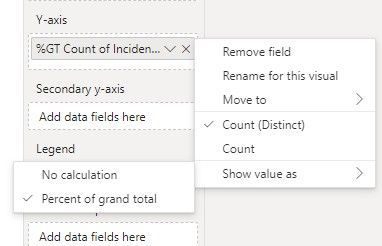
Because I can select only one option in "Show value as"


Chart.JPGOption.JPG

1 ACCEPTED SOLUTION
sudhav
Helper V
Helper V

use book marks and selection pane and create two charts, one with values and another with count and create one button and give actuon to that button, so that you can get it.

View solution in original post

4 REPLIES 4
sudhav
Helper V
Helper V

sudhav_0-1674483417802.png

on the top button if you click on %, you will get in % mode and if you want count you can click on count.

LP280388
Resolver II
Resolver II

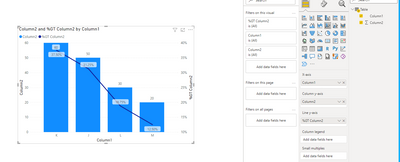
@Anonymous  You can show them in bar and line combo chart as shown below.  

Page https://goodly.co.in/custom-data-labels-power-bi/ talks about custom data labels which you can give a try.

LP280388_0-1674482561543.png


sudhav
Helper V
Helper V

use book marks and selection pane and create two charts, one with values and another with count and create one button and give actuon to that button, so that you can get it.

Anonymous
Not applicable

Thank you so much for your guide.

Helpful resources

Announcements
November Power BI Update Carousel

Power BI Monthly Update - November 2025

Check out the November 2025 Power BI update to learn about new features.

Fabric Data Days Carousel

Fabric Data Days

Advance your Data & AI career with 50 days of live learning, contests, hands-on challenges, study groups & certifications and more!

FabCon Atlanta 2026 carousel

FabCon Atlanta 2026

Join us at FabCon Atlanta, March 16-20, for the ultimate Fabric, Power BI, AI and SQL community-led event. Save $200 with code FABCOMM.

Top Solution Authors
Top Kudoed Authors