cancel
Showing results for 
Search instead for 
Did you mean: 

View all the Fabric Data Days sessions on demand. View schedule

Reply
ResearchDev
Helper II
Helper II

How to set default Chiclet values like there are On-Hold. Current, Active in this Slicer.

I am able to perform most functions for this visual. How to make the slicer select 'Current' (there is only 3 settings, Active, Current, On-Hold) as the default value?

1 ACCEPTED SOLUTION
ResearchDev
Helper II
Helper II

I figured it out. Thanks anyway.

View solution in original post

3 REPLIES 3
ResearchDev
Helper II
Helper II

I figured it out. Thanks anyway.

v-easonf-msft
Community Support
Community Support

Hi, @ResearchDev 

I don't quite understand what you mean by ‘three settings, Active, Current, On-Hold’?

Can you share relevant screenshot to elaborate on your question further?

Best Regards,
Community Support Team _ Eason

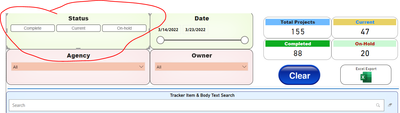
ResearchDev_0-1652093654967.png

Attached is the Chiclet slicer which is the same as the regular slicer. I just like the Current to be the default value when the dashboard is open. I saw a few videos on setting default values but they were all pertaining to date values and calculating the last 6 months, and many relating to dates. The field has 3 values all text (Current, On-Hold and Active). How do I make Current as the Active one?

Helpful resources

Announcements
November Power BI Update Carousel

Power BI Monthly Update - November 2025

Check out the November 2025 Power BI update to learn about new features.

Fabric Data Days Carousel

Fabric Data Days

Advance your Data & AI career with 50 days of live learning, contests, hands-on challenges, study groups & certifications and more!

FabCon Atlanta 2026 carousel

FabCon Atlanta 2026

Join us at FabCon Atlanta, March 16-20, for the ultimate Fabric, Power BI, AI and SQL community-led event. Save $200 with code FABCOMM.

Top Solution Authors
Top Kudoed Authors