cancel
Showing results for 
Search instead for 
Did you mean: 

Get Fabric Certified for FREE during Fabric Data Days. Don't miss your chance! Request now

Reply
JChris
Helper II
Helper II

How to see only the changed data from waterfall chart?

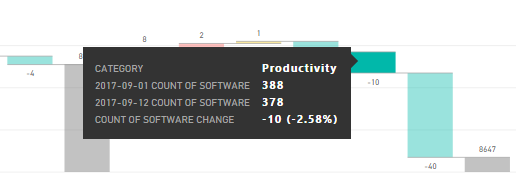
I have the following waterfall chart:


Capture.PNG


I want to see only the data entries from "software change", how can I do so? If I have a Table view of Softwares, whenever I click in one of those variances it will show the "final form" of the list of softwares, already including the variance. I just want to see what changed, not the "result".

4 REPLIES 4
v-ljerr-msft
Microsoft Employee
Microsoft Employee

Hi @JChris,


Currently, there is no options to discard default fields from the tooltip. Here is a similar idea shared on Power BI Ideas forum. You can vote it up and add your comments there to improve Power BI on this feature. Smiley Happy


Regards


@v-ljerr-msft wrote:

Hi @JChris,


Currently, there is no options to discard default fields from the tooltip. Here is a similar idea shared on Power BI Ideas forum. You can vote it up and add your comments there to improve Power BI on this feature. Smiley Happy


Regards


I believe you didn't understand my question. I don't want to change anything on the tooltip. I just want to see the data it refers to. In my case, the "count of software change" is -10, as it went from 388 to 378. How can I see/list those 10 items (inside a table, or matrix, for example)?

Hi @JChris,


So you just need to calculate the count of software change, then show it on a Table/Matrix? If that is the case, a measure could to that. However, without knowing your table structures, it's hard for us to write it for you. So could you share a sample pbix file, so that we can further assist on this issue? You can upload it to OneDrive or Dropbox and post the link here. Do mask sensitive data before uploading.


Regards

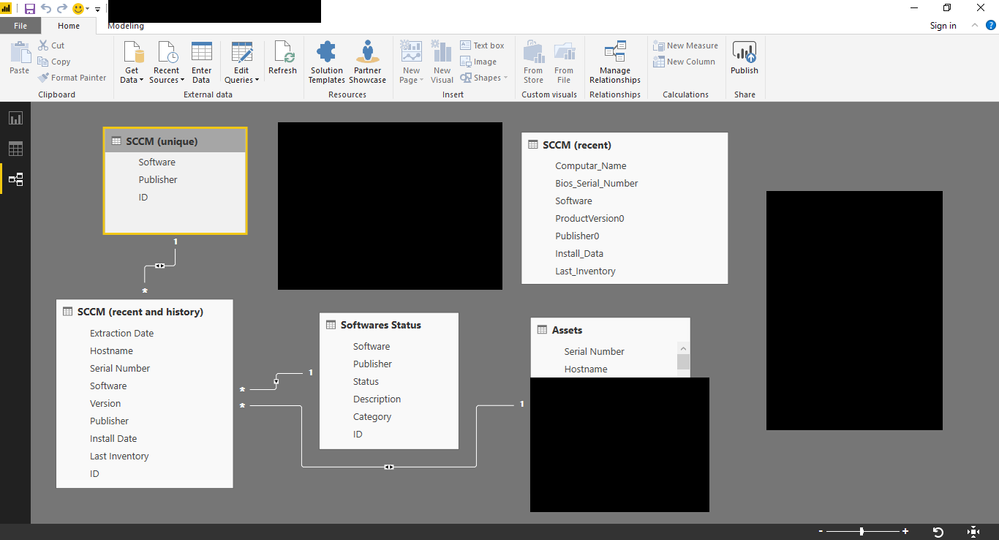
Sadly I can't share any info, but I can share the relationship.


Untitled.png

Helpful resources

Announcements
November Power BI Update Carousel

Power BI Monthly Update - November 2025

Check out the November 2025 Power BI update to learn about new features.

Fabric Data Days Carousel

Fabric Data Days

Advance your Data & AI career with 50 days of live learning, contests, hands-on challenges, study groups & certifications and more!

FabCon Atlanta 2026 carousel

FabCon Atlanta 2026

Join us at FabCon Atlanta, March 16-20, for the ultimate Fabric, Power BI, AI and SQL community-led event. Save $200 with code FABCOMM.

Top Solution Authors
Top Kudoed Authors