cancel
Showing results for 
Search instead for 
Did you mean: 

The Power BI Data Visualization World Championships is back! Get ahead of the game and start preparing now! Learn more

Reply
JHob
Advocate I
Advocate I

How to resolve Nested Big Query Data

Hi


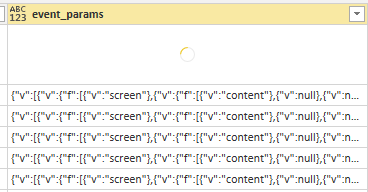
Am connecting to Google Big Query  which contains data sourced from Firebase.  When I connect the nested fields are coming back without the necessary level of detail 

JHob_0-1598510104302.png


I have tried both the Power BI Big Query connector and the Simba ODBC connector but they are both having the same issue.


I did find the following post but this requires work on the Big Query side.  I have daily files that will need to be converted and it is not clear how I manage this process

https://www.inflexionanalytics.com/blogs/importing-unnested-data-from-bigquery-to-powerbi/


Is anyone aware of another solution?

1 ACCEPTED SOLUTION
Anonymous
Not applicable

Hello @JHob,

I would like to suggest that you check the JSON string and try to correct them as common JSON formats, then you can use the JSON connector to parse these texts and extract specific fields you want.
If you are still confused about how to do this, please share some dummy data from your receiving records (delete sensitive data parts) and share it here with the expected results and fields.
Next, we can test the encoding formula in this sample data.

Best regards

Xiaoxin Sheng

View solution in original post

4 REPLIES 4
amitchandak
Super User
Super User

@JHob , can check how to  handle JSON data, if that can help

https://www.youtube.com/watch?v=ipI6mrWLQKA
https://www.mssqltips.com/sqlservertip/4621/using-power-bi-with-json-data-sources-and-files/
https://zappysys.com/blog/howto-import-json-rest-api-power-bi/?gclid=EAIaIQobChMI7Za92YSi6wIVFSQrCh0...

Share with Power BI Enthusiasts: Full Power BI Video (20 Hours) YouTube
Microsoft Fabric Series 60+ Videos YouTube
Microsoft Fabric Hindi End to End YouTube

Thank you @amitchandak but the issue is more complicated.

The Google Big Query nested data format is not handled well by Power BI and the data is not available even when parsing the column

Please how did you resolve this?

Anonymous
Not applicable

Hello @JHob,

I would like to suggest that you check the JSON string and try to correct them as common JSON formats, then you can use the JSON connector to parse these texts and extract specific fields you want.
If you are still confused about how to do this, please share some dummy data from your receiving records (delete sensitive data parts) and share it here with the expected results and fields.
Next, we can test the encoding formula in this sample data.

Best regards

Xiaoxin Sheng

Helpful resources

Announcements
November Power BI Update Carousel

Power BI Monthly Update - November 2025

Check out the November 2025 Power BI update to learn about new features.

Fabric Data Days Carousel

Fabric Data Days

Advance your Data & AI career with 50 days of live learning, contests, hands-on challenges, study groups & certifications and more!

FabCon Atlanta 2026 carousel

FabCon Atlanta 2026

Join us at FabCon Atlanta, March 16-20, for the ultimate Fabric, Power BI, AI and SQL community-led event. Save $200 with code FABCOMM.

Top Solution Authors
Top Kudoed Authors