FabCon is coming to Atlanta
Join us at FabCon Atlanta from March 16 - 20, 2026, for the ultimate Fabric, Power BI, AI and SQL community-led event. Save $200 with code FABCOMM.
Register now!- Power BI forums
- Get Help with Power BI
- Desktop
- Service
- Report Server
- Power Query
- Mobile Apps
- Developer
- DAX Commands and Tips
- Custom Visuals Development Discussion
- Health and Life Sciences
- Power BI Spanish forums
- Translated Spanish Desktop
- Training and Consulting
- Instructor Led Training
- Dashboard in a Day for Women, by Women
- Galleries
- Data Stories Gallery
- Themes Gallery
- Contests Gallery
- QuickViz Gallery
- Quick Measures Gallery
- Visual Calculations Gallery
- Notebook Gallery
- Translytical Task Flow Gallery
- TMDL Gallery
- R Script Showcase
- Webinars and Video Gallery
- Ideas
- Custom Visuals Ideas (read-only)
- Issues
- Issues
- Events
- Upcoming Events
The Power BI Data Visualization World Championships is back! Get ahead of the game and start preparing now! Learn more
- Power BI forums
- Forums
- Get Help with Power BI
- Desktop
- How to report on column with multiple values split...
- Subscribe to RSS Feed
- Mark Topic as New
- Mark Topic as Read
- Float this Topic for Current User
- Bookmark
- Subscribe
- Printer Friendly Page

- Mark as New
- Bookmark
- Subscribe
- Mute
- Subscribe to RSS Feed
- Permalink
- Report Inappropriate Content
How to report on column with multiple values split by a comma
Hi All,
I currently have a table with multiple columns. Each row has a unique index number, and there is one column that can have a varying amount of entries seperated by a comma. The other problem is that i dont know how many items will be in the row some only have 1 or 2 others can have as many as 10 some of which i dont care about
An example would be
ID, Title, Tags
1, Test Item, Overhead
2, Green Tree, Overhead, Housekeeping
3, Blue Tree, Housekeeping, Troubleshooting, Overhead
4, Yellow Tree, Housekeeping, Troubleshooting, Change
What i need to do is count up all the rows that have Overhead or Change etc.
I can manage this by the use of wildcards when all i want is numbers, but when i try and display this on a report i will get something like the below for Overheads
1 for Overheads
1 for Overheads, Housekeeping
1 for Housekeeping, Troubleshooting, Overhead
When what i would actually want to see is
3 for Overheads
3 for Housekeeping
2 for Troubleshooting
1 for Change
Any help on this would be appreciated!
Thanks

- Mark as New
- Bookmark
- Subscribe
- Mute
- Subscribe to RSS Feed
- Permalink
- Report Inappropriate Content
@chokedoke,
Please check the steps in the following PBIX file.
https://1drv.ms/u/s!AhsotbnGu1Nogw3M5Qej-vxlW1xt
Regards,
Lydia


- Mark as New
- Bookmark
- Subscribe
- Mute
- Subscribe to RSS Feed
- Permalink
- Report Inappropriate Content
@Anonymous Lydia, it is not a good idea to split a column into new columns, if you don't now how many new columns you will get. Your solution has the "rat trap" as nicely illiustrated by Excel On Fire in this video (to which I added a comment for improvement).
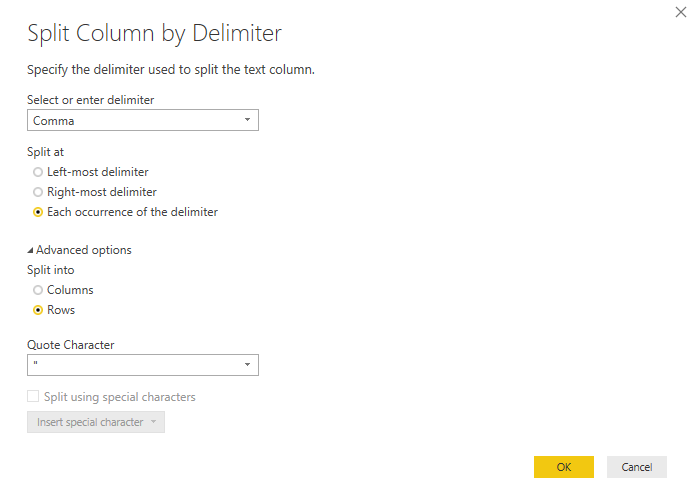
Otherwise my suggestion, in this case, would be to use the advanced option to split the column to rows. Your amended code could look like:
let
    Source = Table.FromRows(Json.Document(Binary.Decompress(Binary.FromText("i45WMlTSUQpJLS5R8CxJzQWy/ctSizJSE1OUYnWilYyAAu5Fqal5CiFAEklWR8Ejv7Q4NTs1tSAzLx2s1hgo7ZRTmgpTiqxAByiYX5qUk1qckZ9fAhZAsccEqD4yNScnv5xI3c4ZiXnpqUqxsQA=", BinaryEncoding.Base64), Compression.Deflate)), let _t = ((type text) meta [Serialized.Text = true]) in type table [ID = _t, Title = _t, Tags = _t]),
    #"Changed Type" = Table.TransformColumnTypes(Source,{{"ID", Int64.Type}, {"Title", type text}, {"Tags", type text}}),
    #"Split Column by Delimiter" = Table.ExpandListColumn(Table.TransformColumns(#"Changed Type", {{"Tags", Splitter.SplitTextByDelimiter(",", QuoteStyle.Csv), let itemType = (type nullable text) meta [Serialized.Text = true] in type {itemType}}}), "Tags"),
    #"Changed Type1" = Table.TransformColumnTypes(#"Split Column by Delimiter",{{"Tags", type text}}),
    #"Trimmed Text" = Table.TransformColumns(#"Changed Type1",{{"Tags", Text.Trim, type text}}),
    #"Renamed Columns" = Table.RenameColumns(#"Trimmed Text",{{"Tags", "Value"}})
in
    #"Renamed Columns"
- Mark as New
- Bookmark
- Subscribe
- Mute
- Subscribe to RSS Feed
- Permalink
- Report Inappropriate Content
Thanks, and that would work however i have a slight extra layer of complexity in that the table that needs the split has a one to many relationship with another table
The other table contains item history and each change to a record is kept in its own row. I am currently linking by a field called WorkItemSK which in the table we are looking at here has a single record per WorkItemSK that links to the history table that has many rows with WorkItemSK
So if i try to split each record into multiple rows it break this relationship.
Any ideas or have i just got myself into a bad situation and i need to explore something else?
- Mark as New
- Bookmark
- Subscribe
- Mute
- Subscribe to RSS Feed
- Permalink
- Report Inappropriate Content
@chokedoke,
You can re-create relationship . If you have duplicated values in relationship field in both tables, create another bridge table containing unique values in relationship field, then create relationship among the three tables.
Regards,
Lydia
- Mark as New
- Bookmark
- Subscribe
- Mute
- Subscribe to RSS Feed
- Permalink
- Report Inappropriate Content
I have heard these bridge tables mentioned before but im not really familiar with what they are or how they would be set up
Could you please point me in the direction of a good example?
Thanks
- Mark as New
- Bookmark
- Subscribe
- Mute
- Subscribe to RSS Feed
- Permalink
- Report Inappropriate Content
@chokedoke,
Please help to share sample data of the two tables so that I can provide you detailed steps.
Regards,
Lydia

- Mark as New
- Bookmark
- Subscribe
- Mute
- Subscribe to RSS Feed
- Permalink
- Report Inappropriate Content
I would think that you would need to split your column out and unpivot the columns to rows.
Follow on LinkedIn
@ me in replies or I'll lose your thread!!!
Instead of a Kudo, please vote for this idea
Become an expert!: Enterprise DNA
External Tools: MSHGQM
YouTube Channel!: Microsoft Hates Greg
Latest book!: DAX For Humans
DAX is easy, CALCULATE makes DAX hard...
Helpful resources

Power BI Dataviz World Championships
The Power BI Data Visualization World Championships is back! Get ahead of the game and start preparing now!

Power BI Monthly Update - November 2025
Check out the November 2025 Power BI update to learn about new features.

FabCon Atlanta 2026
Join us at FabCon Atlanta, March 16-20, for the ultimate Fabric, Power BI, AI and SQL community-led event. Save $200 with code FABCOMM.

| User | Count |
|---|---|
| 66 | |
| 44 | |
| 40 | |
| 29 | |
| 19 |


| User | Count |
|---|---|
| 200 | |
| 126 | |
| 103 | |
| 70 | |
| 53 |


