Hi @deanbland
This Power Query code works - download my example PBIX file
let
    Source = Table.FromRows(Json.Document(Binary.Decompress(Binary.FromText("i45WcssvSk1OLC5RitWJVnJMTs4vzStRMEThGaHwjME8MBEZ4kKKtlgA", BinaryEncoding.Base64), Compression.Deflate)), let _t = ((type nullable text) meta [Serialized.Text = true]) in type table [Column1 = _t]),
    YTD_Pos = List.PositionOf(Table.Column(Source,"Column1"),"YTD"),
    RemoveRows = Table.RemoveRows(Source,YTD_Pos-1,Table.RowCount(Source)-YTD_Pos+1)
in
    RemoveRows
Using this sample data
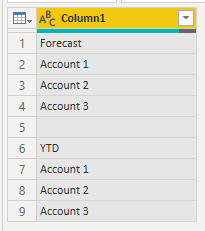
This sample code requires that the column containing YTD is named Column1 so you'll need to change that to suit your table.
Regards
Phil
Did I answer your question? Then please mark my post as the solution.
If I helped you, click on the Thumbs Up to give Kudos. Blog ::
YouTube Channel ::
Connect on Linkedin Proud to be a Super User!


