Join us at FabCon Atlanta from March 16 - 20, 2026, for the ultimate Fabric, Power BI, AI and SQL community-led event. Save $200 with code FABCOMM.
Register now!The Power BI Data Visualization World Championships is back! Get ahead of the game and start preparing now! Learn more
Hi,
My question is simple - I need to remove a field because it no longer exists in the underlying database view.
If I just remove it, the next time I try to refresh, it fails because the field does not exist.
What am I missing?
As a temporary solution I've added the field again to the view, but I don't want it to stay if it isn't needed.
Thanks.
Solved! Go to Solution.
Thanks @Sean.
Actually it turned out that the right thing to do is just to drop the column in the database without making any change in Power BI.
When I tried to delete a field in Power BI, it got into the transformation sequence that runs when refreshing a table,
and it would fail because the column doesn't exist anymore, so cannot be removed.
So it's better to just drop it in the database without changing the model. Then the field would automatically be removed when refreshing.
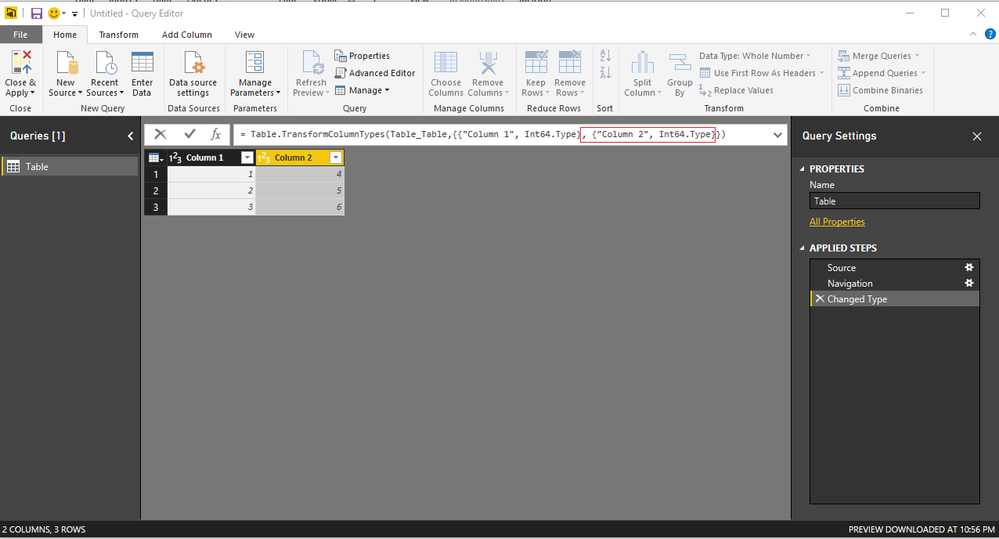
Say you want to do this with Column 2 - delete the highlighted part for the appropriate field in the Query Editor Formula Bar
then Close & Apply
Good Luck! ![]()
Thanks @Sean.
Actually it turned out that the right thing to do is just to drop the column in the database without making any change in Power BI.
When I tried to delete a field in Power BI, it got into the transformation sequence that runs when refreshing a table,
and it would fail because the column doesn't exist anymore, so cannot be removed.
So it's better to just drop it in the database without changing the model. Then the field would automatically be removed when refreshing.
The Power BI Data Visualization World Championships is back! Get ahead of the game and start preparing now!
| User | Count |
|---|---|
| 41 | |
| 39 | |
| 37 | |
| 29 | |
| 24 |
| User | Count |
|---|---|
| 119 | |
| 100 | |
| 72 | |
| 69 | |
| 65 |