Join us at FabCon Atlanta from March 16 - 20, 2026, for the ultimate Fabric, Power BI, AI and SQL community-led event. Save $200 with code FABCOMM.
Register now!Get Fabric Certified for FREE during Fabric Data Days. Don't miss your chance! Request now
I have a straight table with two columns for now that I want to be at the left side instead of the top.
How can I do this?
Before:
| Date | Homeruns |
| 2022-10-05 | 1 |
| 2022-10-06 | 3 |
After:
| Date | 2022-10-05 | 2022-10-06 |
| Homeruns | 1 | 3 |
@HarryT ,
try this,
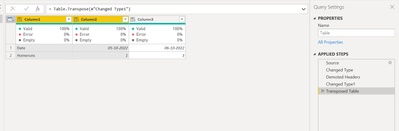
step 1 : Go to Power Query Editor, then demote the headers.
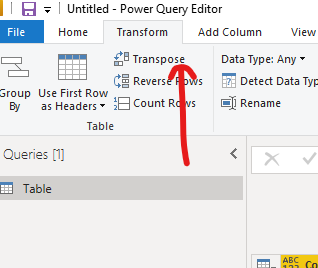
step 2 : Transpose the table.
you will get the result like the below and you can rename the columns based on your requirement (OR) If you want to promote the headers you can do that as well.
attached the M code for the same,
let
Source = Table.FromRows(Json.Document(Binary.Decompress(Binary.FromText("i45WMjIwMtI1NNA1MFXSUTJUitVBEjIDChkrxcYCAA==", BinaryEncoding.Base64), Compression.Deflate)), let _t = ((type nullable text) meta [Serialized.Text = true]) in type table [Date = _t, Homeruns = _t]),
#"Changed Type" = Table.TransformColumnTypes(Source,{{"Date", type date}, {"Homeruns", Int64.Type}}),
#"Demoted Headers" = Table.DemoteHeaders(#"Changed Type"),
#"Changed Type1" = Table.TransformColumnTypes(#"Demoted Headers",{{"Column1", type any}, {"Column2", type any}}),
#"Transposed Table" = Table.Transpose(#"Changed Type1")
in
#"Transposed Table"
Thanks,
Are you saying to transpose the whole table? There is like 50 columns and I only want to show 2 of them in a table view this way.
Hi,
I would transpose your table in Power Query
which would result in the following M code:
let
Source = Table.FromRows(Json.Document(Binary.Decompress(Binary.FromText("i45WckksSVXSUfLIz00tKs0rVorViVYyMjAy0jU00DUwBcoYogqZAYWMlWJjAQ==", BinaryEncoding.Base64), Compression.Deflate)), let _t = ((type nullable text) meta [Serialized.Text = true]) in type table [Column1 = _t, Column2 = _t]),
#"Transposed Table" = Table.Transpose(Source)
in
#"Transposed Table"
Check out the November 2025 Power BI update to learn about new features.
Advance your Data & AI career with 50 days of live learning, contests, hands-on challenges, study groups & certifications and more!