cancel
Showing results for 
Search instead for 
Did you mean: 

The Power BI Data Visualization World Championships is back! Get ahead of the game and start preparing now! Learn more

Reply
Anonymous
Not applicable

How to make this behaviour in a Slicer

Hi, Im trying several options to do this:

I have a column (category) that has values like 'cat 1, cat 2, cat 3, etc' I want a slicer that has the options: cat 1 and "All".

If I select cat 1, then the dataset will filter only those rows with category = cat 1, if I select All then no filter is applied.


Is there any way to acomplish this? 

Thanks for your help!


1 ACCEPTED SOLUTION
v-juanli-msft
Community Support
Community Support

Hi @Anonymous 

Create a new table,

Table 3 = FILTER(VALUES('Table 2'[product]),[product]="a")

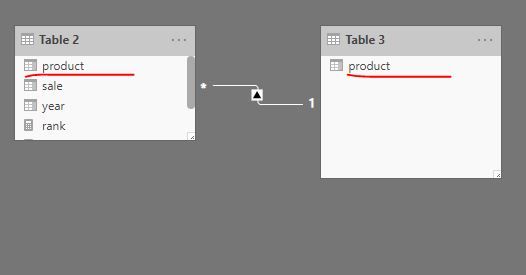
Create relationship

Capture3.JPG

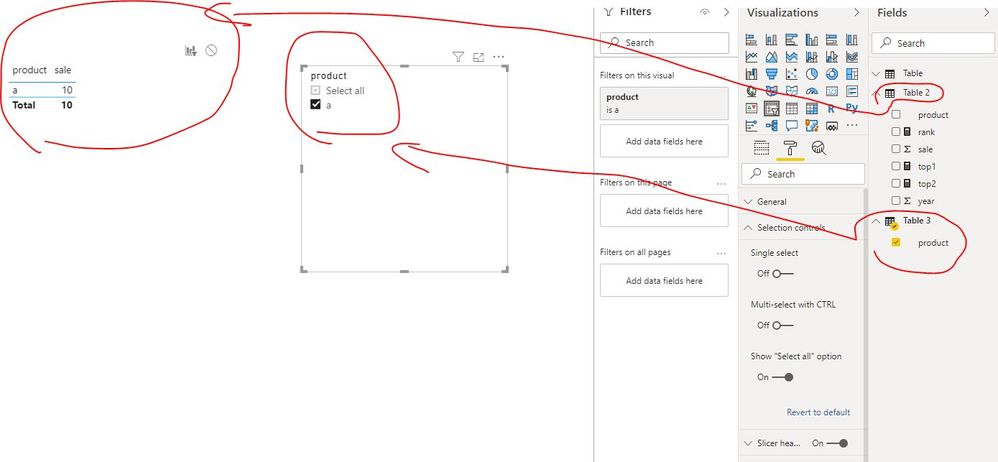
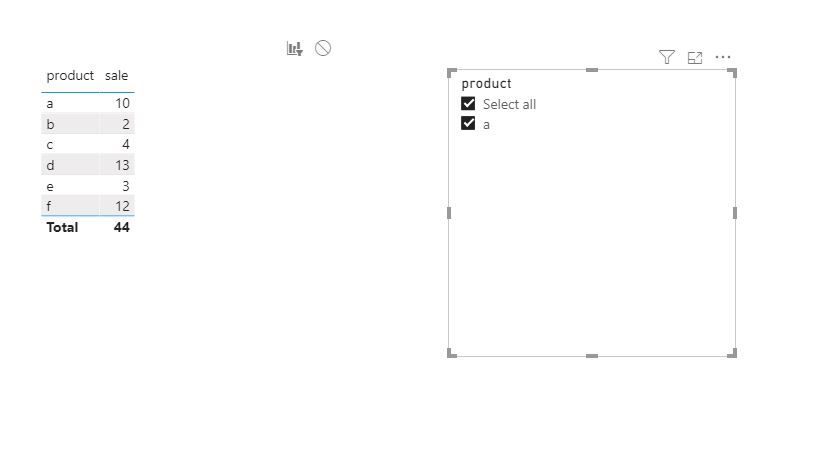
Add filter

Capture4.JPGCapture5.JPG

Best Regards
Maggie
Community Support Team _ Maggie Li
If this post helps, then please consider Accept it as the solution to help the other members find it more quickly.

View solution in original post

4 REPLIES 4
v-juanli-msft
Community Support
Community Support

Hi @Anonymous 

Create a new table,

Table 3 = FILTER(VALUES('Table 2'[product]),[product]="a")

Create relationship

Capture3.JPG

Add filter

Capture4.JPGCapture5.JPG

Best Regards
Maggie
Community Support Team _ Maggie Li
If this post helps, then please consider Accept it as the solution to help the other members find it more quickly.

v-juanli-msft
Community Support
Community Support

Hi @Anonymous 

You can turn on "show all" option in Format->selection control for a default slicer.

"all" in slicer always means to show all values instead of applying any filter.


Best Regards

Maggie

Community Support Team _ Maggie Li
If this post helps, then please consider Accept it as the solution to help the other members find it more quickly.

Anonymous
Not applicable

Thanks, I know that I can activate the option "show all" the problem is I dont want to show in the slicer all the categories, I want to show only category 1 and the "show all" option, the slicer should not act as a filter the other categories that dont appear, only just hide them in the slicer

amitchandak
Super User
Super User

@Anonymous , not sure what you want here. this is the default behavior of slicer.


In case it is disconnected slicer, then you can use is filtered

https://powerpivotpro.com/2013/03/hasonevalue-vs-isfiltered-vs-hasonefilter/

Share with Power BI Enthusiasts: Full Power BI Video (20 Hours) YouTube
Microsoft Fabric Series 60+ Videos YouTube
Microsoft Fabric Hindi End to End YouTube

Helpful resources

Announcements
Power BI DataViz World Championships

Power BI Dataviz World Championships

The Power BI Data Visualization World Championships is back! Get ahead of the game and start preparing now!

December 2025 Power BI Update Carousel

Power BI Monthly Update - December 2025

Check out the December 2025 Power BI Holiday Recap!

FabCon Atlanta 2026 carousel

FabCon Atlanta 2026

Join us at FabCon Atlanta, March 16-20, for the ultimate Fabric, Power BI, AI and SQL community-led event. Save $200 with code FABCOMM.