cancel
Showing results for 
Search instead for 
Did you mean: 

The Power BI Data Visualization World Championships is back! Get ahead of the game and start preparing now! Learn more

Reply
asanb
Frequent Visitor

How to lock zoom/view of map

Hi, 

I want to be able to lock the zoom option on my map. Meaning, I don't want to zoom in or out of the map, I just want to lock down on this one location/view. Is there a way I can do this? 


I've tried to turn off the auto zoom option, lock objects in view pane, but can't figure it out. 

2 REPLIES 2
Anonymous
Not applicable

You could try layering a blank shape over the top of the map and fixing the layer position so that no one can click/zoom/recenter on the actual map object

v-piga-msft
Resident Rockstar
Resident Rockstar

Hi @asanb ,

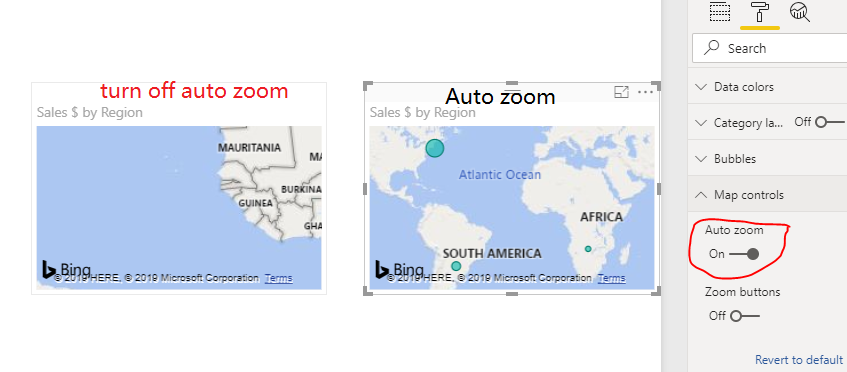
Here is the Auto zoom result.

Untitled.png

If you want to disable the zoom with the mouse, I'm afraid that there is no option for us to achieve that currently.

Best  Regards,

Cherry


Community Support Team _ Cherry Gao
If this post helps, then please consider Accept it as the solution to help the other members find it more quickly.

Helpful resources

Announcements
Power BI DataViz World Championships

Power BI Dataviz World Championships

The Power BI Data Visualization World Championships is back! Get ahead of the game and start preparing now!

November Power BI Update Carousel

Power BI Monthly Update - November 2025

Check out the November 2025 Power BI update to learn about new features.

FabCon Atlanta 2026 carousel

FabCon Atlanta 2026

Join us at FabCon Atlanta, March 16-20, for the ultimate Fabric, Power BI, AI and SQL community-led event. Save $200 with code FABCOMM.